
Rebeltec SoundBox 390 Manual
PDF manual · 4 Pages
English



Quick check
Incorrect answer, please try again.
Chat with your Rebeltec SoundBox 390 manual using AI
Get instant AI answers from your Rebeltec SoundBox 390 manual
Ask anything about the Rebeltec SoundBox 390. Answers come from this manual, with the pages they are based on.
Ask a Question
Do you recommend SoundBox 390?
Yes NoFrequently Asked Questions
The built-in 3600mAh Li-ion battery provides about 6–12 hours of playback depending on volume levels, EQ settings and the chosen playback mode. Battery life shortens at higher volumes or with heavy bass settings.
Is this answer helpful?
The SoundBox 390 supports Bluetooth 4.2 wireless streaming, USB flash drives, microSD/TF cards (MP3 playback), a 3.5mm AUX input for wired devices, and FM radio with auto-scan and station memory.
Is this answer helpful?
Charge the device via the micro USB DC 5V port using a 5V/1A adapter. A red LED indicates charging and a steady light shows a full battery. Avoid using higher-voltage adapters to prevent damage.
Is this answer helpful?
Yes. When connected via Bluetooth the speaker supports hands-free calls: a short button press answers incoming calls, and a long press redials the last contact. Audio prompts confirm connections.
Is this answer helpful?
Use AUTO SCAN (hold) to scan 87.5–107 MHz; found stations are saved to channels CH01–CH50. Use FM- and FM+ to switch saved channels. Press REP/CH to toggle manual frequency tuning and press again to return to stored channel mode.
Is this answer helpful?
Do not puncture, heat, or dispose of the battery in fire. Keep away from children, avoid exposure to high humidity or temperatures, and follow local regulations for battery recycling. Battery removal should only be done by authorized personnel.
Is this answer helpful?
Advantages and Disadvantages
Advantages

- Multiple input options: Bluetooth 4.2, USB, microSD, AUX and FM for flexible playback.
- Long-lasting 3600mAh Li-ion battery providing approximately 6–12 hours of playback.
- Automatic media playback and simple controls with MODE, VOL, EQ and REP/CH buttons.
- FM auto-scan and memory for up to 50 stations for quick radio access.
- Hands-free call handling and easy Bluetooth pairing with audible confirmation.
Disadvantages

- Battery warranty only six months, shorter than many competitors.
- No advanced codecs or high-resolution audio features indicated.
- Charging via micro USB rather than faster modern USB-C standard.
- Exposure to high humidity or water can damage the unit; not water-resistant.
- Limited EQ options—basic bass/treble presets only, no custom tuning.
Product Specification
Power
20W RMS
Display
LED
Tuner
FM
Frequency Range
22Hz-18kHz
Connections
AUX In (3.5mm jack), USB-A, Card reader (microSD)
Wireless
Bluetooth 4.2
Power Supply
Li-ion battery (3600mAh), USB
Playback Time
12h
Special Features
Hands-free function
Color
black
Dimensions
15.35x6.30x7.52in (WxHxD)
Product Description
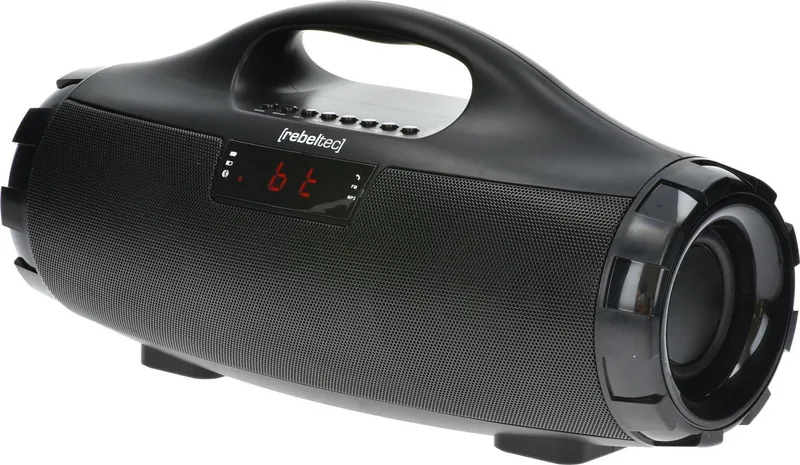
Rebeltec SoundBox 390 — Compact Powerhouse
The Rebeltec SoundBox 390 is a versatile portable Bluetooth speaker designed for everyday listening, travel, and small gatherings. With Bluetooth 4.2 connectivity, a 3600mAh Li-ion battery, and multiple input options, it balances convenience, battery life, and functionality in a compact package.
Design and Connectivity
The speaker offers straightforward, user-friendly controls: MODE to switch between Bluetooth, USB, microSD, FM and AUX; VOL+ and VOL- for precise volume control; and EQ for toggling sound presets (bass/treble). Pairing is simple—set the unit to Bluetooth, search on your phone or laptop, and connect. The device also handles hands-free calls and redialing via button press.
Playback and Inputs
Playback is flexible: stream wirelessly over Bluetooth, insert a USB flash drive or microSD card (MP3 supported), plug in an external device via the 3.5mm AUX jack, or tune FM radio stations. MP3 mode automatically starts playback when media is inserted, and repeat/random options are available. FM mode supports automatic scanning (87.5–107 MHz) and stores up to 50 channels for quick access.
Battery and Charging
A built-in 3600mAh Li-ion battery delivers roughly 6–12 hours of playback depending on volume and mode. Charging uses a DC 5V/1A micro USB input; a red LED indicates charging and a steady indicator shows a full battery. The manual advises avoiding exposure to high humidity, high temperatures, and water. Battery warranty coverage is six months.
Sound and Controls
The SoundBox 390 includes basic EQ presets for boosting bass or treble and supports track skip, pause/play, and repeat functions across modes. Volume levels are displayed from V00 to V15, and the unit provides audible feedback when pairing succeeds. REP/CH and related buttons let you switch playback modes and manage FM presets.
Safety and Compliance
Built with standard safety guidance for rechargeable batteries, the speaker warns against battery misuse, puncturing, exposure to fire, and improper disposal. It complies with applicable EU directives and harmonized standards, and bears relevant CE declarations.
Notes
- Battery life varies with volume, EQ settings, and source.
- Use only a DC 5V/1A charger for safe charging.
- Keep the speaker dry and avoid prolonged exposure to heat/humidity.
- Battery warranty: 6 months.
Search for 67,706 Manuals online


Type-in Brand or Model