
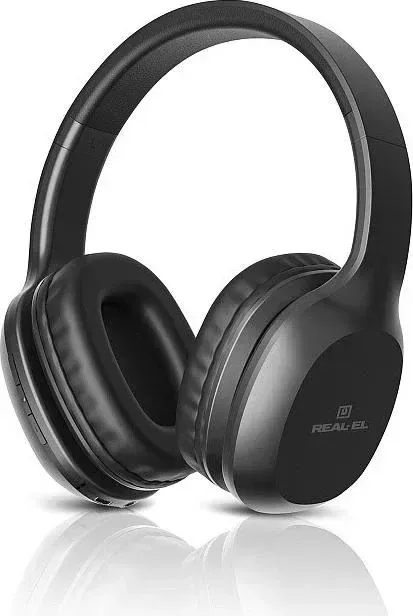

Real-El GD-820 Manual
PDF manual · 5 Pages
English



Quick check
Incorrect answer, please try again.
Chat with your Real-El GD-820 manual using AI
Get instant AI answers from your Real-El GD-820 manual
Ask anything about the Real-El GD-820. Answers come from this manual, with the pages they are based on.
Ask a Question
Do you recommend GD-820?
Yes NoFrequently Asked Questions
Press and hold the power button on the control panel until the LED indicator begins alternating between blue and red. This signals that the headphones are in search mode and ready to pair with your Bluetooth device.
Is this answer helpful?
The headset is equipped with a lithium polymer battery that offers up to twelve hours of operation time after a full charge is completed.
Is this answer helpful?
Yes, the package includes a 3.5 mm mini-jack audio cable that allows you to connect the headphones to compatible devices using a wired link if needed.
Is this answer helpful?
Absolutely. The built-in microphone is designed specifically for conversations and supports voice assistant commands effectively for clear communication.
Is this answer helpful?
Yes, the headphones operate with compatible systems including PCs, notebooks, and mobile devices that support Bluetooth technology for signal transmission.
Is this answer helpful?
Keep the warranty card safe inside the original packaging or a secure place to ensure you have proof of purchase for future claims and support.
Is this answer helpful?
Avoid using the stereo headphones while driving and do not listen at high volumes for prolonged periods to protect your hearing health effectively.
Is this answer helpful?
Advantages and Disadvantages
Advantages

- Built-in microphone allows for convenient hands-free conversation and voice assistant activation during use.
- Bluetooth 5.0 technology ensures stable wireless connectivity up to ten meters radius for mobile devices.
- Long battery life provides up to twelve hours of continuous operation on a single full charge.
- Includes auxiliary mini-jack cable for wired connection when battery power is depleted or unavailable.
- Neodymium capsule delivers high quality audio with broad frequency response for clear sound reproduction.
Disadvantages

- Uses micro USB charging port instead of newer USB-C standard which may limit cable compatibility.
- No active noise cancellation feature is listed so background noise may still enter during calls.
- Initial pairing process requires holding multiple buttons which might be confusing for first-time users.
- Headphones should not be worn while driving which limits usage scenarios for commuters or road trips.
- Volume levels require careful adjustment over long sessions to prevent potential hearing impairment risks.
Product Specification
Type
Headphones (Over-Ear)
Construction
Headband
Design
Closed-back
Microphone
Built-in
Connection
3.5mm Jack
Wireless
Bluetooth 5.0
Cable
Single-sided, Detachable
Controls
2-button Remote
Battery Life
12 hours
Battery
USB Micro-B Charging Port
Frequency Response
20Hz-20kHz
Impedance
32 Ohms
Sensitivity
104dB
Driver Size
1.57 inches
Color
Black
Weight
0.40 lbs
Product Description
Experience Immersive Audio with Real-El
Starting your journey with the Real-El GD-820 offers a seamless blend of convenience and high-fidelity sound. This wireless stereo headphone set is designed for modern lifestyles where mobility meets performance. Upon opening the box, you receive every necessary component to begin using the device immediately. The package ensures you are never stranded without connectivity options due to its versatile design choices. Users who appreciate detailed guidance often refer to the Real-El GD-820 Manual to maximize their experience with the hardware. Understanding the layout of buttons prevents accidental interruptions during critical call moments. This ensures a distraction-free environment whether you are commuting or relaxing at home.
Superior Sound Engineering
At the heart of this headset lies a powerful neodymium capsule delivering clear acoustics. The drivers support a wide frequency response ranging from twenty to twenty thousand hertz for balanced audio reproduction. Impedance and sensitivity settings ensure compatibility with various signal sources like PCs and mobiles. Whether you enjoy bass-heavy tracks or spoken word podcasts, the ninety four point three decibel sensitivity guarantees audible clarity without distortion. The forty millimeter membrane size contributes significantly to the depth of the soundstage experienced by listeners. Technical specifications highlight thirty two ohm impedance which manages power delivery efficiently across connected devices.
Connectivity and Control Features
Communication capabilities are robust thanks to the integrated microphone system allowing hands free conversations. You can accept phone calls or activate voice assistants with simple button presses. Bluetooth five point zero protocol supports stable transmission up to ten meters away consistently. Should the battery drain unexpectedly, the included audio cable allows for wired operation instantly. This dual mode capability reduces downtime during heavy usage periods significantly. Managing playback and volume remains effortless through the dedicated control panel situated on the earcup. Volume adjustments correspond to track changes enabling precise media control without touching your screen.
Power and Portability
The lithium polymer battery sustains operation for up to twelve hours of continuous listening time. Charging is facilitated through the convenient micro USB port located on the side casing easily. The entire unit weighs only one hundred eighty grams making it lightweight for travel and backpack storage. Safety protocols advise avoiding high volume levels to protect hearing health over long durations. Adhering to the guidelines ensures longevity of both your ears and the equipment over time effectively. Regular maintenance keeps the leather cushions soft and comfortable against sensitive skin areas during extended wear.
Conclusion and Setup
Installing software drivers is not required due to plug and play functionality on most operating systems. Initial setup involves holding the power button until the LED indicator flashes red then blue. Pairing occurs automatically once the search mode activates successfully on your phone screen. Referencing the Real-El GD-820 Manual helps troubleshoot minor pairing delays effectively during first time use. Ultimately, this headset represents a reliable investment for personal entertainment and professional needs alike today.
Warranty and Manufacturer Details
Ownership comes with confidence backed by the ENEL Group OU manufacturing standards. Registration of your product enables access to official updates regarding specifications changes. Contacting technical support at the official website resolves potential configuration questions quickly. Keeping the warranty card safe ensures full coverage protection should defects arise unexpectedly. Product codes help identify specific batches for replacement purposes accurately.
Search for 67,706 Manuals online


Type-in Brand or Model