
Rapoo V500PRO Manual
PDF manual · 2 Pages
English



Quick check
Incorrect answer, please try again.
Chat with your Rapoo V500PRO manual using AI
Get instant AI answers from your Rapoo V500PRO manual
Ask anything about the Rapoo V500PRO. Answers come from this manual, with the pages they are based on.
Ask a Question
Do you recommend V500PRO?
Yes NoFrequently Asked Questions
Press the Fn key and the Windows key simultaneously to lock the Windows key. Press them again to unlock.
Is this answer helpful?
There are twelve modes including Ripple, Static, Reactive, Breathing, Starlight, Roulette, Curve, Aurora, Firework, Raindrop, FPS gaming, and MOBA gaming.
Is this answer helpful?
This keyboard is primarily designed for Windows XP and later versions. While it may function physically on Mac, full key mapping support is not guaranteed.
Is this answer helpful?
Yes, use the Fn key combined with the Up arrow to increase brightness and the Down arrow to decrease it.
Is this answer helpful?
It uses BLUE mechanical switches which offer a tactile bump and an audible click sound for every keystroke.
Is this answer helpful?
Advantages and Disadvantages
Advantages

- Twelve diverse lighting modes allow for deep personalization of the keyboard appearance
- BLUE switches provide excellent tactile feedback and audible click for precise input
- Win Lock function effectively prevents accidental Windows key activation during gameplay
- Broad compatibility supports Windows XP through Windows 10 and newer versions seamlessly
Disadvantages

- No dedicated media keys are included for quick volume or track control adjustments
- Lighting effects cannot be customized individually per key without additional software
- Non-detachable cable may limit portability for users who travel frequently
Product Specification
Layout
UK
Type
mechanical
Lighting
RGB
Keycap Level
raised, frameless
Keycap Format
standard
Keycap Dome
concave
Numpad
Standard
Cursor Block
Standard
Control Keys
Standard
Enter Key
shortened
Delete Key
Standard
Status Indicator
Caps Lock, Num, Scroll
Wrist Rest
N/A
Chassis
Metal
Chassis Color
solid, black
Keycap Finish
solid, black
Key Inscription
solid, white (translucent)
Connection
wired (4.92 ft), USB-A 2.0
Power Supply
USB
Dimensions (WxDxH)
17.09x1.42x5.16 in
Weight
1.78 lbs
Features
Anti-Ghosting (N-Key Rollover), splash-resistant, FN key
Product Description
Elevate Your Gaming with the Rapoo V500PRO
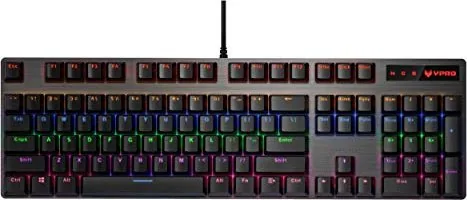
The Rapoo V500PRO is a backlit mechanical gaming keyboard designed for enthusiasts who demand precision and style. Featuring durable BLUE switches, this keyboard delivers a satisfying tactile click and audible feedback that enhances typing speed and accuracy during intense gaming sessions or long work hours. The UK layout ensures familiar key placement for British users while offering a sleek aesthetic that fits any modern desk setup.
One of the standout features of the V500PRO is its extensive lighting customization. Users can toggle between twelve distinct lighting effects using simple Fn key combinations. From the gentle Pulse mode to the dynamic Firework effect, each setting transforms the keyboard into a visual centerpiece. The Ripple, Starlight, and Aurora modes provide subtle ambient lighting, while the FPS and MOBA gaming modes offer specific patterns tailored to competitive play.
For gamers who frequently use the Windows key, the V500PRO includes a dedicated Win Lock feature. By pressing Fn and the Windows key simultaneously, you can disable the Windows key to prevent accidental interruptions during critical moments in a game. This small but crucial addition ensures your focus remains on the action without unwanted pop-ups.
The keyboard is plug-and-play compatible with Windows XP through Windows 10 and later versions via a standard USB port. Its robust construction and ergonomic design make it suitable for both professional esports athletes and casual home users. Whether you are battling in a MOBA or typing out documents, the Rapoo V500PRO provides reliability and performance.
Key Highlights
- Twelve unique lighting modes including reactive and breathing effects.
- Durable BLUE mechanical switches for tactile feedback.
- Integrated Win Lock to prevent accidental key presses.
- Compatible with all major Windows operating systems.
Important Notes
Always ensure you have the latest drivers if custom software is required for advanced macro programming, though the hardware functions independently via Fn keys.
Search for 67,706 Manuals online


Type-in Brand or Model