


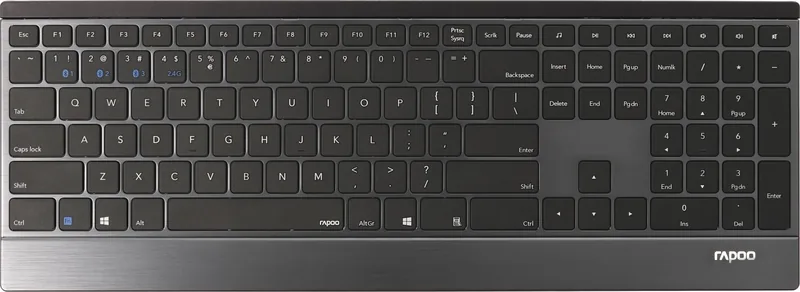
Rapoo E9500M Manual
PDF manual · 2 Pages
English



Quick check
Incorrect answer, please try again.
Chat with your Rapoo E9500M manual using AI
Get instant AI answers from your Rapoo E9500M manual
Ask anything about the Rapoo E9500M. Answers come from this manual, with the pages they are based on.
Ask a Question
Do you recommend E9500M?
Yes NoFrequently Asked Questions
Press and hold Fn+1, Fn+2, or Fn+3 for at least three seconds to pair. The keyboard becomes discoverable for 60 seconds. Complete pairing on your device settings.
Is this answer helpful?
The keyboard supports Windows XP, Vista, 7, 8, 10 and later versions requiring a USB port for the receiver connection.
Is this answer helpful?
Yes, you can pair up to three devices via Bluetooth using specific key combinations. Use Fn+4 to switch between paired devices and the receiver.
Is this answer helpful?
Yes, the device includes a two-year limited hardware warranty from the date of purchase. Please visit the official website for more details.
Is this answer helpful?
Yes, the keyboard has dedicated keys for Play, Pause, Previous Track, Next Track, Volume Up, Volume Down, and Mute controls.
Is this answer helpful?
The provided text specifies Windows support. For Mac compatibility, please check the full manual or manufacturer website for verification.
Is this answer helpful?
Advantages and Disadvantages
Advantages

- Connects via 2.4GHz receiver for low latency or Bluetooth for wireless convenience.
- Dedicated multimedia keys allow easy control of playback and volume settings.
- Compatible with a wide range of Windows operating systems including XP to 10.
- Includes a two-year limited hardware warranty for user protection and peace of mind.
Disadvantages

- Pairing Bluetooth devices requires holding specific key combinations for at least three seconds.
- Lacks backlit keys making it difficult to use in low light environments effectively.
- Layout is fixed to QWERTZ which may require adjustment for non-European users.
Product Specification
Layout
German
Type
Rubber Dome
Lighting
N/A
Keycap Profile
standard, with frame
Keycap Style
flat
Keycap Top
straight
Numpad
Standard
Arrow Keys
Standard
Control Keys
Standard
Enter Key
Standard
Delete Key
Standard
Wrist Rest
fixed
Case
Metal
Case Color
solid, black
Keycap Design
solid, black
Key Legends
solid, white
Connectivity
Wireless (2.4 GHz), USB (USB-A Receiver) or Wireless (Bluetooth 4.0)
Power Source
2x AAA
Dimensions (WxHxD)
17.05x0.91x6.61 in
Weight
1.53 lbs
Features
7 multimedia keys, Bluetooth connections switchable via key (3 devices), FN key
Product Description
Experience Seamless Connectivity with Rapoo E9500M Multi-mode Wireless Keyboard black, USB/Bluetooth, German Manual
Versatile Connection Options
In the modern digital workspace, efficiency is truly paramount for every user these days.
The Rapoo E9500M Multi-mode Wireless Keyboard black, USB/Bluetooth, German Manual offers a robust solution for individuals demanding versatility without sacrificing overall style or professional aesthetics.
This sleek peripheral is meticulously designed to enhance your daily productivity across multiple devices effortlessly.
It serves as an ideal replacement for cumbersome wired setups that limit your physical movement completely.
Precision and Multimedia Control
One of the absolute standout features of this sophisticated keyboard is its versatile multi-mode capability.
You can connect via a stable 2.4GHz receiver for instant response or switch between three different Bluetooth devices with extreme ease.
The guide instructs users to hold Fn+1, Fn+2, or Fn+3 for at least three seconds to pair devices successfully and quickly without trouble.
This flexibility allows you to manage your desktop computer, tablet, and smartphone from a single compact typing station simultaneously.
Additionally, the Fn+4 key enables smooth switching between paired Bluetooth devices and the 2.4GHz receiver connection whenever needed.
Reliability and Support
Typing experience remains a top priority for designers and professional developers alike in any setting or home.
The keyboard features a dedicated multimedia key panel located conveniently for quick access during work hours.
You can control music playback, pause audio tracks, skip songs forward, or adjust volume levels directly from the keys without navigating menus.
The compact design fits well on any desk layout, while the full QWERTZ layout ensures absolute familiarity for German users specifically and others.
The quick start guide provides clear instructions for Windows systems ranging from XP through 10, ensuring broad compatibility for everyone.
Conclusion
Manufacturers understand the critical need for dependable hardware in professional environments constantly.
This model comes with a comprehensive two-year limited hardware warranty starting from the purchase date, offering total peace of mind for your investment.
The device complies with various strict global safety standards regarding radio equipment and environmental regulations.
Whether for heavy office work or casual personal use, the Rapoo E9500M delivers consistent performance daily.
The battery life supports extended usage without frequent recharging interruptions occurring during critical tasks.
Many users find the build quality sturdy enough for long term daily use.
In conclusion, this wireless keyboard represents a significant upgrade for anyone juggling multiple screens and complex systems today effectively.
The combination of wireless convenience and wired reliability ensures you stay connected securely wherever you work today without fail.
Search for 67,732 Manuals online


Type-in Brand or Model
Klaus Schmidt
7 months ago
I am interested in the design but the reviews mention durability issues like the casing separating. Is this a known defect and is it covered by warranty?
Manual.ly
6 months ago
Thank you for reaching out. While many users appreciate the brushed aluminium build, some have reported casing separation or mechanical failure after prolonged daily use. Our products are covered by a standard manufacturer warranty against defects in materials and workmanship. If you experience these issues within the warranty period, please contact support to arrange a replacement or repair. We advise inspecting the unit carefully immediately upon unboxing.