
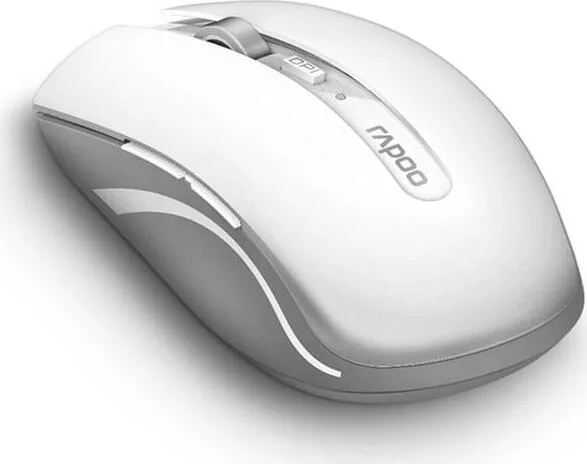
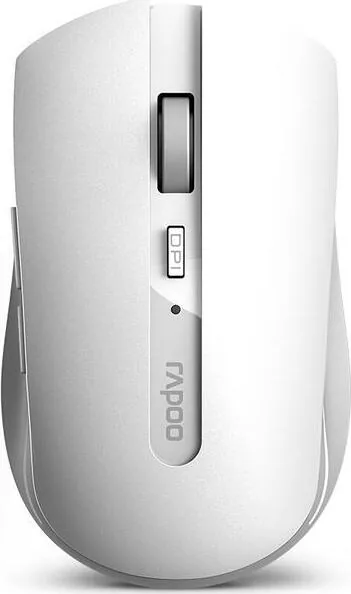
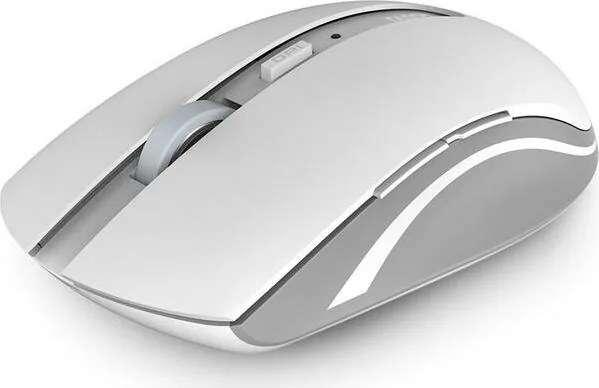
Rapoo 7200M Manual
PDF manual · 2 Pages
English



Quick check
Incorrect answer, please try again.
Chat with your Rapoo 7200M manual using AI
Get instant AI answers from your Rapoo 7200M manual
Ask anything about the Rapoo 7200M. Answers come from this manual, with the pages they are based on.
Ask a Question
Do you recommend 7200M?
Yes NoFrequently Asked Questions
Yes, the keyboard supports Bluetooth pairing with three different devices simultaneously. You can use Fn key combinations like Fn+1 to Fn+4 to switch between these connected devices quickly and easily without reconfiguring settings each time you switch tasks.
Is this answer helpful?
Turn on the mouse and press the Bluetooth button to select the channel. Press and hold the button for three seconds until the LED flashes slowly. Select the device in your computer settings within two minutes when the mouse is discoverable.
Is this answer helpful?
Yes, the system requirements specify compatibility with Windows XP through Windows 10. It also includes a USB port requirement for the 2.4 GHz receiver connection ensuring support for many legacy and modern setups.
Is this answer helpful?
The keyboard uses blue, green, and cyan lights for status. The mouse uses green and blue lights. Slow flashing indicates pairing while stable light indicates connection via 2.4 GHz. Off lights indicate the device is disconnected from Bluetooth.
Is this answer helpful?
Yes, the device is provided with a two-year limited hardware warranty starting from the purchase day. Please visit the official website for more detailed information regarding the terms and conditions of your hardware guarantee.
Is this answer helpful?
Use Fn key combinations on the keyboard or press the Bluetooth button on the mouse. The manual specifies Fn+1 through Fn+4 for keyboard switching. The mouse switches channels using its dedicated button.
Is this answer helpful?
Advantages and Disadvantages
Advantages

- Supports connection to up to three keyboard devices via Bluetooth seamlessly.
- Includes a wireless 2.4 GHz receiver for stable low-latency connections.
- Features clear LED indicators to show pairing status and active devices.
- Covers a wide range of Windows operating systems from XP to 10.
- Comes with a comprehensive two-year limited hardware warranty for peace of mind.
Disadvantages

- Pairing process can take up to 60 seconds or more for keyboard visibility.
- Mouse is only discoverable for two minutes while pairing on Bluetooth mode.
- The manual is provided in multiple languages which may increase confusion.
- Switching devices requires specific key combinations or button presses to work.
- Some older Windows installations may require manual device addition steps.
Product Specification
Hand Orientation
Right Hand
Buttons
6 (total), 2 (main), 1 (top), 2 (left), 1 (Wheel Click)
Scroll Wheel
1 x 2-way
Tracking
LED-red / IR
Resolution
1600 dpi, adjustable
Lighting
N/A
Connectivity
Wireless (2.4GHz), USB-A (USB-A Receiver) or Wireless (Bluetooth 3.0, Bluetooth 4.0)
Battery
1x AA
Dimensions (WxHxD)
2.52x1.42x4.21 in
Approximate Volume
3.97 in^3 (approximate shape)
Weight
2.50 oz
Color
Multi-color, white / grey
Features
Bluetooth connections switchable by button, stowable receiver
Product Description
Elevate Your Workspace with Advanced Connectivity
The Rapoo 7200M Multi-mode Wireless white/grey, USB/Bluetooth Manual provides essential insights for modern users seeking maximum efficiency. This peripheral set offers seamless integration into any digital environment without compromising performance or stability. Whether you are managing multiple workstations or switching between personal and professional devices, versatility is key to a streamlined digital workflow. The keyboard and mouse bundle supports dual connectivity protocols designed specifically for flexibility and control.
A 2.4 GHz receiver ensures stable latency for typing, while Bluetooth allows connection to multiple devices simultaneously without interference. The keyboard can pair with three devices, and the mouse can pair with two devices independently. This feature eliminates the need to constantly unplug USB receivers or toggle physical connections. Color design prioritizes modern aesthetics, as the white and grey finish complements neutral desk setups effectively. It reduces visual clutter while maintaining a professional appearance across various office spaces and home environments.
Durability is assured through a two-year limited hardware warranty from the manufacturer. This commitment reflects the high standards of Shenzhen Rapoo Technology Co., Ltd. Usage tips are crucial for maximizing features. Switching between paired devices is intuitive via specific shortcuts. On the keyboard, use Fn key combinations to toggle connections effortlessly. The mouse has a dedicated Bluetooth button for channel selection. Status LEDs provide critical visual feedback during pairing sequences. Blue, green, and cyan indicate keyboard status. Green and blue indicate mouse status. Slow flashes mean pairing, fast flashes mean connection switching. Understanding these indicators prevents connection errors and improves user satisfaction daily.
System requirements are minimal, supporting Windows XP through version 10 reliably. Windows XP is supported for legacy systems. Vista and 7 work well with the driver-free design. Windows 8 and 10 settings simplify pairing through the devices menu. This ensures a smooth experience regardless of your OS version. The manual details the pairing steps for Windows 7, 8, and 10 specifically. It emphasizes holding buttons for at least three seconds to enter discovery mode. Wait for the flashing lights to confirm device readiness before selecting in operating system settings. Follow the instructions precisely to ensure optimal performance every time you set up a new device.
Investing in multi-mode hardware simplifies workflow management significantly for professionals. You avoid constant cable management or troublesome re-pairing hassles throughout your day. The guide outlines pairing steps clearly for supported operating systems and regions. Enjoy a clutter-free experience with this reliable input solution for your daily computing tasks and needs. FCC compliance statements ensure the equipment does not cause interference. It meets regulations for uncontrolled environments. Users must accept interference. Modifications can void authority. This safety standard protects network integrity. LED behavior is vital for troubleshooting. If stable for 6 seconds on mouse, it connects via Bluetooth. If off, it uses 2.4 GHz receiver lights. This feedback is crucial for troubleshooting. Warranty coverage is specific to hardware defects. It starts on the date of purchase.
Search for 67,732 Manuals online


Type-in Brand or Model