
Raidon SafeTANK GR3660-BA31 Manual
PDF manual · 23 Pages
English


Quick check
Incorrect answer, please try again.
Chat with your Raidon SafeTANK GR3660-BA31 manual using AI
Get instant AI answers from your Raidon SafeTANK GR3660-BA31 manual
Ask anything about the Raidon SafeTANK GR3660-BA31. Answers come from this manual, with the pages they are based on.
Ask a Question
Do you recommend SafeTANK GR3660-BA31?
Yes NoFrequently Asked Questions
The device supports four distinct modes: RAID 0 for increased speed, RAID 1 for data mirroring and redundancy, BIG mode for combined storage capacity, and JBOD for managing drives independently.
Is this answer helpful?
Yes, the GR3660-BA31 can be used to install and run operating systems like macOS and Windows. It supports booting from the external drive, making it useful for portable computing or system recovery.
Is this answer helpful?
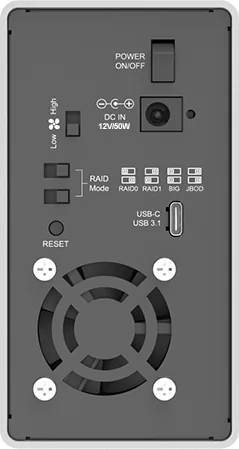
To switch modes, connect the device to a computer, set the physical RAID switch on the back to the desired position, press the hidden reset key until the LED stabilizes, and then reboot the unit.
Is this answer helpful?
Yes, switching RAID modes will erase existing data on the drives. It is critical to back up all important files before changing the configuration to prevent permanent data loss.
Is this answer helpful?
The enclosure accepts both 2.5-inch and 3.5-inch HDDs and SSDs. Different screw kits are provided to secure each drive size properly within the removable trays.
Is this answer helpful?
If a drive fails during a rebuild, the system may stop. You should restart the unit to check the status. If the new drive is faulty, replace it again. The process can resume from where it stopped upon reboot.
Is this answer helpful?
The device completes rebuilds even if the host enters standby, but it may not enter sleep mode automatically afterward. You may need to manually shut down the device or wake the host to sync states.
Is this answer helpful?
Advantages and Disadvantages
Advantages

- Supports multiple RAID modes including 0, 1, BIG, and JBOD for flexible data management
- High-speed USB 3.2 Gen2 Type-C interface with 10Gbps transfer rates
- Tool-less design allows for easy installation and removal of 2.5 and 3.5 inch drives
- Built-in LED indicators provide clear visual status of drive health and activity
- Capable of hosting bootable operating systems for macOS and Windows
Disadvantages

- Requires manual switching of physical switches to change RAID configurations
- Does not include internal power supply; requires external AC adapter
- Data loss occurs if switching RAID modes without prior backup
- USB 3.2 C to A cable requires host port to be Gen2 for optimal performance
- System may not enter sleep mode automatically after data rebuild completion
Product Specification
Form factor
3.5"
Internal connection
2x SATA 6Gb/s
External connection
1x USB-C 3.1 (10Gb/s)
RAID level
0/1/JBOD
Fan
1x 40mm
Dimensions
8.74x4.72x2.52 inches
Color
black
Features
On/Off switch, includes USB cable (USB-A), includes USB cable (USB-C)
USB spelling
Link
Product Description
Unlock Massive Storage with the Raidon SafeTANK GR3660-BA31
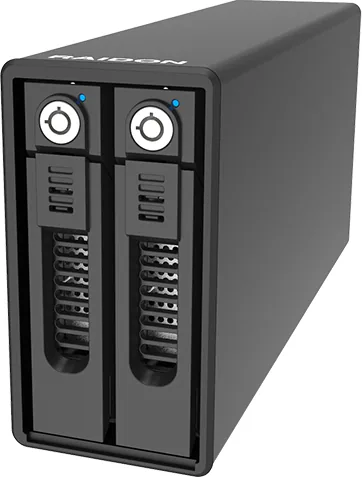
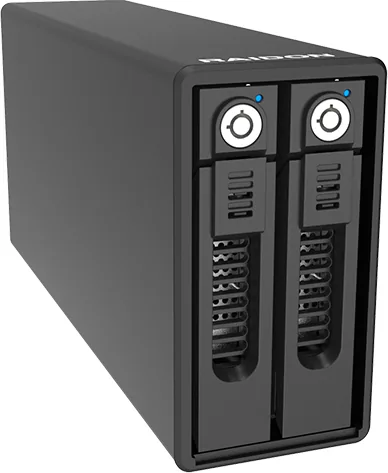
The Raidon SafeTANK GR3660-BA31 USB-C 3.1 represents a significant leap in portable storage solutions, designed for professionals who demand speed, reliability, and flexibility. This dual-bay enclosure supports both 2.5-inch and 3.5-inch drives, allowing users to customize their storage capacity based on specific needs. Whether you are a video editor requiring rapid data transfer or a photographer needing robust backup options, this device delivers performance that meets high-end demands.
Equipped with a USB 3.2 Gen2 Type-C port, the GR3660-BA31 ensures blazing fast data transfer speeds up to 10Gbps. The interface is backward compatible, supporting various connection types via included cables. The device features a sleek metal chassis that not only looks professional but also aids in heat dissipation during intensive operations. Inside, the hardware installation process is streamlined, featuring tool-less drive trays that make swapping hard drives effortless.
One of the standout features of this unit is its versatile RAID configuration capabilities. Users can easily switch between RAID 0 for maximum speed, RAID 1 for data mirroring and security, BIG mode for combined capacity, and JBOD for independent drive management. A dedicated switch on the rear panel allows for quick mode changes without complex software setups. The system includes intelligent LED indicators that provide real-time status updates on drive health, activity, and rebuild processes, ensuring you are always aware of your data's safety.
Beyond simple storage, the GR3660-BA31 can serve as a bootable drive for operating systems like macOS and Windows. Detailed guides within the product ecosystem explain how to install full OS environments directly onto the external enclosure, turning it into a portable workstation. This capability is invaluable for IT professionals or anyone needing to troubleshoot systems without installing software on the host machine. With comprehensive safety precautions and automatic data rebuilding features, this product stands as a reliable partner for all your digital asset management needs.
Search for 67,732 Manuals online


Type-in Brand or Model