
Raidon InTANK iR2623-S3 Manual
PDF manual · 25 Pages
English


Quick check
Incorrect answer, please try again.
Chat with your Raidon InTANK iR2623-S3 manual using AI
Get instant AI answers from your Raidon InTANK iR2623-S3 manual
Ask anything about the Raidon InTANK iR2623-S3. Answers come from this manual, with the pages they are based on.
InTANK iR2623-S3 Maintenance Schedule
It is highly recommended to back up important data on a regular basis or whenever necessary to a remote or separate storage device.
Periodically insert the removed backup hard drive back into the unit to execute automatic backup and protect against viruses or simultaneous failure.
Ask a Question
Do you recommend InTANK iR2623-S3?
Yes NoFrequently Asked Questions
Changing the RAID mode will result in complete data loss on those drives. You must back up all data before reconfiguring the mode.
Is this answer helpful?
Yes, but the total usable capacity will be limited to the size of the smaller drive. The larger drive's extra space will remain unused.
Is this answer helpful?
When a failed drive is replaced, the system automatically copies data from the surviving drive to the new one without user intervention.
Is this answer helpful?
Yes, the iR2623-S3 supports both 2.5-inch and 3.5-inch SATA hard drives via removable trays.
Is this answer helpful?
Check the LCD display, verify SATA cable connections, and ensure the BIOS is set to detect drives automatically. Check for compatibility issues if problems persist.
Is this answer helpful?
Technically no, but if the source drive has bad sectors, data in those specific sectors might be lost during the copy process.
Is this answer helpful?
Advantages and Disadvantages
Advantages

- Supports flexible RAID 0 and RAID 1 configurations via rear jumpers
- Features an LCD screen for real-time status and error monitoring
- Enables hot-swapping of drives without system shutdown
- Includes automated data rebuilding after drive replacement
- Offers GUI software with email notification and S.M.A.R.T. monitoring
Disadvantages

- Total capacity in RAID 1 is limited by the smallest drive installed
- Firmware updates carry a risk of malfunction if not performed carefully
- System requires restart when changing RAID modes
- Performance may degrade if drives from different manufacturers are mixed
- RS232 port setup requires specific knowledge for industrial integration
Product Specification
Type
Chassis
Internal connections
2x 3.5" SATA 6Gb/s, 1x 2.5" SATA 6Gb/s
External connections
SATA 6Gb/s
Hot-Swap
No
Drive bay
2x 5.25"
Case cooling
1x Fan (2.4 inch)
Power supply
1x 4-Pin Molex
Lock
Yes
Features
Display, RAID (0/1)
Product Description
Discover the RaidSonic Raidon InTANK iR2623-S3 Internal RAID Module
The RaidSonic Raidon InTANK iR2623-S3 is a robust internal storage solution designed for users who demand reliability and flexibility in their data management. This SATA 6Gb/s module supports two hard drives, offering versatile configuration options to suit various needs, from high-speed performance to critical data redundancy.
Versatile RAID Configurations
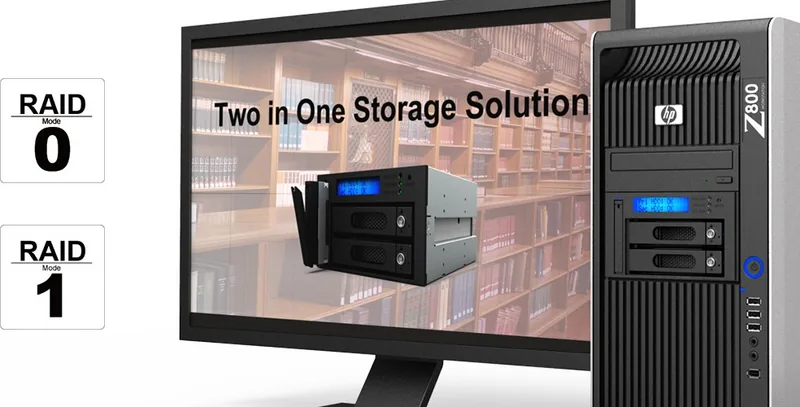
One of the standout features of the iR2623-S3 is its ability to switch between RAID 0 and RAID 1 modes using a simple jumper setting on the rear panel. In RAID 0 mode, the system combines the capacity of both drives into a single volume, delivering faster read and write speeds ideal for media editing or large file transfers. Conversely, RAID 1 mode mirrors data across both drives, ensuring that if one drive fails, your data remains safe on the other. This mirror mode provides essential peace of mind for storing important files.
User-Friendly Monitoring and Maintenance
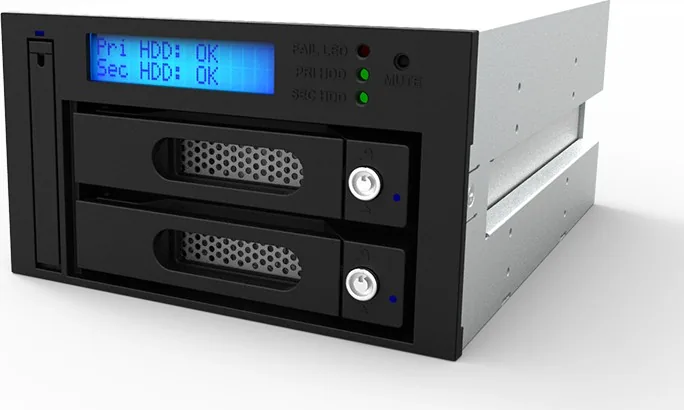
The device comes equipped with an intuitive LCD screen that displays real-time status information. Users can easily monitor drive health, view rebuild progress, and identify errors such as fan failures or overheating conditions. The built-in buzzer alerts you immediately to any hardware issues. Additionally, the hot-swap capability allows you to replace a failed drive without shutting down the system, triggering an automatic data rebuild process that restores redundancy seamlessly.
Advanced Software Integration
For deeper control, the iR2623-S3 includes GUI monitoring software accessible via CD. This tool offers comprehensive system status checks, S.M.A.R.T. diagnostics, and firmware update capabilities. It also supports email notifications, allowing administrators to receive instant alerts about drive malfunctions or removals. The inclusion of an RS232 port further enables industrial control systems to monitor hardware status remotely, making it suitable for professional environments.
Installation and Compatibility
Installation is straightforward, requiring only standard SATA cables and power connections. The unit supports both 2.5-inch and 3.5-inch drives, providing flexibility for different storage form factors. While the system accepts drives from different manufacturers, using identical models is recommended for optimal performance and capacity utilization. Always ensure drives are free of bad sectors before installation to prevent data loss.
Key Notes
- Supports SATA I, II, and III interfaces.
- Automatic data rebuilding upon drive replacement.
- Email notification support for proactive maintenance.
- Requires BIOS set to AUTO for detection.
Search for 67,732 Manuals online


Type-in Brand or Model