
R-Go HE Break Manual
PDF manual · 41 Pages
English



Quick check
Incorrect answer, please try again.
Chat with your R-Go HE Break manual using AI
Get instant AI answers from your R-Go HE Break manual
Ask anything about the R-Go HE Break. Answers come from this manual, with the pages they are based on.
Ask a Question
Do you recommend HE Break?
Yes NoFrequently Asked Questions
Yes, but forward and backward buttons are not compatible with MacOS systems.
Is this answer helpful?
Click the DPI button located on the bottom of the mouse.
Is this answer helpful?
Green means working healthy, orange means break time, red means working too long.
Is this answer helpful?
No, use a damp water-based cloth only to avoid damaging the coating.
Is this answer helpful?
Press the pair button on the bottom and select the device in settings.
Is this answer helpful?
R-Go Break software is compatible and controls the LED light features.
Is this answer helpful?
Yes, versions are available for left or right handed users.
Is this answer helpful?
Advantages and Disadvantages
Advantages

- Vertical design prevents wrist strain and promotes forearm movement.
- Wireless USB or Bluetooth options provide flexible connectivity.
- Integrated software gives visual feedback for healthy work habits.
- Lightweight construction reduces muscle tension during use.
- DPI button allows sensitivity customization based on preference.
Disadvantages

- Forward and backward buttons do not work on MacOS.
- Requires specific software for LED traffic light features.
- USB cable is for charging only and not data transfer.
- Cannot be cleaned with water or alcohol containing liquids.
- Rubber parts on bottom cannot be removed without damage.
Product Specification
Hand Preference
Right Hand (Vertical)
Buttons
6 (total), 2 (main), 1 (top), 2 (left), 1 (Scroll Wheel Click)
Scroll Wheel
1x 2-way
Sensor
Red LED / IR
Resolution
2400 dpi, reducible to 1600/1200/800/400 dpi
Lighting
red, green, orange
Connection
Wireless (Bluetooth), Removable Cable (USB-C Port)
Power Supply
Battery (Fixed, 500mAh)
Dimensions (WxHxD)
3.03 in x 2.76 in x 3.70 in
Approximate Volume
8.12 cu in (Approximate Shape)
Weight
3.03 oz
Color
Multi-color, black/silver
Features
Thumb rest, Pause indicator, Reduced click noise
Note
Hand Length up to 6.50 in -> Mouse Size S (Small), Hand Length from 6.50 to 7.28 in -> Mouse Size M (Medium), Hand Length greater than 7.28 in -> Mouse Size L (Large)
Product Description
Redefine Your Workspace Health with the R-Go HE Break Mouse
In today's digital era, spending long hours at a computer desk has become the norm for countless professionals worldwide. However, this modern lifestyle often comes with a hidden cost to our physical well-being. Repetitive Strain Injury, commonly known as RSI, can develop quickly when hands and wrists are not supported properly during daily tasks. This is why the R-Go HE Break Mouse has emerged as a revolutionary tool designed to prevent such critical issues while simultaneously enhancing your overall productivity levels.
Ergonomic Design for Natural Movement
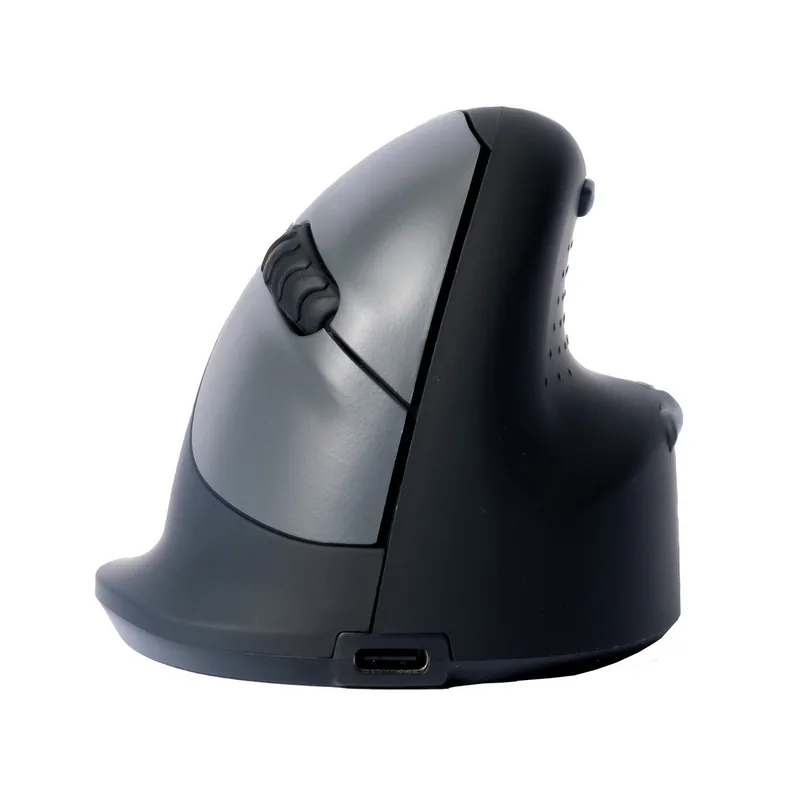
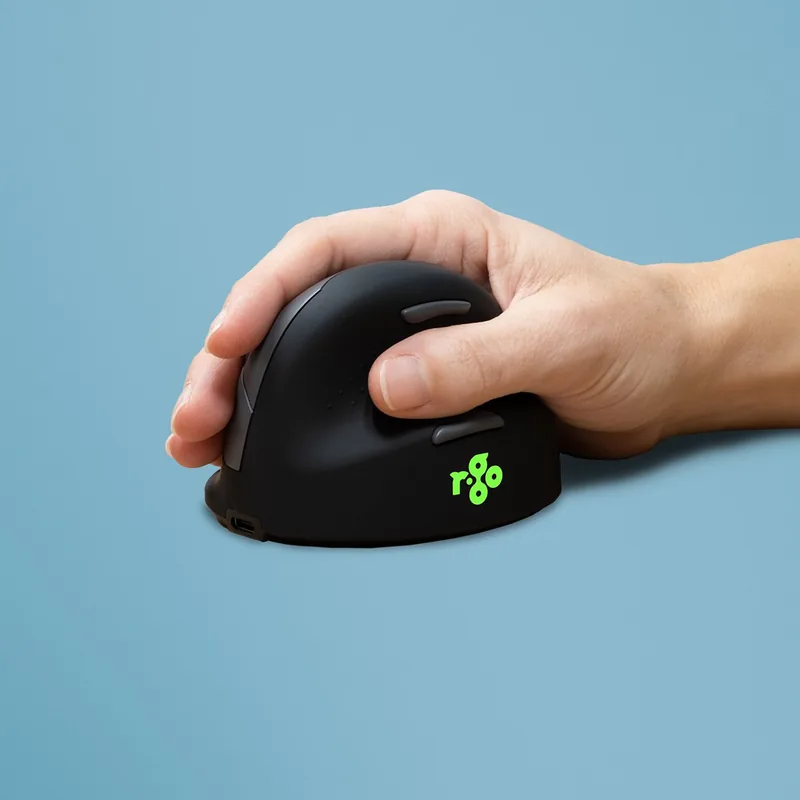
The R-Go HE Break Mouse Small Vertical Wireless Mouse Bluetooth features a unique vertical grip that stands out from standard peripherals. This design ensures a natural and relaxed position for your hand and wrist throughout the day. Instead of forcing your forearm to twist unnaturally, this mouse stimulates movements from the forearm to prevent strain. The lightweight construction reduces muscle tension significantly, making it ideal for extended work sessions. It supports your thumb and fingers comfortably while maintaining a sleek profile for a modern aesthetic.
Seamless Wireless Connectivity
Connectivity is effortless with options for either Bluetooth connectivity or a USB dongle. Setting up is simple for both Windows and MacOS systems without complex drivers. You can adjust the sensitivity dynamically using the DPI button located on the bottom of the device. A lower DPI setting is recommended to encourage larger arm movements rather than small wrist flicks, aligning with the goal of injury prevention. This ensures stability during long usage periods. Whether you are on a laptop or a desktop, the wireless connection ensures a clutter-free workspace.
Smart Break Reminder Software
The standout feature of this device is its seamless integration with the dedicated R-Go Break software. This smart tool monitors your work behavior over time and provides visual feedback through a colored LED light. The light acts like a traffic signal system. Green indicates you are working healthily and safely. Orange suggests it is time for a short rest break. Red warns that you have been working too long without respite. This positive reinforcement helps you maintain a healthy work-life balance effortlessly.
Maintenance and System Compatibility
To keep your mouse in top condition, strictly avoid water contact and use only a damp cloth for cleaning dust. Do not remove the rubber parts on the bottom sensor area as this affects movement. The mouse is fully compatible with Windows XP, Vista, 10, 11, and MacOS operating environments. While some forward and backward buttons are specific to Windows, the core ergonomic functions remain universal. Investing in this ergonomic solution is a vital step towards a healthier future and improved daily comfort for everyone.
Setup and Support
Setting up the device is straightforward. You can pair it via Bluetooth or use the dongle. Ensure your system meets the requirements. Contact support if issues arise.
Search for 67,732 Manuals online


Type-in Brand or Model