

R-Go Compact Manual
PDF manual · 11 Pages
English



Quick check
Incorrect answer, please try again.
Chat with your R-Go Compact manual using AI
Get instant AI answers from your R-Go Compact manual
Ask anything about the R-Go Compact. Answers come from this manual, with the pages they are based on.
Ask a Question
Do you recommend Compact?
Yes NoFrequently Asked Questions
Connect the keyboard to a USB port on your computer and turn on your machine. Connect directly to the computer and avoid using a USB hub to ensure stability.
Is this answer helpful?
Yes, it works with Mac OS computers that have integrated USB 2.0 port functionality. It is also compatible with Windows and Linux systems.
Is this answer helpful?
Press and hold the blue FN key on the bottom row of the keyboard, then press F1. Or press FN and F11. Refer to your manual for specific combinations.
Is this answer helpful?
No. Trying to open or modify the device will void the warranty and pose electrical risks like shock. Repairs must be done by authorized technicians.
Is this answer helpful?
Check the USB cable connection, try a different port, and restart the computer. Ensure the device is plugged directly into the computer without hubs.
Is this answer helpful?
Do not expose the device to moisture or humidity. Store it in dry areas to prevent damage. Avoid placing it near sinks or wet environments.
Is this answer helpful?
The product is manufactured in China. It is a product of R-Go Tools b.v. based in The Nederlands with technical support available.
Is this answer helpful?
Advantages and Disadvantages
Advantages

- USB 2.0 compatibility ensures wide support across operating systems including Windows, Mac, and Linux.
- Compact design fits seamlessly into any desk setup without taking up excessive space.
- Dedicated function keys and FN combos streamline workflow and navigation controls.
- EU compliance with EMC and RoHS directives guarantees safety and health standards are met.
- Support for F1 to F12 keys is available with simple FN key combinations.
Disadvantages

- Direct USB connection is required; USB hubs may cause signal issues or failure.
- Warranty is voided if the device is opened or disassembled by unauthorized users.
- F11 and F12 keys require holding the FN key, which takes practice to master.
- Do not dispose of in household waste; must go to specific electronic recycling centers.
- Operation is not guaranteed for all home-built or whitebox PC configurations.
Product Specification
Layout
DE
Product Description
Experience Comfort and Efficiency with the R-Go Ergonomic Keyboard
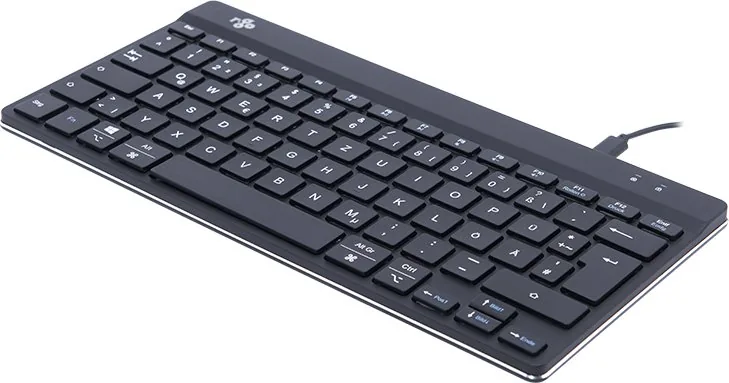
In the modern workspace, comfort is paramount for productivity and health. The R-Go Ergonomic Keyboard, USB, QWERTZ / DE-Layout Manual provides essential information for mastering your typing environment. This device brings a compact design that fits seamlessly into any desk setup. Whether you are coding, writing, or managing daily tasks, the layout is designed for intuitive use. Ergonomic aids are crucial, and this tool supports that need effectively within a professional environment.
Setup and Configuration
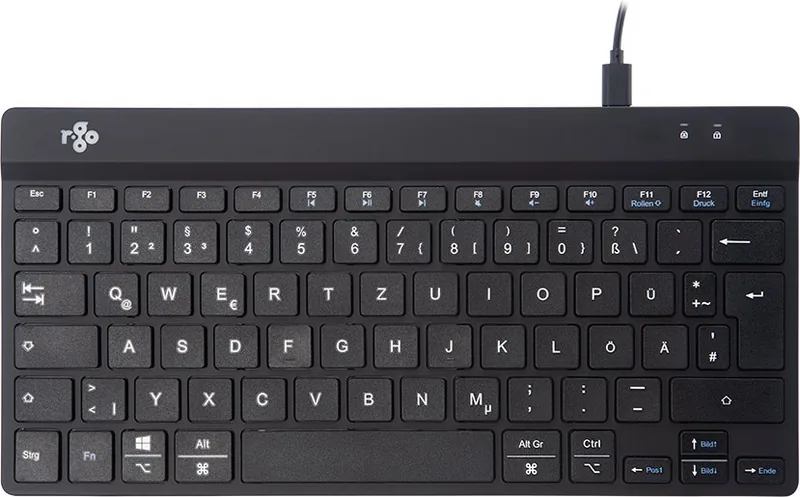
Setting up your keyboard is incredibly straightforward. Simply connect the keyboard to a USB port on your computer and turn on your machine. The device supports USB 2.0 technology, ensuring wide compatibility with various operating systems. It works reliably with Windows versions including 98 through 10, Mac OS, and Linux machines that have integrated USB ports. If you need to access function keys like F11 or F12, hold the blue FN key and press the corresponding F key. This interaction model is standard for compact keyboards today.
Advanced Features
Beyond standard typing, this keyboard offers specialized navigation functions. By pressing the blue FN key along with arrow keys or F10, you can access features like Scroll Lock, Home, End, Page Up, and Page Down. This flexibility reduces the strain on reaching for distant keys on standard layouts. It streamlines workflow by consolidating navigation controls into a dedicated area for better efficiency.
Troubleshooting Common Issues
Occasionally, users may face connectivity issues during initial setup. If the keyboard does not work, check the USB cable connection first. Try using a different USB port on your machine to rule out port failure. Connect directly to the computer and avoid using a USB hub as it might cause signal issues. If the issue persists, please restart your computer completely to refresh drivers. These steps resolve most connectivity barriers quickly.
Safety and Maintenance
Proper care extends the life of your equipment significantly. Do not expose the device to moisture or humidity as water damage is common. Avoid direct sunlight or excessive heat for extended periods to prevent material degradation. Avoid bending the USB cord with excessive force as it can damage internal wiring. Never attempt to disassemble the unit yourself, as this voids the warranty and poses serious electrical risks like shock.
Compliance and Manufacturer Information
European compliance meets strict safety directives for your peace of mind. R-Go Tools b.v. declares compliance with EMC and RoHS directives. Dispose of old equipment at recycling centers. Contact support via email or website. Manufactured in China. Address in Netherlands. Phone support available. This ensures quality control.
Notes
Do not open device. Keep dry. Check USB. Contact R-Go Tools for support.
Search for 67,732 Manuals online


Type-in Brand or Model