

R-Go Compact Break Manual
PDF manual · 41 Pages
English



Quick check
Incorrect answer, please try again.
Chat with your R-Go Compact Break manual using AI
Get instant AI answers from your R-Go Compact Break manual
Ask anything about the R-Go Compact Break. Answers come from this manual, with the pages they are based on.
Ask a Question
Do you recommend Compact Break?
Yes NoFrequently Asked Questions
The R-Go Compact Break lists compatibility with Windows XP, Vista, 10 and 11. For other operating systems such as macOS or Linux, functionality may be limited and is not explicitly documented; test connectivity or contact support for assistance.
Is this answer helpful?
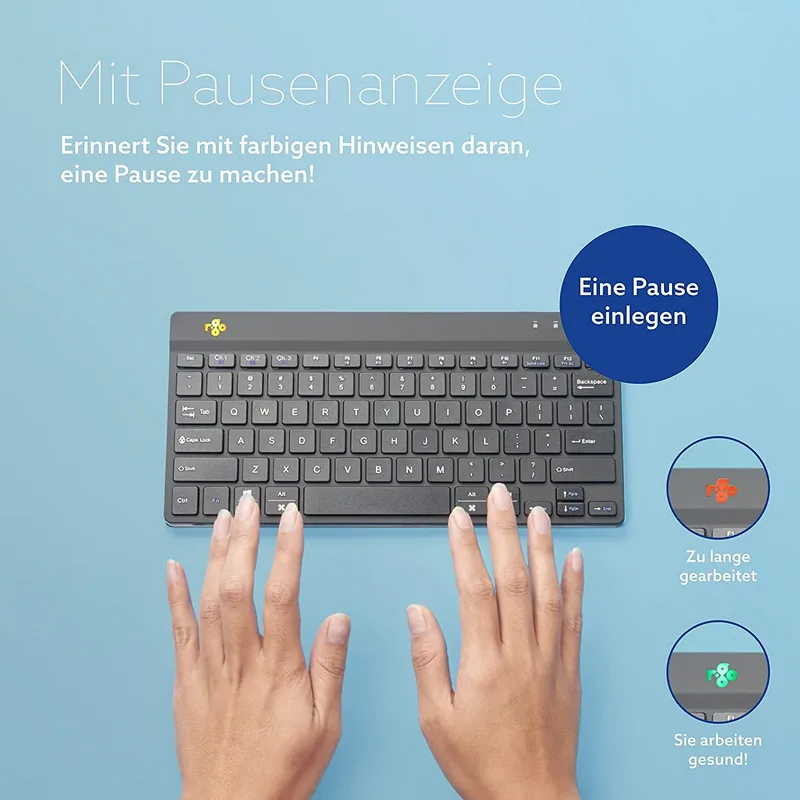
The built-in LED uses a traffic-light system: green means you are working healthily, orange signals it’s time for a short break, and red indicates you have been working too long. The indicator can be toggled with Fn + A and customized via the R-Go Break software.
Is this answer helpful?
Turn the keyboard on, choose channel 1, 2 or 3 to pair different devices. Press once to switch channels or press-and-hold the chosen channel key to initiate pairing; the top-right LED will light when it’s searching or connected.
Is this answer helpful?
Check the cable and connector, try a different USB port, connect directly to the computer instead of a hub, restart your PC, and test on another computer. If issues persist, contact support at [email protected].
Is this answer helpful?
Yes. Download the R-Go Break software from https://r-go.tools/bs to customize function keys, monitor your work behavior, and control the break indicator LED for personalized break reminders and usage insights.
Is this answer helpful?
Yes. The package includes a USB-C to USB-A converter so you can connect the keyboard to systems without native USB-C ports.
Is this answer helpful?
Yes. The keyboard provides additional USB ports allowing you to connect a numpad or other peripherals directly to the keyboard for a compact, integrated setup.
Is this answer helpful?
Advantages and Disadvantages
Advantages

- Ergonomic slim design reduces wrist and shoulder strain and minimizes RSI risk.
- Integrated R-Go Break LED provides visual break reminders (green/orange/red).
- Available wired and wireless versions with rechargeable option and 3-channel pairing.
- Light keystroke reduces finger fatigue for extended typing sessions.
- Includes USB-C to USB-A converter and extra ports for numpad or peripherals.
Disadvantages

- Limited official compatibility notes focused on Windows; macOS/Linux not explicitly listed.
- Wireless pairing requires manual channel selection and holding keys to connect.
- Performance may be affected when connected through a USB hub—direct connection recommended.
- Feature customization requires downloading separate R-Go Break software.
- Compact layout may omit dedicated keys some users expect from full-size keyboards.
Product Specification
Layout
US
Product Description
R-Go Ergonomic Keyboards, USB, QWERTY / US Layout Manual
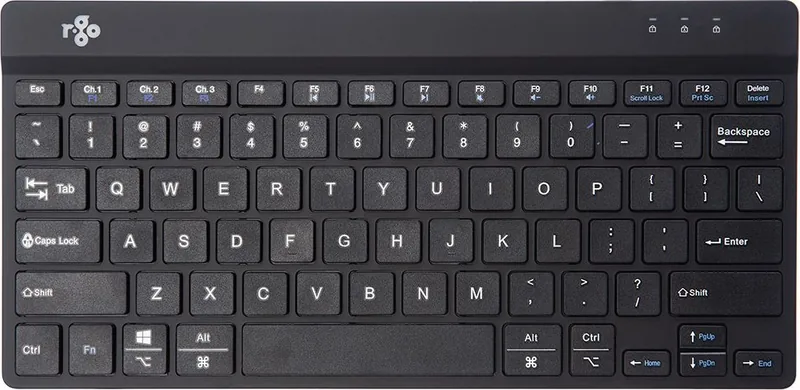
The R-Go Compact Break keyboard combines ergonomic design with intuitive break reminders and multi-device connectivity to help you work healthier and longer. Designed for people who type frequently, this compact USB keyboard features a low-profile, light keystroke to reduce muscle tension in hands and forearms. Its slim, flat layout encourages a natural wrist position and keeps hands within shoulder width when used alongside a mouse—reducing strain that can lead to RSI.
Available in wired and wireless versions, the keyboard includes a USB-C connection and a USB-C to USB-A converter for compatibility with a wide range of systems (Windows XP/Vista/10/11). The wired model connects directly via cable, while the wireless model offers a rechargeable battery and a three-channel pairing system so you can quickly switch between devices. The keyboard also supports adding a numpad or other peripherals via built-in USB ports.
A standout feature is the integrated R-Go Break indicator: an LED that functions like a traffic light to guide healthy work habits. Green indicates balanced work, orange signals it’s time for a short break, and red warns you’ve been working too long. For deeper customization and behavior insights, the free R-Go Break software lets you personalize function keys, monitor work patterns, and control the breakpoint LED from your PC.
Function keys are color-marked and accessed with the Fn key (for example, Fn + A toggles the break indicator). The keyboard includes standard status LEDs for Caps Lock and Scroll Lock and practical connectivity guidance: plug directly into your computer rather than through hubs for best performance, or try another USB port if issues arise.
Troubleshooting steps are simple: verify cable and connector, try a different USB port, bypass USB hubs, restart the computer, or test the keyboard on another machine. If problems persist, R-Go provides support via [email protected].
Whether you choose the compact wired model for a straightforward plug-and-play setup or the rechargeable wireless variant for flexible device switching, the R-Go Compact Break is built to promote healthier typing, customizable controls, and reliable connectivity.
Notes
- Compatible with Windows XP/Vista/10/11.
- Includes USB-C to USB-A converter.
- Download R-Go Break software at https://r-go.tools/bs for customization and break tracking.
Search for 67,732 Manuals online


Type-in Brand or Model