

Q-Connect KF11507 Manual
PDF manual · 37 Pages
English



Quick check
Incorrect answer, please try again.
Chat with your Q-Connect KF11507 manual using AI
Get instant AI answers from your Q-Connect KF11507 manual
Ask anything about the Q-Connect KF11507. Answers come from this manual, with the pages they are based on.
KF11507 Maintenance Schedule
Wipe with a soft, dry cloth. Do not use harsh solvents or detergents.
Remove back cover screws, insert new battery with positive side up, and secure cover to prevent leakage damage.
Ask a Question
Do you recommend KF11507?
Yes NoFrequently Asked Questions
The calculator automatically shuts down if not used for five to twelve minutes. This feature preserves battery life by ensuring the device is not left running unnecessarily. It provides a hassle-free way to save power during breaks in work.
Is this answer helpful?
Remove the screws holding the back cover and take off the panel. Wipe the new battery with a cloth and insert it with the positive side facing up. Replace the cover and secure it with the screws before pressing the power button.
Is this answer helpful?
No, avoid harsh solvents or detergents. Use a soft dry cloth to wipe the surface only. Harsh chemicals may damage the casing or screen. Ensure the unit is dry before use if moisture contacts it.
Is this answer helpful?
It supports four memory functions including addition, subtraction, recall, and clear. You can store numbers and modify them in memory. Use the M+ and M- keys to add or subtract values from the stored total.
Is this answer helpful?
Yes, it handles percentages easily. You can add tax or calculate discounts directly. Press the percentage key after inputting the numbers to get the result immediately for pricing or financial tasks.
Is this answer helpful?
Keep it in a dry location away from moisture. Do not bend or twist the unit. Avoid direct impact or dropping. Regular cleaning with a dry cloth helps maintain its appearance and function over time.
Is this answer helpful?
No, this model is designed for standard arithmetic and percentage operations. It does not feature specific multi-currency settings but can calculate values for any currency symbol provided the base numbers are correct.
Is this answer helpful?
Advantages and Disadvantages
Advantages

- Auto Power Off feature saves energy by shutting down after 5-12 minutes of inactivity, ensuring long battery life without manual effort.
- Four-function memory allows addition, subtraction, recall, and clear operations for complex calculations and multi-step tasks.
- Mark up function enables quick pricing adjustments and percentage calculations for business needs like tax and discounts.
Disadvantages

- Battery replacement requires removing screws from the back cover which can be inconvenient for users needing frequent changes.
- Device relies solely on batteries with no solar power option, requiring periodic maintenance and eventual replacement.
- No advanced programming or tax setting functions, limiting it to basic arithmetic and percentage tasks without customization.
Product Specification
Type
Desktop Calculator
Display
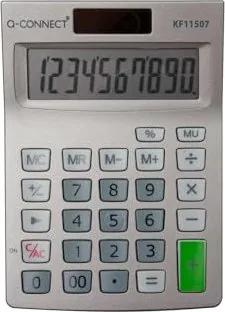
LCD (1 Line, 10 Digits)
Functions
Percentage
Printer
None
Power Source
Solar, Battery (LR1130)
Dimensions
5.51 in x 0.43 in x 4.06 in
Color
Gray
Product Description
Experience Reliable Arithmetic with the Q-Connect KF11507
Managing daily finances requires tools that are dependable, accurate, and easy to integrate into your workspace. The Q-Connect KF11507 Desk Calculator provides a robust solution for everyday arithmetic demands in a professional setting. Its sleek grey design fits seamlessly into any office environment, offering a modern aesthetic alongside practical functionality. Users seeking reliability will find this device meets their expectations for consistent performance across a wide range of tasks. It serves as an essential companion for those who handle significant amounts of data regularly.
A key benefit is the intelligent Auto Power Off feature designed for efficiency. If the calculator is not used within approximately five to twelve minutes of inactivity, the unit shuts off automatically. This helps conserve energy and extends the lifespan of the internal batteries significantly. You do not need to remember to turn it off manually after every session, which reduces the risk of drained power unexpectedly. For those who work long hours with frequent breaks, this feature is essential for maintaining operational readiness without battery waste. It saves time and money in the long run for the user by preventing unnecessary power consumption.
Memory management is also highly capable with four distinct functions available for complex tasks. You can use addition and subtraction keys to update the stored total instantly without losing previous data. Recall allows you to view the total number held in memory at any time, while clear resets the value back to zero for new tasks. This is particularly useful when adding up a series of invoices or calculating aggregate expenses for a specific project. The Mark Up function further simplifies pricing strategies by allowing quick adjustments for profit margins and cost changes.
Performing specific financial calculations like adding tax or applying discounts is straightforward and intuitive. Simply input the base amount, select the percentage function, and the machine handles the math instantly. For example, adding six percent tax to a twenty euro purchase yields the final amount immediately. Battery replacement is secure when done correctly by removing the back panel screws. Always place the positive side of the new battery facing up to ensure correct polarity for operation. If a dead battery remains for too long, it could leak and cause damage, so timely checks are recommended for safety.
Care and maintenance guidelines are simple to follow to ensure longevity of the device. Do not expose the unit to moisture or harsh chemicals that could degrade the plastic casing. Use a soft dry cloth for cleaning to avoid scratching the surface or screen. Avoid dropping or bending the device to prevent internal mechanical damage to the keys or circuitry. The sturdy construction ensures it survives daily office use and remains functional for years. This calculator remains a versatile tool for students, accountants, and small business owners alike. It simplifies complex numbers into readable results quickly and accurately. The semi-desktop form factor provides stability on the desk surface for accurate entry.
Notes Keep the display screen clean for better visibility. Ensure the keys are not pressed with excessive force. Regular checks are recommended for battery health.
Search for 67,732 Manuals online


Type-in Brand or Model