
Q-Connect KF01605 Manual
PDF manual · 41 Pages
English



Quick check
Incorrect answer, please try again.
Chat with your Q-Connect KF01605 manual using AI
Get instant AI answers from your Q-Connect KF01605 manual
Ask anything about the Q-Connect KF01605. Answers come from this manual, with the pages they are based on.
Ask a Question
Do you recommend KF01605?
Yes NoFrequently Asked Questions
The calculator automatically shuts down if it is not used within approximately five to twelve minutes. This helps conserve battery life automatically without requiring user input.
Is this answer helpful?
Yes, you can change the tax rate by pressing and holding the tax set key until zero is displayed, entering the new percentage, and pressing the set key again to store it.
Is this answer helpful?
Remove the screws holding the back cover, take off the cover and old battery. Wipe the new battery with a dry cloth, place it with the positive side up, and secure the cover with screws.
Is this answer helpful?
The memory functions include addition to memory, subtraction from memory, recall of stored numbers, and clearing the memory to zero.
Is this answer helpful?
Yes, it supports cost, selling, and margin calculations which are essential for business financial planning and inventory management tasks.
Is this answer helpful?
Wipe it with a soft, dry cloth. Do not use harsh solvents or detergents as they may damage the unit surface or keys.
Is this answer helpful?
Avoid dropping or striking the calculator as it can damage internal components. Its durability relies on careful handling and proper placement.
Is this answer helpful?
Advantages and Disadvantages
Advantages

- Automatic power off saves energy and extends battery performance significantly.
- Built-in tax calculation features handle complex business pricing needs.
- Four-function memory allows for easy storage and recall of data numbers.
- Dedicated margin calculator assists in determining profit percentages quickly.
- Durable construction ensures reliability during regular daily office use.
Disadvantages

- Battery replacement requires using tools to open the back cover screws.
- No backlit display makes it harder to use in very low light environments.
- Manual does not provide digital download options in all regions.
- Memory functions are simple and lack advanced statistical capabilities.
- Device lacks a carrying pouch included in the standard package.
Product Specification
Type
Calculator
Display
LCD (1 line, 12 digits)
Functions
Square Root, Percent, Margin, Tax (Tax)
Printer
N/A
Power Supply
Solar powered, Battery powered (LR1130)
Dimensions
5.43x1.22x4.06in
Color
Gray
Product Description
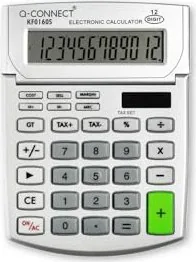
Unleash Efficiency with the Q-Connect KF01605 Desktop Calculator Grey
In the fast-paced world of modern business, accuracy and speed are paramount. The Q-Connect KF01605 Desktop Calculator Grey stands out as a reliable companion for financial tasks. Designed with functionality in mind, this device ensures that your calculations are precise every single time. Whether you are balancing a budget, managing inventory costs, or handling daily transactions, having the right tool makes all the difference. It simplifies daily workflows by removing the need for manual estimation.
Core Features for Business Success
This calculator comes equipped with essential functions that streamline complex arithmetic. One standout feature is the Auto Power Off system. If you step away from your work for around five to twelve minutes, the unit shuts down automatically. This saves energy and extends battery life without any manual input from the user. Additionally, the four-function memory allows you to store numbers for later recall. This is perfect for summing up large columns of data or carrying over totals to the next step. You can add to or subtract from the memory easily. The display shows an M indicator when memory is in use.
Simplifying Tax and Margin Calculations
Managing finances often involves tax adjustments. The Q-Connect KF01605 Desktop Calculator Grey handles this effortlessly. It calculates prices plus tax, prices minus tax, and the specific tax amount based on your settings. The tax rate is easily adjustable via the dedicated key. You can set the percentage to 8 percent or any other value required for your region. Just press and hold the tax set key to configure the initial rate. Beyond taxes, the device supports cost, sell, and margin calculations. These business-centric features help you determine gross profit margins or selling prices quickly. Just input the cost and desired margin, and the machine does the rest for you. This helps in retail and wholesale scenarios significantly.
Maintenance and Care
To ensure longevity, keep the unit dry. Avoid harsh solvents when cleaning. Simply use a soft, dry cloth. Do not drop or bend the device, as its durability relies on proper handling. Replacing the battery is straightforward, though it requires removing screws from the back cover. Always ensure the positive side faces up when installing fresh batteries. Note that old batteries can leak if left inside too long, potentially damaging internal components. It is crucial to check these points regularly.
Documentation titled Q-Connect KF01605 Desktop Calculator Grey Manual provides detailed guidance for users worldwide. It emphasizes safety and optimal usage patterns. By following these guidelines, you maximize the lifespan of your tool. Its grey finish blends well into any office environment, offering a professional look. Users appreciate the tactile feedback of the keys and clarity. It remains a top choice for professionals needing dependable arithmetic assistance. Whether for home use or an accounting firm, this device delivers consistent results. The content ensures everyone can operate it regardless of language barriers. Instructions cover percent calculations and discount operations. This versatility makes it a staple globally. Remember to test the tax setting. With proper care, it serves faithfully for years. An investment in accuracy and professional productivity.
Search for 67,732 Manuals online


Type-in Brand or Model