
PXN V10 Manual
PDF manual · 1 Pages
English


Quick check
Incorrect answer, please try again.
Chat with your PXN V10 manual using AI
Get instant AI answers from your PXN V10 manual
Ask anything about the PXN V10. Answers come from this manual, with the pages they are based on.
Ask a Question
Do you recommend V10?
Yes NoFrequently Asked Questions
The PXN V10 supports PC, PS4, Xbox One and Xbox Series X|S. For console setup, you must use the original console controller to guide the wheel pairing via the wheel’s controller interface.
Is this answer helpful?
Force feedback works when the wheel is in D-input mode. Connect the wheel via USB to your PC and ensure the wheel indicator shows D-input. Use supported games that provide force feedback; switch modes by holding the mode button for 3 seconds.
Is this answer helpful?
You can adjust wheel tilt (4 positions), panel angle, pedal angle and pedal tension using the included Allen key and threaded adjusters. The PXN Wheel app also allows software adjustments like rotation angle and force feedback strength.
Is this answer helpful?
Yes. The force feedback motor runs on DC24V using the included power adapter. The USB connection provides data and 5V for controller guidance but not the motor power.
Is this answer helpful?
Use D-input mode for games that support force feedback (e.g., Assetto Corsa, Euro Truck Simulator 2, Forza Horizon 5). Use X-input if a game lacks force feedback support or needs broader controller compatibility.
Is this answer helpful?
Yes. The wheel uses clamps and screws to secure to desks or rigs. The manual provides step-by-step instructions—tighten clamps and mounting screws with the included Allen key, but avoid over-tightening.
Is this answer helpful?
Yes. The PXN Wheel mobile app allows button mapping, preset configurations, rotation degree and force feedback adjustments, and button testing for personalized setups.
Is this answer helpful?
Advantages and Disadvantages
Advantages

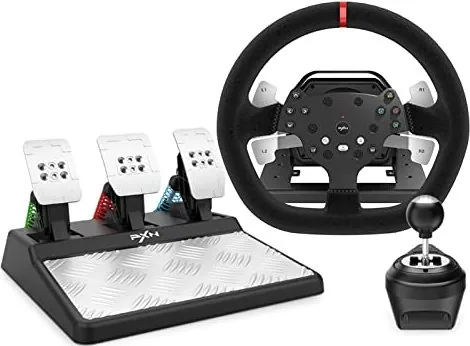
- Comprehensive 3-in-1 kit: wheel, 3 pedals and 6+1 gear shifter included for an all-in-one sim setup.
- Force feedback support in D-input mode for realistic road feel with compatible PC games.
- Adjustable wheel tilt, pedal angle and pedal tension for personalized ergonomics.
- PXN Wheel app offers rotation range, force feedback and button mapping customization.
- Wide platform support: PC, PS4, Xbox One and Xbox Series X|S (requires original controller for pairing).
Disadvantages

- Force feedback unavailable in X-input mode, limiting feel for some games.
- Console pairing requires an original controller connected to the wheel, adding setup steps.
- Motor requires DC24V power adapter, increasing cable clutter and power needs.
- Manual warns against over-tightening and disassembly, indicating some maintenance caution.
- Weight and size may require sturdy desk or dedicated rig for secure mounting.
Product Specification
Type
Steering wheel
Compatibility
PC, PS4, Xbox Series S, Xbox Series X, Xbox One
Material
Plastic
Mounting
clampable
Connectivity
wired, USB
Power supply
USB
Buttons
13 (total), 2 (left), 3 (middle), 6 (right), 2 (rear)
D-pad
concave
Pedals
3 standing
Gear shift
2 paddle shifters (plastic, stationary), gear lever
Special features
incl. pedals, incl. gear shift, detachable, incl. clamps
Product Description
PXN V10 Steering Wheel (PC/PS4/Xbox Series X|S/Xbox One) Manual
Experience realistic racing with the PXN V10 Steering Wheel, a versatile 3-in-1 kit designed for PC, PS4, Xbox One and Xbox Series X|S. Built with a detachable wheel, adjustable base, force feedback motor, three pedals and a separate gear shifter, the V10 delivers immersive control and solid build quality for sim racers and casual players alike. It supports D-input (force feedback) and X-input modes, and requires original console controllers for platform guidance when pairing with PS4 or Xbox systems.
Key Features and Setup
The V10 package includes the steering wheel base, power adapter and cable, USB main cable, foot pedal cables, 6+1 gear shifter, clamps, Allen screws and key. Installation is straightforward: clamp the base to a desk, attach the wheel and shifter, connect pedals, and plug in power and USB. Angle, tilt and pedal tension can be adjusted with the included Allen key and threaded adjusters for a personalized fit.
Force feedback is available in D-input mode on compatible PC titles, offering realistic resistance and road feel. X-input mode disables force feedback but can improve compatibility with some games. The unit also features a 270/900-degree rotation switch, customizable button mapping via the PXN Wheel mobile app, and LED indicators for mode and connection status.
Performance and Compatibility
On PC, the V10 supports Windows 7/8/10/11 and works with popular simulation and arcade racers. Recommended force-feedback titles include Euro Truck Simulator 2, Forza Horizon 5, Assetto Corsa and F1 2020. For X-input titles without force feedback, games like Forza Horizon 4 (Steam), SnowRunner and Need for Speed are suitable. Note: console use requires connecting the original console controller to the wheel to guide pairing.
Design and Durability
The wheel frame and pedals are solidly built with adjustable clamps and multiple mounting points for secure installation. The product tolerances and threaded adjustment range are highlighted in the manual—avoid over-tightening bolts. The V10 runs on DC24V for the motor and 5V USB for controller guidance, with recommended operating temperatures of 10–40°C and humidity 20–80%.
Notes
- Use the included original console controller to pair on PS4 and Xbox platforms.
- Switch modes by holding the mode button for 3 seconds: D-input (force feedback) or X-input (no force feedback).
- Download the PXN Wheel app for advanced settings: rotation range, force feedback strength, button mapping and presets.
- Avoid disassembly, water exposure and extreme environments.
- Children should use under adult supervision.
Search for 67,706 Manuals online


Type-in Brand or Model