
PureLink CSW200 Manual
PDF manual · 28 Pages
English



Quick check
Incorrect answer, please try again.
Chat with your PureLink CSW200 manual using AI
Get instant AI answers from your PureLink CSW200 manual
Ask anything about the PureLink CSW200. Answers come from this manual, with the pages they are based on.
Ask a Question
Do you recommend CSW200?
Yes NoFrequently Asked Questions
The device supports a range of up to 10 meters, but only when there is a clear line of sight between the transmitter and receiver. Obstacles like walls will shorten this distance.
Is this answer helpful?
Yes, it supports HDMI resolutions up to 4K@30Hz and PC resolutions up to 4096x2160p at 30Hz without compression.
Is this answer helpful?
Press the PAIRING key on the receiver box first, then press the PAIRING key on the transmitter box. The connection will establish automatically once paired.
Is this answer helpful?
No, this product is intended for indoor use only. Exposure to moisture, rain, or extreme outdoor temperatures can damage the device.
Is this answer helpful?
No, the system uses no compression technology, resulting in near-zero latency ideal for gaming and live events.
Is this answer helpful?
Check for interference from other wireless devices like routers or microwaves. Reposition the stands or move the devices closer together to improve the signal.
Is this answer helpful?
Advantages and Disadvantages
Advantages

- Supports uncompressed 4K@30Hz video transmission with near-zero latency
- Wireless range up to 10 meters in direct line-of-sight conditions
- Includes adjustable stands for flexible placement and signal optimization
- Compatible with HDCP 2.0 for secure playback of protected content
Disadvantages

- Range significantly reduced by obstacles like thick concrete walls or metal doors
- Indoor use only; not suitable for outdoor environments or moisture exposure
- Requires manual pairing between transmitter and receiver if connection fails
- May experience interference from Wi-Fi routers or microwave ovens nearby
Product Specification
Type
Extender
Specification
HDMI 2.0
Features
Active
Product Description
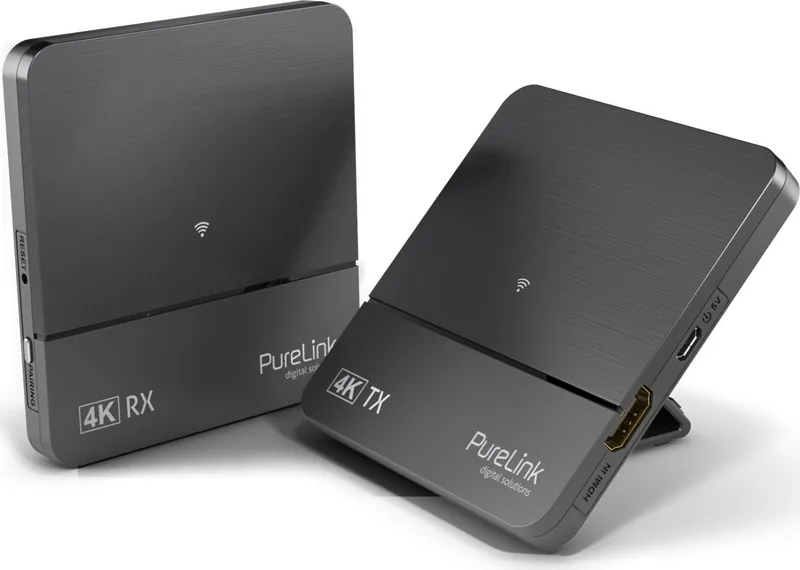
PureLink 4K Wireless HDMI Set: Experience True Wireless UltraHD
The PureLink 4K Wireless HDMI Set, up to 10m is the ultimate solution for eliminating cable clutter in your home theater or meeting room. This device allows you to transmit high-definition video and audio wirelessly from a source like a gaming console or Blu-ray player directly to an UltraHDTV or projector without any loss of quality. Designed for users who need flexibility, this set supports resolutions up to 4K@30Hz and 4096x2160p, ensuring crystal clear images for all your entertainment needs.
One of the standout features of this system is its zero-compression technology. Unlike many wireless extenders that degrade image quality to achieve transmission speeds, the PureLink 4K Wireless HDMI Set delivers uncompressed video with near-zero latency. This makes it perfect for fast-paced gaming or real-time presentations where every millisecond counts. Operating on the Ultra Wide Band 60GHz frequency, it provides a stable connection up to 10 meters in a direct line-of-sight environment.
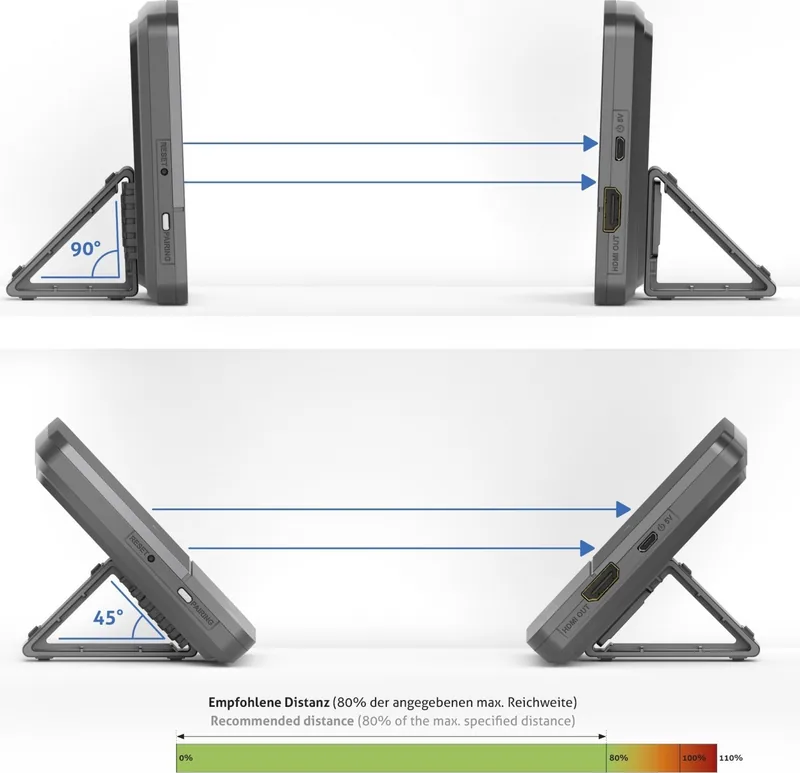
Installation is straightforward and requires no complex configuration beyond a simple pairing process. The kit includes a transmitter and a receiver, each equipped with stands that can be adjusted to 45 or 90 degrees for optimal signal direction. Once paired, the devices automatically maintain a connection, indicated by solid white LEDs on both units. The system also supports HDCP 2.0, ensuring compatibility with protected content from major streaming services and media players.
Whether you are setting up a dedicated game room, expanding your home cinema, or organizing a corporate presentation, this wireless extender removes the constraints of long HDMI cables. It handles compressed audio formats like Dolby 5.1 and DTS, providing a complete surround sound experience alongside your visuals. With low power consumption and robust safety features, it is built for reliable daily use indoors.
Important Notes
- Always ensure a direct line of sight for maximum range; walls and metal objects can reduce performance.
- Use only the provided DC 5V/1A power adapters to prevent damage.
- Keep the device away from pacemakers and other medical implants as per safety guidelines.
- Do not cover the units during operation to avoid overheating.
Search for 67,706 Manuals online


Type-in Brand or Model