
Profoto D2 500 AirTTL Manual
PDF manual · 28 Pages
English



Quick check
Incorrect answer, please try again.
Chat with your Profoto D2 500 AirTTL manual using AI
Get instant AI answers from your Profoto D2 500 AirTTL manual
Ask anything about the Profoto D2 500 AirTTL. Answers come from this manual, with the pages they are based on.
D2 500 AirTTL Maintenance Schedule
Replace the front glass if it shows visible damage such as cracks or deep scratches that affect functionality.
Replace these components if they are damaged or thermally deformed. Do not touch with bare hands.
Use only recommended fuses as specified in the technical data section.
Ask a Question
Do you recommend D2 500 AirTTL?
Yes NoFrequently Asked Questions
Navigate to the special settings menu by holding the Settings button for three seconds. Select the Mode option and choose between Normal for stable color or Freeze for shorter flash durations.
Is this answer helpful?
Yes, it works with most standard reflector mounts. However, it is not compatible with OCF light shapers designed specifically for LED strobes.
Is this answer helpful?
The Profoto D2 500 delivers 500 watt-seconds of power, adjustable in 1/10 stop increments or full stops depending on your preference.
Is this answer helpful?
Yes, but you must use an optional Air Remote TTL transceiver connected to your camera to enable HSS functionality.
Is this answer helpful?
Replace the tube if it shows visible damage or thermal deformation. Frequent use of HSS may reduce the lifespan of the tube.
Is this answer helpful?
No, the device is not waterproof. Avoid using it in wet environments or near liquids to prevent electrical hazards.
Is this answer helpful?
Connect the unit to power, hold the adjustment wheel, and press the On/Off button. The version number will appear on the display.
Is this answer helpful?
Advantages and Disadvantages
Advantages

- Built-in Air Transceiver for wireless control without extra gear
- Rapid recycling time of up to 20 flashes per second at low power
- Consistent color stability across the entire power range
- Compatible with over 120 different light shaping modifiers
- Intelligent cooling system protects against overheating
Disadvantages

- Not compatible with OCF light shapers designed for LED heads
- High voltage components require professional servicing only
- Freeze mode results in slightly higher color temperature variance
- Requires specific fuses which must be replaced carefully
- HSS function requires optional Air Remote TTL transceiver
Product Specification
Flash power
500Ws
Guide number
150.3 (2m / ISO 100)
Power output
1/1-1/10
Flash duration
1/2600-1/63000s
Recycle time
0.03-0.6s
Modeling light
300W
Trigger method
Photo cell, radio, sync socket
Mount type
5/8"
Dimensions
5.1x12.2x7.1in (WxHxD)
Weight
6.61lbs
Product Description
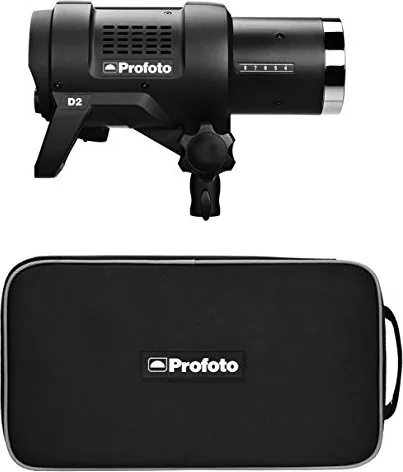
Profoto D2 Air 500TTL: Mastering Professional Lighting
The Profoto D2 Air 500TTL represents a pinnacle in portable studio lighting, designed for photographers who demand reliability and speed. With nearly half a century of expertise behind its creation, this unit combines robust build quality with advanced wireless capabilities. It is not merely a flash; it is a versatile tool that adapts to your creative vision through an extensive ecosystem of light shapers.
At the heart of the D2 Air 500TTL is its powerful 500-watt-second output, capable of delivering consistent color temperature and rapid recycling times. The built-in Air Transceiver allows for seamless wireless control, enabling you to adjust power, group settings, and trigger modes from your camera or via remote controls. Whether you are shooting high-speed action using High Speed Sync (HSS) or capturing portraits with TTL automation, this flash handles the technical complexities so you can focus on composition.
Safety and durability are paramount. The unit features an intelligent cooling system that adjusts fan speed based on internal temperature, ensuring longevity even during intense shooting sessions. It supports various synchronization methods including radio, infrared slave, and cable connections. The manual operation mode offers precise control over power steps, while the freeze mode optimizes flash duration for freezing fast motion.
Handling the D2 is intuitive. The front glass and flash tube are user-replaceable, allowing for quick maintenance in the field. Compatibility extends to over 120 light shapers, giving you the freedom to shape light into softboxes, grids, or reflectors. The device operates on standard AC power but also works with generators, making it perfect for location shoots. Always ensure proper ventilation and avoid moisture to maintain peak performance.
Notes:
- Ensure firmware is updated via the Micro-USB port for best HSS and TTL performance.
- Do not touch the flash tube with bare hands to prevent oil damage.
- Use only Profoto-approved extension cables to avoid overheating.
Search for 67,706 Manuals online


Type-in Brand or Model