
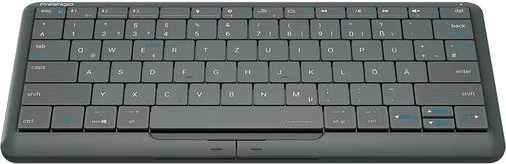
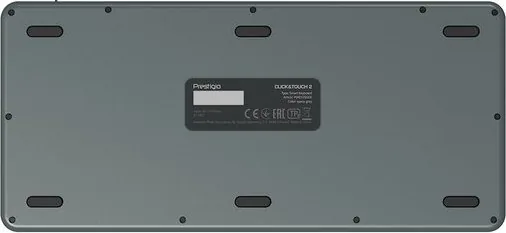

Prestigio Click&Touch 2 PSKEY2SG Manual
PDF manual · 27 Pages
English



Quick check
Incorrect answer, please try again.
Chat with your Prestigio Click&Touch 2 PSKEY2SG manual using AI
Get instant AI answers from your Prestigio Click&Touch 2 PSKEY2SG manual
Ask anything about the Prestigio Click&Touch 2 PSKEY2SG. Answers come from this manual, with the pages they are based on.
Ask a Question
Do you recommend Click&Touch 2 PSKEY2SG?
Yes No
Sara Mller
6 months ago
How stable is the Bluetooth connection at a distance of about 3.5 meters behind a TV?
Frequently Asked Questions
You can connect via Bluetooth by holding F1, F2, or F3 for three seconds until the LED blinks blue, then select 'Click&Touch BT' in your device settings. Alternatively, plug in the included USB Type-C cable for an instant wired connection.
Is this answer helpful?
Yes, it is fully compatible with Mac OS, iPadOS, Windows, and Android. You can enable specific media functions using Fn combinations like Fn+W for Mac or Fn+R for iPadOS.
Is this answer helpful?
Yes, you can configure touch zones and click modes using the free Clevetura mobile app available on the App Store and Google Play. This also allows you to update the firmware.
Is this answer helpful?
The built-in lithium-ion battery provides up to 14 hours of continuous operation. It takes about two hours to fully charge via the USB cable.
Is this answer helpful?
No, the keyboard features a non-replaceable lithium-ion battery. If the battery fails, you would need to contact customer support or replace the unit.
Is this answer helpful?
The keyboard supports pairing with up to four different devices simultaneously, allowing you to switch between them effortlessly using the F1-F3 shortcut keys.
Is this answer helpful?
Advantages and Disadvantages
Advantages

- Integrated touch controls allow cursor movement and gestures directly on the keys
- Supports connection to up to four different devices simultaneously via Bluetooth
- Large touch surface area provides superior precision compared to standard touchpads
- No driver installation required for immediate plug-and-play setup on major OS platforms
- Long battery life offers up to 14 hours of continuous usage per charge
Disadvantages

- Non-replaceable internal battery may limit long-term device lifespan if it degrades
- Touch gesture learning curve might be steep for users accustomed to traditional mice
- Requires a smartphone app for firmware updates and advanced configuration settings
- Bluetooth range is limited to approximately 10 meters for stable connectivity
- LED status indicators can be confusing due to the variety of blinking patterns
Product Specification
Layout
DE
Type
Rubber Dome
Lighting
N/A
Keycap Level
Regular, with Frame, Chiclet
Keycap Format
Flat
Keycap Dome
Straight
Numpad
N/A
Cursor Block
Offset
Function Keys
N/A
Enter Key
Shortened
Delete Key
Standard
Wrist Rest
N/A
Housing
Plastic
Housing Color
Solid, Black
Keycap Finish
Solid, Black
Key Legend
Solid, White
Connection
Wired (4.59 ft), USB-A 2.0 or Wireless (Bluetooth 4.2, LE), Detachable Cable (USB-C Port)
Power Supply
Battery (Built-in)
Dimensions (WxDxH)
11.02 x 0.46 x 5.04 in
Weight
9.98 oz
Features
Switchable Bluetooth connections via key (3 devices), FN Key, Touchpad (TouchOnKeys)
Product Description
Experience Seamless Productivity with the Prestigio Click and Touch 2
The Prestigio Click and Touch 2 Wireless Keyboard redefines how users interact with their digital devices by merging traditional typing with advanced touchpad functionality. This sleek black keyboard is designed for modern multitaskers who demand versatility without cluttering their workspace with separate peripherals. Whether you are working on a Windows PC, a Mac, an Android tablet, or an iPad, this device adapts seamlessly to your ecosystem.
One of its standout features is the integrated touch control embedded directly into the keys. Unlike standard keyboards that require a separate mouse, the Click and Touch 2 allows you to scroll through videos, zoom in on maps, adjust volume, and navigate menus using intuitive gestures on the keys themselves. The touch area is four times larger than standard touchscreens, ensuring precision and comfort during extended use. The ergonomic design supports various hand positions, reducing strain and promoting better posture.
Connectivity is effortless thanks to multiple interface options. You can pair up to four different devices simultaneously via Bluetooth or connect instantly using the included USB Type-C cable. The automatic switching between touchpad and typing modes ensures that your workflow remains uninterrupted. There is no need to install drivers; simply turn it on and start working. For those who want deeper customization, a mobile app allows you to update firmware and tailor key functions to your specific needs.
Power management is equally impressive. A built-in lithium-ion battery provides up to 14 hours of continuous operation on a single charge. Status indicators clearly show whether the device is charging, fully charged, or running low on power, so you are never caught off guard. The keyboard automatically enters sleep mode after ten minutes of inactivity to conserve energy, waking up instantly when you press the spacebar or plug in the USB cable.
This multimedia powerhouse comes with dedicated function keys for media playback, muting, and switching between open applications across different operating systems. It supports complex gestures like window switching on Windows and desktop navigation on macOS, making it a true hub for productivity and entertainment alike.
Search for 67,732 Manuals online


Type-in Brand or Model
AtOdio94
7 months ago
Does the keyboard come with a USB Bluetooth dongle for BIOS access, and is it available separately?
Manual.ly
7 months ago
The keyboard does not include a USB Bluetooth dongle in the package. Unfortunately, we do not currently offer this accessory as a separate purchase option. For BIOS access without a cable, you may need to use a wired connection or an external adapter compatible with your system.