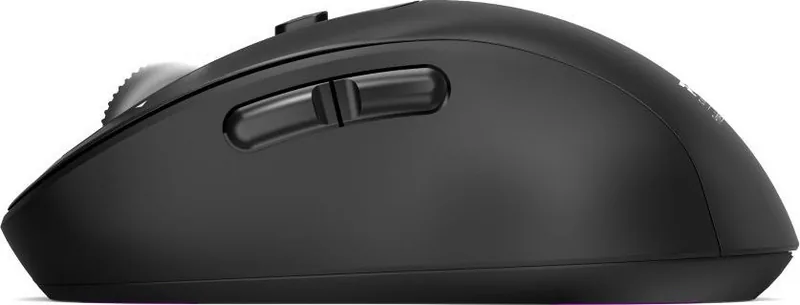
• Characteristics: 6 buttons and scroll wheel with
1000/1600/2400/3200 DPI optical sensor
• Compatibility: Windows
®
& macOS
®
• Dimensions: 10,5 x 6,1 x 3,9 cm
• Weight: 103 gr
EN ENGLISH FR FRANCAISDE DEUTSCHES ESPAÑOLNL NEDERLANDSRU РУССКИЙ
PRODUCT
BLUETOOTH
®
+ WIRELESS
& RECHARGEABLE EXPERT MOUSE
INSTRUCTIONS
Turning on the mouse:
To charge the battery, connect the charging cable to the
mouse and a USB port and wait for the battery to be
charged. Your mouse has dual 2.4 GHz radio and
Bluetooth
®
connectivity.
Select the operating system you are using on the bottom
of the mouse
If you are using a macOS device, please refer to the Table 1
Please follow the procedure below to connect your mouse
to your device:
2.4 GHz wireless connection
1. Open the mouse top cover
2. Take out the nano USB receiver and insert it into a USB
port on your computer
3. Turn the mouse switch to <ON>
4. Press the «mode» button on the mouse and select
«USB mode»
5. Your mouse will then congure itself automatically with
your device
Bluetooth
®
connection
1. Turn the mouse switch to <ON>
2. Press the «mode» button on the mouse and select «BT1
mode» or «BT 2 mode»
3. Keep the mouse button pressed for 3 to 5 seconds until
the LED ashes. The mouse is then in pairing mode.
4. Congure the Bluetooth
®
parameters on your device
using the Bluetooth
®
instructions or the documentation for
your device in order to establish the Bluetooth
®
connection.
WARNING
Keep away from water, re, liquids and out of the reach
of children.
Avoid exposing the product to prolonged periods of
extreme heat or cold.
Qualied personnel must replace the product to avoid a
hazard. Do not dismantle or attempt to repair this product
yourself.
Charging limited to 5.0V voltage,don’t use fast charger
otherwise it may harm the mouse. We advise to use the
charging cable we provided and charge the mouse through
your computer port.
TROUBLESHOOTING
If the unit appears to have failed in functioning, please
check the following:
Check that the batteries are charged and that the polarity
is respected
Check that the receiver is correctly plugged in a working
USB port and that the setup is completed. If the setup has
not been completed, remove the USB receiver restart your
computer and plug the USB receiver and wait for setup to
be completed
PRODUCT REGISTRATION
PORT EUROPE recommends that you register your
product shortly after its purchase on the website http://
www.port-connect.com
TECHNICAL SUPPORT
For technical questions regarding your product, please go
to the contact/support section on the website http://www.
port-connect.com
DECLARATION OF CONFORMITY
This declaration of conformity is issued under the sole
responsibility of the manufacturer.
Hereby, PORT EUROPE, 22 rue de la Fédération
75015 PARIS France, declare that this product complies
with the essential CE requirements and provision and
is in accordance with the standards, guidelines and
specications mentioned below:
RED Directive 2014/53/EU
EN 301 489-1 V2.2.3
EN 301 489-3 V2.3.2
EN 301 489-17 V3.2.4
EN 55032: 2015+A11
EN 55035: 2017+A11
EN 300 328 V2.2.2
EN 300 440 V2.1.1
EN 62479:2010
LVD Directive 2014/35/EU
EN 62368-1:2020+A11:2020
RoHS Directive 2011/65/EU & revision 2015/863/EU
Eric RAMPI
09/10/2023, Paris
EUROPEAN DIRECTIVE 2012/19/EU
The European Directive 2012/19/EU on Waste Electrical
and Electronic Equipment (WEEE), requires that old
household electrical appliances must not be disposed of in
the normal household waste stream. Old appliances must
be collected separately in order to optimize the recovery
and recycling of the materials they contain and reduce the
impact on human health and the environment. The symbol
of the crossed out dustbin is marked on all products to
remind the obligations of separate collection. Consumers
should contact their local authority or retailer for
information concerning the correct disposal of their product.
PRODUIT
SOURIS EXPERTE BLUETOOTH
®
+ SANS FIL ET RECHARGEABLE
INSTRUCTIONS
Mise en marche de la souris :
1. Ouvrez le capot de la souris
2. Insérez la pile dans l’emplacement prévu à cet eet
Si votre pile possède une protection plastique retirez la
avant de l’installer.
Votre souris bénécie d’une double connectivité radio 2,4
GHz et Bluetooth
®
. Veuillez suivre la procédure ci-dessous
pour connecter votre souris à votre appareil :
Connexion sans l 2,4 GHz
1. Ouvrez le capot de la souris
2. Sortez le récepteur nano USB et insérez le dans un port
USB de votre ordinateur
3. Mettez l’interrupteur de la souris sur <ON>
4. Pressez le bouton « mode » situé souris la souris et
sélectionner « mode USB »
5. Votre souris se congure alors automatiquement avec
votre appareil
Connexion Bluetooth
®
1. Mettez l’interrupteur de la souris sur <ON>
2Pressez le bouton « mode » situé souris la souris et
sélectionner « mode BT1 » ou «mode BT 2 »
3. Maintenez le bouton situé souris la souris appuyé pendant
3 à 5 secondes jusque à ce que la LED clignote. La souris
est alors en mode appairage.
4. Congurez les paramètres Bluetooth
®
sur votre appareil
en vous remportant à la notice Bluetooth
®
ou sur la
documentation de votre appareil an d’établir la connexion
Bluetooth
®
.
ATTENTION
Tenir à l’écart de l’eau, du feu ou de tout liquide et hors de
la portée des enfants.
Éviter d’exposer le produit à des périodes prolongées de
chaleur ou de froid extrême.
Un personnel qualié doit remplacer le produit an d’éviter
tout danger. Ne pas démonter ou tenter de réparer ce
produit vous-même.
Ce produit est conforme à la norme IEC/EN 60825-1: 2008-
05. Laser de Classe 2 : ne pas regarder dans le faisceau ni
cibler les yeux ou le visage avec le faisceau.
RÉSOLUTION DES PROBLÈMES
Si l’appareil semble ne pas fonctionner, veuillez vérier les
points suivants :
Vérier que la pile est chargée et que la polarité est
respectée
Vérier que le récepteur est correctement branché sur
un port USB et que l’installation s’est bien terminée. Si
l’installation n’a pas aboutie, retirer le récepteur USB,
redémarrer votre ordinateur, brancher le récepteur et
attendre la n de l’installation.
ENREGISTREMENT PRODUIT
PORT EUROPE vous recommande d’enregistrer votre produit
dans les plus brefs délais après son achat sur le site internet
http://www.port-connect.com
SUPPORT APRES-VENTE
Pour les questions techniques relatives à votre produit
merci de vous rendre dans la section contact / support
après-vente sur le site Internet http://www.port-connect.
com
DECLARATION DE CONFORMITE
Cette déclaration de conformité est établie sous la seule
responsabilité du fabricant.
Nous PORT EUROPE, 22 rue de la Fédération 75015
PARIS France, Déclarons que ce produit est conforme
aux dispositions CE et en conformité avec les normes,
directives et spécications mentionnées ci-dessous :
RED Directive 2014/53/EU
EN 301 489-1 V2.2.3
EN 301 489-3 V2.3.2
EN 301 489-17 V3.2.4
EN 55032: 2015+A11
EN 55035: 2017+A11
EN 300 328 V2.2.2
EN 300 440 V2.1.1
EN 62479:2010
LVD Directive 2014/35/EU
EN 62368-1:2020+A11:2020
RoHS Directive 2011/65/EU & revision 2015/863/EU
Eric RAMPI
09/10/2023, Paris
DIRECTIVE EUROPÉENNE 2012/19/UE
La directive Européenne 2012/19/UE sur les Déchets des
Equipements Electriques et Electroniques (DEEE), exige
que les appareils ménagers usagés ne soient pas jetés
dans le ux normal des déchets ménagers. Les appareils
usagés doivent être collectés séparément an d’optimiser
le taux de récupération et le recyclage des matériaux qui
les composent et réduire l’impact sur la santé humaine
et l’environnement. Le symbole de la poubelle barrée est
apposé sur tous les produits pour rappeler les obligations
de la collecte séparée. Les consommateurs devront
contacter les autorités locales ou leur revendeur concernant
la démarche à suivre pour l’enlèvement de leur appareil.
PRODUKT
BLUETOOTH
®
+ DRAHTLOSE &
WIEDERAUFLADBARE EXPERTENMAUS
ANWEISUNGEN
Aktivieren der Maus:
1. Önen Sie die Mausabdeckung
2. Setzen Sie die Batterie in den dafür vorgesehenen
Steckplatz ein.
Wenn Ihre Batterie über einen Kunststoschutz verfügt,
entfernen Sie diesen vor dem Einsetzen der Batterie.
Ihre Maus verfügt über eine duale 2,4-GHz-Funk- und
Bluetooth
®
-Konnektivität. Befolgen Sie die folgenden
Anweisungen, um Ihre Maus an Ihr Gerät anzuschließen:
Kabellose Verbindung mit 2,4 GHz
1. Önen Sie die Mausabdeckung
2. Nehmen Sie den Nano-USB-Empfänger heraus und
stecken Sie ihn in einen USB-Port Ihres Computers.
3. Stellen Sie den Mausschalter auf <ON>
4. Drücken Sie die „Modus»-Taste auf der Maus und
wählen Sie „USB-Modus».
5. Ihre Maus konguriert sich dann automatisch mit Ihrem
Gerät
Bluetooth
®
-Verbindung
1. Stellen Sie den Mausschalter auf <ON>
2. Drücken Sie die Taste „Modus», die sich auf der
Maus bendet, und wählen Sie „BT1-Modus» oder „BT
2-Modus».
3. Halten Sie die Maustaste für 3 bis 5 Sekunden gedrückt,
bis die LED blinkt. Die Maus bendet sich jetzt im Pairing-
Modus.
4. Kongurieren Sie die Bluetooth
®
-Parameter auf Ihrem
Gerät, indem Sie die Bluetooth
®
-Anweisungen oder die
Dokumentation Ihres Geräts abrufen, um die Bluetooth
®
-
Verbindung herzustellen.
WARNUNG
Von Wasser, Feuer und Flüssigkeiten fernhalten und
außerhalb der Reichweite von Kindern aufbewahren.
Vermeiden Sie es, das Gerät über längere Zeit starker
Hitze oder Kälte auszusetzen.
Zur Vermeidung von Gefahren ist das Produkt durch
qualiziertes Personal auszutauschen. Versuchen Sie
nicht, dieses Produkt auseinanderzubauen oder selbst zu
reparieren.
Dieses Produkt entspricht der IEC/EN 60825-1: 2008-05.
Lasergerät der Klasse 2 mit emittierender Laserstrahlung:
nicht in den Strahl blicken oder mit dem Strahl auf Augen/
Gesichter zielen.
FEHLERBEHEBUNG
Bei Funktionsstörungen überprüfen Sie bitte Folgendes:
Überprüfen Sie, ob die Batterien aufgeladen sind und die
Polarität beachtet wurde
Überprüfen Sie, ob der Empfänger korrekt in einem
funktionierenden USB-Port angeschlossen und die
Installation abgeschlossen ist. Wenn die Installation
noch nicht abgeschlossen ist, entfernen Sie den USB-
Empfänger von Ihrem Computer, führen einen Neustart des
Computers durch, schließen den USB-Empfänger erneut
an und warten bis die Installation abgeschlossen ist
PRODUKTREGISTRIERUNG
PORT EUROPE empehlt, dass Sie Ihr Produkt gleich
nach dem Kauf auf der Webseite http://www.port-connect.
com registrieren
TECHNISCHER SUPPORT
Für technische Fragen, die das Produkt betreen, gehen
Sie bitte zum Kontakt/Support Bereich auf der Webseite
http://www.port-connect.com
KONFORMITÄTSERKLÄRUNG
Diese Konformitätserklärung wird in alleiniger
Verantwortung des Herstellers ausgestellt.
Hiermit erklärt PORT EUROPE, 22 rue de la Féderation
75015 PARIS Frankreich, dass dieses Produkt die
entsprechenden CE Anforderungen und Vorschriften
einhält und mit den unten genannten Standards, Richtlinien
und Spezikationen übereinstimmt:
RED Directive 2014/53/EU
EN 301 489-1 V2.2.3
EN 301 489-3 V2.3.2
EN 301 489-17 V3.2.4
EN 55032: 2015+A11
EN 55035: 2017+A11
EN 300 328 V2.2.2
EN 300 440 V2.1.1
EN 62479:2010
LVD Directive 2014/35/EU
EN 62368-1:2020+A11:2020
RoHS Directive 2011/65/EU & revision 2015/863/EU
Eric RAMPI
09/10/2023, Paris
EUROPÄISCHE VERORDNUNG 2012/19/EU
Die Europäische Verordnung 2012/19/EU über Elektronik-
und Altgeräteentsorgung bestimmt, dass alte elektrische
Haushaltsgeräte nicht im normalen Hausmüll entsorgt
werden dürfen. Alte Haushaltsgeräte müssen gesondert
gesammelt werden, um optimale Rückgewinnung und
Recycling der verwendeten Materialien zu gewährleisten und
den Einuss auf menschliche Gesundheit und die Umwelt zu
reduzieren. Das Symbol des durchgestrichenen Mülleimers
wird auf allen Produkten angebracht, um an die Verpichtung
zur Mülltrennung zu erinnern. Konsumenten sollten sich an
lokale Behörden oder Verkäufer wenden, um Informationen
zur korrekten Entsorgung ihrer Produkte zu erhalten.
PRODUCTO
BLUETOOTH
®
+ RATÓN EXPERTO
INALÁMBRICO Y RECARGABLE
INSTRUCCIONES
Encendido del ratón:
1. Abra la tapa del ratón
2. Inserte la batería en el espacio provisto
Si su batería tiene protección plástica, retírela antes de
instalarla.
Su ratón tiene radio dual de 2.4 GHz y conectividad
Bluetooth
®
. Siga el procedimiento a continuación para
conectar su ratón a su dispositivo:
Conexión inalámbrica de 2,4 GHz
1. Abra la tapa del ratón
2. Saque el receptor micro USB e insértelo en un puerto
USB de su ordenador
3. Encienda el ratón <ON>
4. Presione el botón «modo» ubicado bajo el ratón y
seleccione «modo USB»
5. Su ratón se congurará automáticamente con su
dispositivo
Conexión Bluetooth
®
3. Encienda el ratón <ON>
2. Presione el botón «modo» ubicado bajo el ratón y
seleccione «modo BT1» o «modo BT 2»
3. Mantenga presionado el botón bajo el ratón de 3 a
5 segundos hasta que el LED parpadee. El ratón se
dispondrá en modo emparejamiento.
4. Congure los parámetros de Bluetooth
®
en su
dispositivo siguiendo las instrucciones de Bluetooth
®
o la documentación de su dispositivo para establecer la
conexión Bluetooth
®
.
AVISO
Mantenga el dispositivo alejado del agua, del fuego, de los
líquidos y del alcance de los niños.
No exponga el producto a periodos prolongados de calor o
frío extremo.
Para prevenir riesgos, el producto debe ser sustituido por
personal cualicado. No desmonte o intente reparar el
producto por su cuenta.
Este producto cumple con la norma IEC/EN 60825-1:
2008-
05
. Dispositivo láser de clase 2 que emite radiación láser: no
mire jamente el haz ni apunte los ojos o las caras con el haz.
SOLUCIÓN DE PROBLEMAS
Si parece que la unidad no funciona correctamente,
compruebe lo siguiente:
Compruebe que las baterías estén cargadas y que se haya
respetado la polaridad
Compruebe que el receptor esté correctamente conectado
en un puerto USB que funcione y que la instalación haya
nalizado. Si la instalación no ha nalizado, retire el receptor
USB, reinicie el ordenador, conecte el receptor USB y espere
a que nalice la instalación
REGISTRO DEL PRODUCTO
PORT EUROPE recomienda que registre su producto
poco después de la compra en el sitio web http://www.port-
connect.com
SOPORTE TÉCNICO
Si tiene preguntas técnicas sobre el producto, consulte
la sección contacto/soporte del sitio web http://www.port-
connect.com
DECLARACIÓN DE CONFORMIDAD
Esta declaración de conformidad se emite bajo la exclusiva
responsabilidad del fabricante.
Por la presente, PORT EUROPE, con domicilio en 22
rue de la Fédération 75015 PARÍS (Francia), declara que
este producto satisface los requisitos y disposiciones
esenciales de la CE y cumple con las normas, directrices y
especicaciones que se mencionan a continuación:
RED Directive 2014/53/EU
EN 301 489-1 V2.2.3
EN 301 489-3 V2.3.2
EN 301 489-17 V3.2.4
EN 55032: 2015+A11
EN 55035: 2017+A11
EN 300 328 V2.2.2
EN 300 440 V2.1.1
EN 62479:2010
LVD Directive 2014/35/EU
EN 62368-1:2020+A11:2020
RoHS Directive 2011/65/EU & revision 2015/863/EU
Eric RAMPI
09/10/2023, Paris
DIRECTIVA EUROPEA 2012/19/UE
La Directiva europea 2012/19/UE sobre residuos de
aparatos eléctricos y electrónicos (RAEE) establece que los
electrodomésticos viejos no deben ser eliminados junto con
los residuos domésticos normales. Los aparatos viejos deben
ser recogidos selectivamente para optimizar la recuperación
y el reciclado de los materiales que los componen y reducir el
impacto en la salud humana y el medio ambiente. El símbolo
del contenedor de basura tachado se marca en todos los
productos para recordar la obligación de recogida separada.
Los consumidores deben contactar con la autoridad local o
el minorista para obtener información relativa a la correcta
eliminación del producto.
PRODUCT
BLUETOOTH
®
+ DRAADLOZE EN
OPLAADBARE EXPERTMUIS
INSTRUCTIES
De muis aanzetten:
1. Open de klep van de muis
2. Plaats de batterij in het compartiment hiervoor.
Als uw batterij een beschermplastic heeft, verwijder dit dan
voordat u deze plaatst.
Uw muis kan verbinding maken met zowel 2,4 GHz-radio
als Bluetooth
®
. Volg de onderstaande procedure om uw
muis op uw apparaat aan te sluiten:
Draadloze 2,4 GHz-verbinding
1. Open de klep van de muis
2. Haal de nano-USB-ontvanger eruit en steek deze in een
USB-poort op uw computer
3. Zet de schakelaar van de muis op <ON>
4. Druk op de «modus»-knop op de muis en selecteer
«USB-modus»
5. Uw muis zal nu automatisch zichzelf congureren met
uw apparaat
Bluetooth
®
-verbinding
1. Zet de schakelaar van de muis op <ON>
2. Druk op de «modus»-knop op de muis en selecteer
«BT1-modus» of «BT 2-modus»
3. Houd de muisknop 3 tot 5 seconden ingedrukt totdat
de led knippert. De muis staat nu in de koppelingsmodus.
4. Congureer de Bluetooth
®
-parameters op uw apparaat
volgens de Bluetooth
®
-instructies of de documentatie van
uw apparaat om de Bluetooth
®
-verbinding tot stand te
brengen.
WAARSCHUWING
Op afstand houden van water, vuur, vloeistoen en buiten
bereik van kinderen houden.
Vermijd het product langdurig aan extreem hoge of lage
temperaturen bloot te stellen.
Het product moet door vakbekwaam personeel vervangen of
gerepareerd worden om gevaar te voorkomen. Probeer dit
product niet zelf te openen of te repareren.
Dit product voldoet aan IEC/EN 60825-1:
2008-05
. Klasse 2
laserapparaat dat lasterstraling afgeeft: kijk niet in de straal of
richt niet op ogen/gezichten met de straal.
STORINGEN EN OPLOSSINGEN
Controleer, als het apparaat niet correct werkt, de volgende
punten:
Controleer of de batterijen opgeladen zijn en of de polariteit
wordt nageleefd
Controleer of de ontvanger correct is aangesloten op een
werkende USB-poort en of de instelling is voltooid. Als de
instelling niet is voltooid, verwijdert u de USB-ontvanger, start
u de computer opnieuw op en sluit u de USB-ontvanger aan .
Wacht tot de instelling is voltooid.
PRODUCTREGISTRATIE
PORT EUROPE raadt het u aan uw product zo snel mogelijk
na aankoop te registreren op de website http://www.port-
connect.com
TECHNISCHE BIJSTAND
Raadpleeg, voor technische vragen over uw
product, de rubriek contact/bijstand op de website
http://www.port-connect.com
CONFORMITEITSVERKLARING
Deze conformiteitsverklaring wordt verstrekt onder de
exclusieve verantwoordelijkheid van de fabrikant.
PORT EUROPE, 22 rue de la Fédération 75015 PARIJS
Frankrijk, verklaart hierbij dat dit product voldoet aan de EG
richtlijnen en aan de hieronder vermelde normen, richtlijnen
en specicaties:
RED Directive 2014/53/EU
EN 301 489-1 V2.2.3
EN 301 489-3 V2.3.2
EN 301 489-17 V3.2.4
EN 55032: 2015+A11
EN 55035: 2017+A11
EN 300 328 V2.2.2
EN 300 440 V2.1.1
EN 62479:2010
LVD Directive 2014/35/EU
EN 62368-1:2020+A11:2020
RoHS Directive 2011/65/EU & revision 2015/863/EU
Eric RAMPI
09/10/2023, Paris
EUROPESE RICHTLIJN 2012/19/EU
De Europese richtlijn 2012/19/EU over Afgedankt Elektrisch
en Elektronisch afval (AEEA), vereist dat afgedankte
huishoudelijke apparaten niet bij het normale huisvuil
weggeworpen mogen worden. Afgedankte apparaten moeten
apart ingezameld worden om het terugwinnen en het recyclen
van de materialen die ze bevatten te optimaliseren en de
impact op de volksgezondheid en het milieu te beperken. Het
symbool van een doorgekruiste vuilnisbak staat vermeld op
alle producten om aan de verplichting van een gescheiden
afvalinzameling te herinneren. De consumenten moeten
contact opnemen met de plaatselijke overheid of de verkoper
voor informatie over de correcte verwijdering en verwerking
van hun product.
ИЗДЕЛИЕ
BLUETOOTH
®
+ БЕСПРОВОДНАЯ И
ПЕРЕЗАРЯЖАЕМАЯ ЭКСПЕРТНАЯ МЫШЬ
ИНСТРУКЦИИ
Включение мыши:
1. Откройте крышку мыши.
2. Вставьте батарею в предусмотренное гнездо.
Если батарея имеет пластиковую заглушку, снимите ее
перед установкой.
Ваша мышь подключается двумя способами: по
радиоканалу 2,4 ГГц и с помощью Bluetooth
®
. Чтобы
подключить мышь к своему устройству, следуйте
инструкциям ниже:
Беспроводное соединение 2,4 ГГц
1. Откройте крышку мыши.
2. Достаньте nano-USB приемник и вставьте его в USB-
порт на своем компьютере.
3. Установите переключатель мыши в положение <ON>
(ВКЛ.)
4. Нажмите кнопку мыши «mode (режим)» и выберите
«mode USB (Режим USB)».
5. Мышь автоматически настроится для работы с вашим
устройством.
Bluetooth
®
подключение
1. Установите переключатель мыши в положение <ON>
(ВКЛ.)
4. Нажмите кнопку мыши «mode (режим)» и выберите «
mode BT1 (режим BT1)» или «mode BT2 (режим BT2)».
3. Удерживайте кнопку мыши нажатой от 3 до 5 секунд,
пока светодиод не начнет мигать. Мышь находится в
режиме сопряжения.
4. Чтобы установить Bluetooth
®
соединение, настройте
параметры Bluetooth
®
на своем устройстве согласно
инструкции к Bluetooth
®
адаптеру или документации
устройства.
ПРЕДУПРЕЖДЕНИЕ
Не допускать попадания воды и жидкостей, держать
вдали от источников огня, в недоступном для детей
месте.
Не подвергать длительному воздействию низких и
высоких температур.
Во избежание риска замену изделия должен производить
квалифицированный персонал. Не разбирайте и не
пытайтесь чинить данное устройство самостоятельно.
Это устройство соответствует стандарту IEC/EN 60825-
1: 2008-05. Лазерное устройство класса 2 излучает
лазерные лучи: не смотрите на луч и не направляйте
его в глаза/лицо.
ПОИСК И УСТРАНЕНИЕ НЕИСПРАВНОСТЕЙ
При нарушении работы проверьте следующее:
Убедитесь, что батарейка заряжена и полярность
соблюдена.
Убедитесь, что приемник должным образом вставлен в
рабочий USB-порт и установка драйверов завершена.
Если установка не завершена, отключите USB-приемник,
перезагрузите компьютер, затем снова подключите
приемник и дождитесь завершения установки.
РЕГИСТРАЦИЯ ИЗДЕЛИЯ
PORT EUROPE рекомендует зарегистрировать ваше
изделие в кратчайшие сроки после приобретения на
сайте http://www.port-connect.com
ТЕХНИЧЕСКАЯ ПОДДЕРЖКА
Ответы на технические вопросы о вашем продукте
можно получить в разделе «Контакты» и «Поддержка»
на сайте http://www.port-connect.com
ДЕКЛАРАЦИЯ СООТВЕТСТВИЯ
Эта декларация соответствия выдается под
исключительную ответственность производителя.
Настоящим PORT EUROPE, 22 rue de la Fédération 75015
PARIS France (Франция), заявляет, что данное изделие
соответствует обязательным требованиям и положениям
ЕС, а также нижеуказанным стандартам, руководствам и
техническим условиям.
RED Directive 2014/53/EU
EN 301 489-1 V2.2.3
EN 301 489-3 V2.3.2
EN 301 489-17 V3.2.4
EN 55032: 2015+A11
EN 55035: 2017+A11
EN 300 328 V2.2.2
EN 300 440 V2.1.1
EN 62479:2010
LVD Directive 2014/35/EU
EN 62368-1:2020+A11:2020
RoHS Directive 2011/65/EU & revision 2015/863/EU
Eric RAMPI
09/10/2023, Paris
ДИРЕКТИВА ЕС 2012/19/ЕС
Согласно Директиве ЕС 2012/19/ЕС по утилизации
электрического и электронного оборудования
(WEEE) запрещено утилизировать отработавшие
свой срок службы бытовые электрические приборы
вместе с обычными хозяйственно-бытовыми
отходами. Отработавшие свой срок службы приборы
необходимо собирать отдельно с целью эффективного
восстановления и повторного использования
содержащихся в них материалов и сокращения их
воздействия на здоровье человека и окружающую
среду. Символ перечеркнутой мусорной корзины
нанесен на все изделия и служит напоминанием
об обязательстве по раздельной утилизации. Для
получения информации о правильной утилизации
изделий покупатели должны обращаться к местному
органу власти или предприятию розничной торговли.
Manuel utilisateurAnvändarmanual
BenutzerhandbuchFelhasználói kézikönyv
Manual del usuarioPodręcznik użytkownika
GebruikshandleidingPoužívateľská príručka
Руководство пользователяUživatelská příručka
Manual do Utilizador
Navodila za uporabo
ﻡﺪﺨﺘﺴﻤﻟﺍ ﻞﻴﻟﺩ
REF : 900707C
BLUETOOTH
®
+ WIRELESS
& RECHARGEABLE
EXPERT MOUSE
USER MANUAL
Table 1
2.4
GHz
wireless
B
A
C
D
D
E
C
C
D
E
A
B
BT1
BT2
BT1
BT2
3S
BT1
BT2
BT1
BT2
BT1
BT2
Win/MacWin/Mac
/3
%
Quick check
I'm not a robot
Incorrect answer, please try again.
Chat with your Port Designs Combo Pro Type C manual using AI
Get instant AI answers from your Port Designs Combo Pro Type C manual
Ask anything about the Port Designs Combo Pro Type C. Answers come from this manual, with the pages they are based on.
Ask a Question
0/1000
Do you recommend Combo Pro Type C?
YesNo
Frequently Asked
Questions
A
To connect via Bluetooth, turn the mouse switch to ON. Press the mode button and select BT1 or BT2 mode. Hold the button for 3 to 5 seconds until the LED flashes. Then configure your computer's Bluetooth settings to pair. Ensure your device supports the necessary profiles.
Is this answer helpful?
A
Yes, the product specifications explicitly state compatibility with both Windows and Mac operating systems. You do not need additional drivers for most basic functions, as it is plug-and-play compatible with these platforms.
Is this answer helpful?
A
Connect the charging cable to the mouse and a USB port. Wait for the battery to be fully charged. The device uses a USB-C connection. Do not use a fast charger as it may harm the mouse. Use the provided cable through a computer port.
Is this answer helpful?
A
The mouse features an optical sensor with DPI levels of 1000, 1600, 2400, and 3200. You can adjust these settings based on your needs for precision work or standard navigation tasks.
Is this answer helpful?
A
Check that the battery is charged and polarity is respected. Ensure the nano USB receiver is plugged into a working USB port. If setup failed, restart your computer, remove the receiver, and reconnect it. Keep the mouse away from liquids.
Is this answer helpful?
A
No. Qualified personnel must replace the product to avoid a hazard. Do not dismantle or attempt to repair the product yourself. Contact technical support for assistance if the battery fails.
Is this answer helpful?
M: qwen/qwen3.5-flash-20260224
Advantagesand
Disadvantages
Advantages
Supports dual-mode connectivity via Bluetooth and 2.4 GHz wireless receiver for maximum flexibility.
Built-in 500mAh rechargeable battery eliminates the need for disposable battery replacements.
Adjustable DPI settings from 1000 to 3200 allow precise cursor control for various tasks.
Compatible with major operating systems including Windows and Mac for universal use.
Ergonomic design with six buttons ensures comfort during extended work sessions.
VS
Disadvantages
Requires specific USB-C charging cable which must be kept safe to prevent loss.
Laser Class 2 safety warning requires users to avoid looking directly into the beam.
Battery capacity may be lower compared to some other premium gaming mice models.
User cannot replace the internal battery independently if it fails after warranty.
wireless (2.40GHz), USB-A, USB-C (USB-A receiver, USB-C receiver via adapter) or wireless (Bluetooth), detachable cable (USB-C port)
Power Supply
Battery (built-in, 500mAh)
Dimensions (WxHxD)
2.40x1.54x4.13 in
Approximate Volume
3.97 in^3 (approximate shape)
Weight
3.63 oz
Color
Solid, Black
Features
Bluetooth connections switchable by button (3 devices), battery indicator, reduced click noise, stowable receiver
M: qwen/qwen3.5-flash-20260224
Product
Description
Unleash Productivity with the Port Designs Wireless Rechargeable Combo Pro Type C Mouse
Are you looking for a versatile peripheral to enhance your workflow across different setups? The Port Designs Wireless Rechargeable Combo Pro Type C Mouse, USB-C, USB/Bluetooth Manual represents a significant leap forward in user-friendly computer mouse design. This device is built specifically for modern professionals who demand absolute flexibility across multiple platforms and connection methods. Unlike traditional mice, this model bridges the gap between stability and wireless freedom, offering a seamless transition between office and home environments.
Seamless Connectivity Options
One of the standout features of this mouse is its dual-mode connectivity architecture. Users can switch effortlessly between standard Bluetooth pairing and a highly reliable 2.4 GHz wireless connection using the provided nano USB receiver. This versatility allows you to operate your mouse with desktop computers, ultrabooks, or tablets without worrying about driver incompatibility or hardware limitations. The inclusion of a USB-C port ensures fast charging and data transfer capabilities compatible with the latest devices, ensuring you spend less time tethered to power outlets while maximizing productivity.
Precision and Comfort
Designed for high-level precision, the built-in optical sensor offers DPI settings ranging from 1000 to 3200 on demand. You can adjust the sensitivity based on your specific tasks, whether you are performing detailed graphic design work or simply navigating through massive spreadsheets effortlessly. With six programmed buttons and a smooth precision scroll wheel, navigation becomes intuitive and faster than ever before. The ergonomic design ensures physical comfort during long work sessions, keeping your wrist relaxed even after several hours of continuous use without fatigue or strain.
Battery Life and Durability
Powering the Port Designs Wireless Rechargeable Combo Pro Type C Mouse is a robust 500mAh li-rechargeable battery. This eliminates the constant expense and waste associated with disposable AAA batteries, making it significantly more eco-friendly and cost-effective over the long term. The device explicitly supports both macOS and Windows compatibility, making it a highly versatile choice for mixed IT environments found in many corporate settings. Always remember to keep the device away from water and extreme temperatures to maintain its internal integrity and safety features.
Ease of Setup
Setting up the device is straightforward and intuitive. Most users can connect the mouse within minutes by simply following the visual cues on the packaging or the instructions available online. The mode button allows for quick switching between connection types, ensuring you are never left disconnected during a critical meeting. Troubleshooting is also simplified, as the system provides clear guidance on charging and pairing steps, reducing downtime significantly for all users who need reliable input tools.
Conclusion
Whether you are a software developer, a creative designer, or a busy office worker, this mouse provides the robustness and flexibility needed for today's complex digital landscape. It simplifies the technical setup process while delivering high performance and reliability. By choosing this model, you invest in a tool designed to streamline your computing experience without unnecessary clutter or cable management issues. Experience the true efficiency of a wired-free setup with the peace of mind of a durable rechargeable power source that adapts to your changing needs effortlessly.