
Poly Voyager 4310 UC Manual
PDF manual · 16 Pages
English



Quick check
Incorrect answer, please try again.
Chat with your Poly Voyager 4310 UC manual using AI
Get instant AI answers from your Poly Voyager 4310 UC manual
Ask anything about the Poly Voyager 4310 UC. Answers come from this manual, with the pages they are based on.
Ask a Question
Do you recommend Voyager 4310 UC?
Yes NoFrequently Asked Questions
Insert the BT700/BT700C USB Bluetooth adapter into your computer, turn on the headset, and the adapter typically connects automatically. If not pre-paired, put the headset in pair mode (hold the power switch until LEDs flash red/blue) and pair the adapter via Poly Lens.
Is this answer helpful?
Yes. The headset can remember up to eight devices and maintain up to two active connections simultaneously, allowing a phone and PC to be connected together for quick call handling and media switching.
Is this answer helpful?
Install Poly Lens Desktop App and ensure your softphone is selected in the app. Also confirm firmware is up-to-date and only one softphone application is active. Some softphone controls require Poly software to enable answer/end and mute functionality.
Is this answer helpful?
A full charge takes approximately 90 minutes. Headset LEDs indicate battery status (high, medium, low, critical) while charging; LEDs turn off when charging is complete. You can also view battery status in Poly Lens.
Is this answer helpful?
The BT700 adapter provides improved connection stability, better acoustics, and full softphone call-control integration. It’s optimized for the headset and generally outperforms native computer Bluetooth for unified communications.
Is this answer helpful?
Audio dropouts often stem from Bluetooth density. Use density-friendly corded mode by disconnecting the adapter and connecting the headset directly via the supplied USB cable. Also update firmware and minimize competing Bluetooth devices.
Is this answer helpful?
DeepSleep conserves battery when the headset is left powered on and out of range for more than seven days. To exit DeepSleep, bring a paired device back in range and press the Call control button to wake the headset.
Is this answer helpful?
Advantages and Disadvantages
Advantages

- Excellent softphone integration via included BT700 USB adapter for consistent call quality.
- Lightweight, comfortable design with flexible boom mic for right or left positioning.
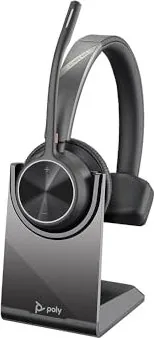
- Fast charging (~90 minutes) and optional charge stand for easy docking and power.
- Supports multi-device pairing (remembers 8 devices, two active connections) for seamless switching.
- Poly Lens app enables firmware updates, customization, language changes, and adapter pairing.
Disadvantages

- Some advanced controls and Teams features require the desktop Teams app and Poly Lens.
- Certain audio controls and app features may not function with web-based or unsupported apps.
- Bluetooth density can cause audio issues; corded mode is a workaround but requires cable use.
- Limited simultaneous connections (two) may be restrictive for users with many active devices.
- Charge stand and adapter designs vary by model; contents differ depending on SKU.
Product Specification
Type
Headphones (On-Ear)
Form Factor
Headband, monaural
Acoustic Design
semi-open
Microphone
Microphone boom
Wireless
Bluetooth 5.2, Multipoint
Cable
59.06 in, single-sided, detachable
Controls
1-button remote control, volume control, mute button
Operating Time
24h (calls), 47h (music)
Battery
USB-C charging port, 1.6h charging time
Frequency Range
20Hz-20kHz, Wideband
Device Features
Status light
Software Features
Voice assistant (Apple Siri, Google Assistant), level limitation
Special Features
incl. USB-Bluetooth adapter
Color
black
Weight
0.27 lb
Product Description
Poly Voyager 4310 UC — High-Performance Bluetooth Headset
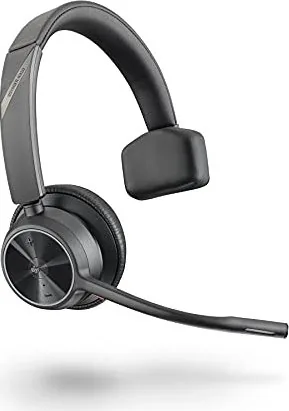
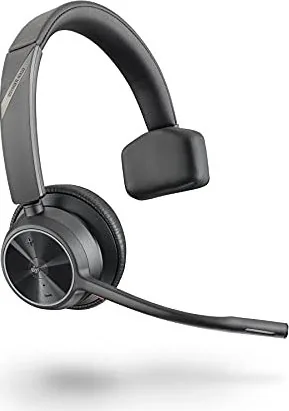
The Poly Voyager 4310 UC is a compact, professional Bluetooth headset engineered for hybrid and remote workers who need reliable call quality and simple device management. With a lightweight design and a noise-tolerant microphone boom, it balances comfort and clarity for all-day wear. The headset supports stereo or mono configurations and pairs easily with mobile devices and PCs, while a high-fidelity USB Bluetooth adapter (BT700/BT700C) delivers optimized softphone integration and superior audio performance compared to built-in computer Bluetooth.
Key features and user experience
The Voyager 4310 UC offers quick pairing, intuitive call controls, and multi-device connectivity. It can remember up to eight devices and maintain two active connections simultaneously, so users can switch between a smartphone and a computer without missing calls. The headset includes dedicated controls for volume, mute, call answer/end, and access to voice assistants (Siri/Google Assistant). Teams-optimized models add a Microsoft Teams button to launch or surface Teams notifications when paired with the Teams desktop app.
Charging is fast and flexible: the headset recharges via USB cable in roughly 90 minutes and some models support an optional charge stand. LEDs indicate battery levels, pairing status, call state, and Microsoft Teams presence. For environments with high Bluetooth density, a corded mode over USB provides a density-friendly connection and charges the headset while in use.
Management and updates
Device settings, language selection, firmware updates, and advanced customization are handled through the Poly Lens Desktop App (poly.com/lens). Poly Lens enables adapter pairing, target softphone selection, and firmware updating to ensure the headset stays current and fully functional. Firmware updates and app installation are recommended for best call control behavior with supported softphones.
Practical notes
The headset includes a USB adapter (pre-paired in most cases), USB-A to USB-C cable, and, depending on model, a charge stand and carrying case. LED indicators provide clear feedback for battery, pairing, mute, streaming, and Teams connection states. DeepSleep mode conserves battery when out of range for extended periods; pressing the Call button wakes the headset when a paired device returns to range.
Notes
- The USB adapter offers better call control and audio quality than native computer Bluetooth.
- Some features (track control, fast-forward/rewind, voice assistant behavior) depend on the connected application and platform.
- Installing Poly Lens may be required for full softphone call control functionality.
Search for 67,732 Manuals online


Type-in Brand or Model