

Poly Studio P15 Manual
PDF manual · 14 Pages
English



Quick check
Incorrect answer, please try again.
Chat with your Poly Studio P15 manual using AI
Get instant AI answers from your Poly Studio P15 manual
Ask anything about the Poly Studio P15. Answers come from this manual, with the pages they are based on.
Ask a Question
Do you recommend Studio P15?
Yes NoFrequently Asked Questions
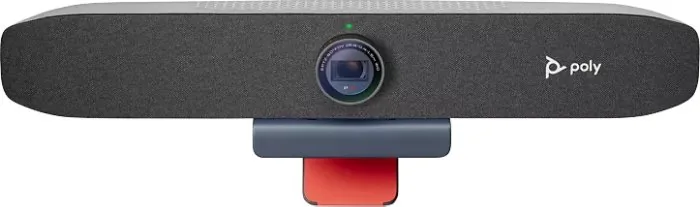
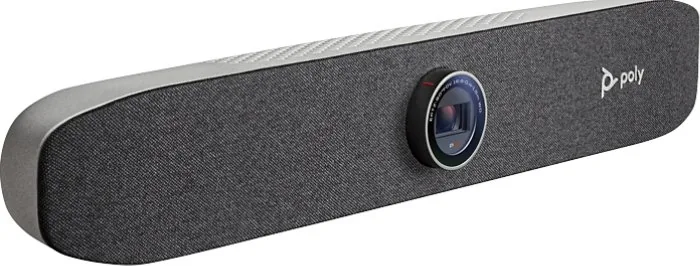
The Poly Studio P15 is a personal USB video bar that combines a camera, speaker, microphones, LED status indicator, and physical privacy shutter for desktop video conferencing.
Is this answer helpful?
Rotate the shutter ring counterclockwise to open the camera or clockwise to close it. When closed, the built-in physical cover blocks the camera lens.
Is this answer helpful?
The device supports computers running Windows 10, macOS 10.15, or macOS 11. A compatible USB connection is required for use as a camera and audio accessory.
Is this answer helpful?
Use the supplied USB-C 3.0 cable with a USB 3.0-capable connection. Older USB ports, third-party cables, and adapters may reduce performance or prevent full 4K video.
Is this answer helpful?
The P15 includes integrated microphones and a speaker, Active Echo Cancellation, and Poly NoiseBlockAI. Its microphones can capture audio within up to 12 feet.
Is this answer helpful?
Yes. Install Poly Lens Desktop to access configurable settings and device features. The app can also be used for manual firmware updates.
Is this answer helpful?
A factory reset erases user data and settings. A factory restore is intended for an unresponsive device and completely erases flash memory before returning the unit to its factory software version.
Is this answer helpful?
Advantages and Disadvantages
Advantages

- All-in-one design combines a camera, speaker, microphones, privacy shutter, and status LED in a compact desktop unit.
- Poly NoiseBlockAI and active echo cancellation help reduce distracting noise and improve conversation clarity.
- Automatic camera framing and up to 4x tracking zoom support a more centered, professional video view.
- The physical shutter provides immediate camera privacy control without relying only on software settings.
- Integrated accessibility features include visual status signals, audible tones, and hands-free audio support.
Disadvantages

- Full 4K video may not be available when connected through USB 2.0 or USB 2.1 ports.
- Third-party USB-C cables or USB-C-to-USB-A adapters can reduce performance or video quality.
- macOS does not support automatic firmware updates, so updates require Poly Lens Desktop.
- Factory reset and factory restore procedures erase settings, with restore also erasing flash memory.
- Advanced configuration options require the separate Poly Lens Desktop app.
Product Specification
Type
Conference camera (video bar)
Image sensor
1x CMOS 8.0 MP
Resolution
3840 x 2160 pixels
Field of view
90 degrees (diagonal)
Zoom function
4x digital
Ports
1x USB-C 3.0 (5 Gb/s), 2x USB-A 2.0 (480 Mb/s)
Wireless
N/A
Camera cover
included
Microphone
integrated
Speaker
integrated
Lighting
N/A
Power supply
AC power
Mount
Mounting clip, with 1/4 in. thread
Dimensions
16.73 x 2.76 x 3.07 in.
Package contents
Camera, power adapter, stand, USB-C cable
Special features
Status LED, security lock (Kensington)
Manufacturer warranty
2 years
Product Description
Poly Studio P15 Videobar - Read, Download & Print Free
A Personal Video Bar for Clearer Everyday Meetings
The Poly Studio P15 Videobar is a compact personal video bar designed to improve video calls from a desktop workspace. It combines a camera, integrated speaker, and microphone array in one streamlined unit, helping professionals create a more polished meeting setup without filling their desk with separate accessories. Whether used for remote work, client calls, training sessions, or team check-ins, it is built to deliver a more natural and focused communication experience.
A physical privacy shutter is included directly on the camera. Turn the shutter ring to block or reveal the lens when needed, giving users a simple visual way to control camera privacy. An LED indicator above the camera communicates key operating states, such as power, active video, muted video, muted microphone detection, and firmware updates.
Audio, Video, and Smart Framing Features
The Poly Studio P15 Videobar includes built-in microphones and a speaker for hands-free conversations. Its microphones can capture sound within up to 12 feet, while Poly NoiseBlockAI helps reduce unwanted background noise so voices remain easier to hear. Active echo cancellation is also enabled by default to support clearer two-way audio.
Automatic camera framing is another standard feature, helping keep the participant positioned effectively in the video view. The device also supports camera tracking with a maximum zoom level of 4x. For the best video quality, connect it with the supplied USB-C 3.0 cable and a compatible USB 3.0 connection. Using older USB ports or third-party adapters may limit performance and can affect access to full 4K video.
Simple Setup for Supported Computers
The videobar connects to a computer through USB-C and supports Windows 10, macOS 10.15, and macOS 11. After connecting it, select the Poly Studio P15 as the preferred camera, microphone, and speaker in your conferencing application's settings. The optional Poly Lens Desktop app provides access to additional device settings, feature controls, and manual firmware updates.
For better calls, place the camera near eye level, preview your image before joining, and use balanced indirect lighting. Keeping windows closed, reducing table noise, and muting when not speaking can further improve audio quality.
Notes
- A factory reset removes saved user settings.
- A factory restore also returns the device to its original software version.
- macOS requires firmware updates through Poly Lens Desktop rather than automatic system updates.
Search for 67,732 Manuals online


Type-in Brand or Model