
Polar M400 Manual
PDF manual · 91 Pages
English



Quick check
Incorrect answer, please try again.
Chat with your Polar M400 manual using AI
Get instant AI answers from your Polar M400 manual
Ask anything about the Polar M400. Answers come from this manual, with the pages they are based on.
M400 Maintenance Schedule
If storing the device for several months, charge it after a few months to extend battery life.
Rinse the USB port after each training session to prevent oxidation and damage from salt water or dirt.
Wipe off any moisture before storing if not worn continuously.
Remove the transmitter from the strap after use, dry with a soft towel, and clean regularly with mild soap and water.
Rinse the strap under running water after each use and hang to dry. Clean occasionally with mild soap and water.
Clean with mild soap and water solution and rinse with clear water. Do not use alcohol or abrasive materials.
Free maintenance reminders
Timed to your purchase date. Always free, unsubscribe anytime.
Ask a Question
Do you recommend M400?
Yes NoFrequently Asked Questions
It is best for runners and active users who want GPS tracking, heart-rate guidance, and structured training tools. It works well for everyday activity tracking too, so it suits both workout sessions and general fitness monitoring.
Is this answer helpful?
Yes. The HR version includes a heart-rate sensor for real-time training data. This helps with zone-based workouts, calorie estimates, and post-workout analysis. It is especially useful if you want more accurate training feedback.
Is this answer helpful?
You can use basic watch and training functions, but the full experience is better with Polar Flow. The app and web service are used for syncing, setup, firmware updates, planning workouts, and reviewing detailed training data.
Is this answer helpful?
Battery life depends on how you use the watch. With GPS and heart-rate monitoring, it lasts up to about 8 hours. In watch mode with activity tracking, it can last around 30 days. Heavy GPS use shortens runtime.
Is this answer helpful?
Yes. The M400 includes an interval timer and training goal options. You can create time-based or distance-based intervals and follow them during your workout, which makes it useful for structured running plans and speed sessions.
Is this answer helpful?
Yes. The Back-to-Start feature uses GPS to guide you back to your starting point. It is helpful for outdoor routes, trail runs, or unfamiliar areas where you want an easy way to return.
Is this answer helpful?
Advantages and Disadvantages
Advantages

- Built-in GPS tracks pace, distance, route, and elevation for outdoor training.
- Heart-rate sensor support enables accurate zone-based coaching and workout analysis.
- Polar Flow app and web service provide deep sync, planning, and progress tracking.
- 24/7 activity tracking and inactivity alerts help monitor daily movement, not just workouts.
- Back-to-Start navigation adds confidence during runs in unfamiliar areas.
Disadvantages

- Best features depend on syncing, app use, and initial setup through Polar Flow.
- Battery life drops noticeably when GPS and heart-rate tracking are used together.
- Smart Notifications are useful, but they are limited during active training sessions.
- The chest strap can feel less convenient than wrist-based heart-rate tracking.
- Many advanced settings may take time to learn for first-time users.
Product Specification
Display
128x128 Pixel, monochrome, rectangular, backlit
Operating system
proprietary
Interfaces
USB Micro-B, Bluetooth
Heart rate measurement
via chest strap (included)
Measurement functions
Pedometer, Speed, Distance, Sleep monitoring, Heart rate, Calorie consumption, Altimeter
Other functions
Date, 12/24h display, Inactivity alarm, Message notification (iOS, Android), Call notification (iOS, Android), Polar OwnCal
Navigation
yes, GPS
Compatibility
Android, iOS
Power supply
Battery (190 mAh)
Operating time
8 h (GPS)
Band material
Plastic
Case colors
black, white
Band colors
white
Width (band)
0.45 in
Weight
0.12 lb
Special features
waterproof (up to 98.43 ft water column)
Product Description
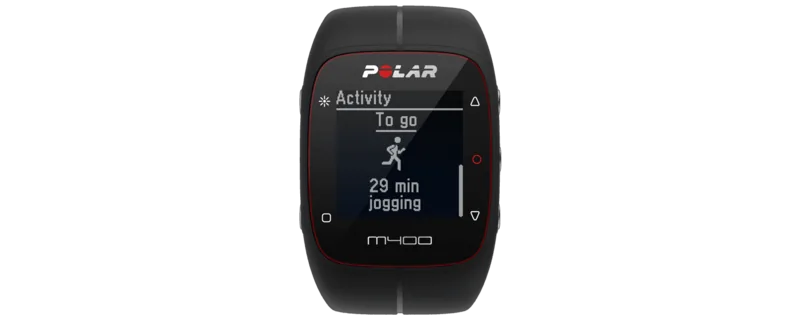
Polar M400 HR White: A Smart Training Watch for Focused Athletes
The Polar M400 HR White blends clean design with serious training tools, making it a strong choice for runners and active users who want more than basic timekeeping. Its white finish gives the watch a fresh, lightweight look, while the feature set is built around performance, structure, and everyday motivation. The included heart-rate sensor helps turn each workout into useful data, so you can train with purpose instead of guesswork.
At the heart of the M400 is built-in GPS, which records pace, distance, route, elevation, and running performance with impressive detail. Combined with Polar’s Smart Coaching features, the watch becomes a practical guide for training in the right heart-rate zones, tracking progress, and understanding how your body responds over time. For runners who like structure, tools such as interval timers, target time estimates, auto lap, and sport profiles make it easier to follow a plan and stay consistent.
The Polar Flow ecosystem is another major strength. With the Flow app and web service, training data can be synced, reviewed, and organized after each session. This makes the M400 especially useful for athletes who like to analyze workouts, compare trends, and adjust goals based on real results. The device also supports 24/7 activity tracking, inactivity alerts, sleep monitoring, and smart calorie estimates, which means it is useful even when you are not training.
A helpful extra is the Back-to-Start function, which guides you to your starting point using GPS-based navigation. That can be a valuable feature for outdoor sessions in unfamiliar areas. Battery life is solid for daily use, though it depends heavily on GPS and sensor use. Setup is straightforward if you use the Polar Flow service first, and firmware updates help keep the watch current.
Notes
- Best suited for runners and fitness users who want heart-rate guided training.
- Requires setup and syncing for the best experience.
- Chest strap heart-rate tracking adds better workout accuracy.
- GPS, activity tracking, and coaching tools make it a well-rounded training partner.
Summary
Polar M400 HR White is a compact GPS training watch that combines heart-rate monitoring, running analytics, and daily activity tracking in one simple, athlete-friendly package.
Search for 67,706 Manuals online


Type-in Brand or Model
Sarah Klein
10 months ago
Do I need a PC or a Polar Flow account to sync workouts? Can I use the M400 offline, and is my heart-rate data exportable or can I delete it?
Manual.ly
10 months ago
The M400 is designed to sync your sessions to Polar Flow. You can transfer data either via the Polar Flow mobile app (Bluetooth) or by syncing to a computer using the included USB cable. If you do not sync, the watch will store activities only until its memory fills, and deeper analysis is only available after transfer. Your heart-rate and GPS data are tied to your Polar Flow account; you can manage the account and delete data from there if you want. For export, use the data options provided inside Polar Flow (account settings) to download your records.