
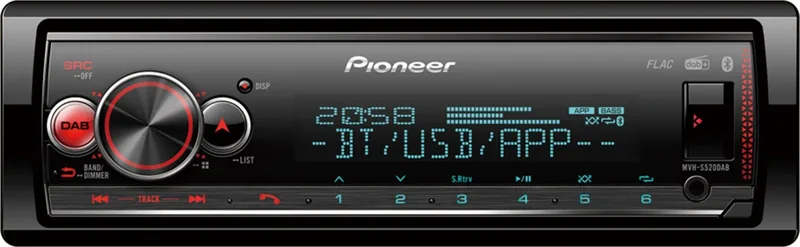
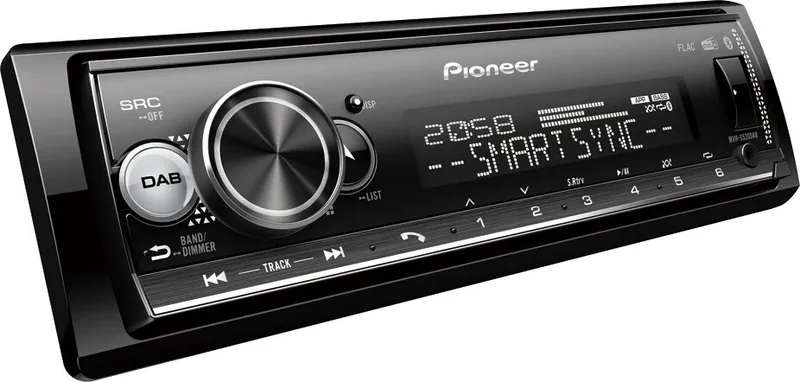
Pioneer MVH-S520DAB Manual
PDF manual · 258 Pages
English


Quick check
Incorrect answer, please try again.
Chat with your Pioneer MVH-S520DAB manual using AI
Get instant AI answers from your Pioneer MVH-S520DAB manual
Ask anything about the Pioneer MVH-S520DAB. Answers come from this manual, with the pages they are based on.
Ask a Question
Do you recommend MVH-S520DAB?
Yes NoFrequently Asked Questions
Connect your iPhone via USB for AOA support or Bluetooth for wireless audio. Ensure the USB MTP setting is off for AOA. You can also use the app control for Spotify or Pioneer Smart Sync features depending on your connection type.
Is this answer helpful?
The tuner will not receive signals. Check the connection for FM or AM bands. The display may show an error message. Ensure the DAB antenna power is set correctly if using an external DAB antenna like the AN-DAB1.
Is this answer helpful?
Yes, you can connect a subwoofer. Select ON in the SPEAKER LEVEL settings. You must choose the correct system mode to ensure proper signal routing and prevent damage to the speakers.
Is this answer helpful?
Yes, the front panel detaches to prevent theft. Store it in the provided case when leaving the vehicle. Do not leave cables attached while detaching the panel to avoid damage.
Is this answer helpful?
Press the RESET button with a pointed instrument. This is needed if strange messages appear or after installation. Keep the front panel detached while resetting to ensure the process is clear.
Is this answer helpful?
Yes, it supports Android via USB AOA or Bluetooth MTP. Ensure the APP CONTROL setting is WIRED or BLUETOOTH. Compatibility may vary based on the Android OS version.
Is this answer helpful?
Advantages and Disadvantages
Advantages

- Advanced DAB+ tuner ensures high-quality digital radio reception with regional support and alternative frequency scanning.
- Bluetooth 4.0 certification allows simultaneous pairing of multiple devices for hands-free calls and audio streaming.
- Pioneer Smart Sync application integration enables navigation and message control for safer driving environments.
- Customizable 13-band equalizer and crossover settings provide professional-grade audio tuning capabilities.
Disadvantages

- Detachable front panel can be easily lost or misplaced if not stored in a protective case when removed.
- No touchscreen interface relies heavily on physical dial and button navigation which may take time to learn.
- Some USB devices require specific FAT file formatting for compatibility and reliable file playback.
- Speakers must match the network or standard mode settings to avoid potential damage or poor sound quality.
Product Specification
Type
Digital Receiver, 1-DIN
Display
Dot Matrix
Navigation
No
TMC
No
Tuner
FM, AM, LW, DAB+
Media
USB Drive
Audio Formats
AAC, FLAC, MP3, WAV, WMA
Power
4x 50W Peak, MOSFET
Connections
3x Preamp Output, 1x AUX In (Front), 1x USB (Front), Bluetooth
Anti-Theft
Removable Faceplate
Features
Hands-Free, Variable Illumination, USB Charging, 13-Band Equalizer
Product Description
Upgrading your vehicle audio system requires a receiver that balances modern connectivity with classic sound quality. The Pioneer MVH-S520DAB stands out as a robust choice for drivers seeking Digital Audio Broadcasting and seamless smartphone integration. This receiver brings high-fidelity music directly into your cabin, ensuring every drive is an entertainment experience. It is designed to fit standard DIN slots, making installation accessible for most vehicle owners.
The unit features advanced DAB+ technology, allowing for crystal clear digital radio reception across multiple bands. You can scan and store favorite stations easily without static interference. The tuner supports regional programming and alternative frequency searches to maintain signal quality while driving. For those who prefer streaming, Bluetooth connectivity supports hands-free calling and audio playback from up to five devices simultaneously. iPhone and Android users will appreciate the dedicated support for AOA and MTP connections via the USB port for file management.
Sound enthusiasts will love the extensive adjustable audio settings. Customizable equalizer options let you tailor bass and treble to your preference. Network mode enables a complex speaker setup with separate woofers and mid-range drivers for a professional sound stage. Time alignment features help synchronize sound from multiple speakers for an immersive listening zone centered on the driver. Subwoofer integration is also supported with phase control options.
Integration goes beyond audio with the Pioneer Smart Sync application. This connects your smartphone to the receiver, allowing navigation and message handling directly through the interface. This app-based control keeps your focus on the road while accessing music libraries without clutter. Illumination settings let you customize the key and display colors to match your car interior style.
Security is a priority with the detachable front panel mechanism. This helps prevent theft when the vehicle is unattended in public areas. Setup menus guide you through speaker configurations and language preferences including English, French, and German. Although it lacks a touchscreen, the multi-control dial offers intuitive navigation through all functions including volume and source selection.
The receiver outputs fifty watts per channel, providing strong power for standard speakers. Note that compatible smartphone models vary and some USB devices might require specific formatting for playback. Always ensure proper speaker wiring to avoid damage during network mode operation. This receiver represents a significant step up in in-vehicle entertainment, combining reliability with modern digital standards for a superior audio journey throughout your daily commute or weekend adventures. Operation remains simple despite the advanced features. Press a single button to change sources or hold a button for settings. The display window provides clear feedback on playback status and tuning. The system allows for quick pairing of devices to ensure constant connection.
Search for 67,732 Manuals online


Type-in Brand or Model