
Pioneer MVH-S120UB Manual
PDF manual · 170 Pages
English


Quick check
Incorrect answer, please try again.
Chat with your Pioneer MVH-S120UB manual using AI
Get instant AI answers from your Pioneer MVH-S120UB manual
Ask anything about the Pioneer MVH-S120UB. Answers come from this manual, with the pages they are based on.
Ask a Question
Do you recommend MVH-S120UB?
Yes NoFrequently Asked Questions
Connect via USB cable and set System settings for Android Wired to APP Control. Launch the Pioneer ARC APP on your device for full functionality.
Is this answer helpful?
Yes, the receiver supports MP3 files up to 320 kbps via USB connection using standard storage devices.
Is this answer helpful?
Bluetooth connectivity is not explicitly listed for this model; USB and AUX connections are primary options provided.
Is this answer helpful?
Access the System menu and select Clock Set to adjust the time based on your local zone settings.
Is this answer helpful?
It is a function that restores compressed audio streams to improve sound quality and clarity during playback sessions.
Is this answer helpful?
Yes, you can configure subwoofers using the audio settings for phase and cutoff frequency to match your system.
Is this answer helpful?
Advantages and Disadvantages
Advantages

- Detachable front panel provides enhanced security against theft when vehicle is parked.
- Extensive audio customization options including five-band EQ and subwoofer tuning.
- Supports high-quality audio formats like FLAC and MP3 via USB connection.
- Intuitive multi-control dial allows easy adjustments while driving safely.
- Power output supports external amplifiers and subwoofer integration smoothly.
Disadvantages

- iPod control functions are not available on the MVH-S120UB specific variant.
- App Mode features may be limited depending on the connected mobile device type.
- USB storage devices must be formatted with FAT12, 16, or 32 systems only.
- Bluetooth connectivity is not explicitly listed in standard specifications.
- iOS compatibility varies significantly between different hardware revisions.
Product Specification
Type
Digital Receiver, 1-DIN
Display
Dot Matrix
Navigation
No
TMC
No
Tuner
FM, AM
Media
USB Storage
Audio Formats
FLAC, MP3, WAV, WMA
Power
4x 50W Peak, MOSFET
Connections
1x Preamp Output, 1x AUX In (Front), 1x USB (Front)
Anti-Theft
Removable Faceplate
Features
5-Band Equalizer
Product Description
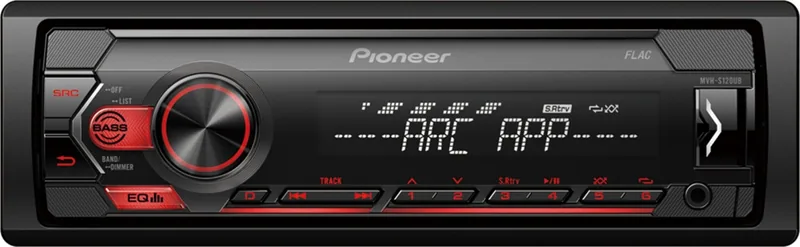
Pioneer MVH-S120UB Overview
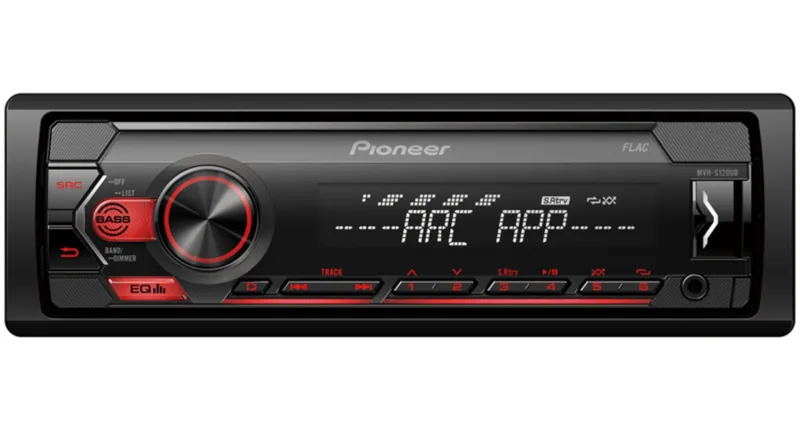
Discover the power of modern audio with the Pioneer MVH-S120UB digital media receiver. This unit brings exceptional clarity and flexibility to your vehicle sound system. The detachable front panel ensures your head unit remains secure when parked, adding a significant layer of theft protection for your investment. Design meets functionality with a clear display window and intuitive multi-control dial for easy adjustments while driving safely. Safety is prioritized through accessible controls that minimize distraction on the road significantly. The unit operates on standard DC power suitable for most automotive electrical systems including alternators and batteries.
Connectivity is a major highlight for drivers who love their mobile libraries. USB ports allow direct access to your music collection without relying on radio stations. Compatible formats include popular MP3 and WMA tracks as well as lossless FLAC formats when using storage devices properly. AUX input serves as a reliable fallback for legacy devices or direct headphone output. Android users can utilize the Pioneer ARC APP for seamless control over source selection and playback settings via USB wiring. Note that specific models may vary in compatibility with iOS features like iPod control depending on the exact hardware revision available in the market. Pioneer recommends checking compatibility lists online before installation to avoid issues with older device firmware or operating systems.
Sound customization is where this receiver truly shines for audio enthusiasts. The advanced audio settings allow listeners to tweak the experience to their personal preference. A five-band graphic equalizer provides precise control over frequencies ranging from 80 Hz to 8 kHz. Bass boost capabilities let you enhance low frequencies for deeper impact without distorting the midrange significantly. Subwoofer settings include phase controls and cutoff frequencies to integrate external amplifiers smoothly into the existing chassis. Sound retriever technology restores rich audio details even from compressed streams for a fuller listening experience. You can also adjust loudness to compensate for road noise at lower volume levels to ensure clarity during quiet moments.
The radio tuning section offers robust performance with standard FM and AM bands. RDS functionality provides station information where signals are available in your region. Preset memory allows quick access to favorite channels with six strong stations stored automatically by the system. The system also features traffic announcements and alternative frequency switching for uninterrupted listening during long commutes. Illumination settings match the dashboard lighting with dimming options for night driving comfort. Power specifications deliver consistent performance under load. Continuous output ensures loud playback capability without strain on the electrical system.
Regular maintenance ensures longevity of the components within the chassis over time. The detachable face panel removal requires specific steps to prevent physical damage during storage procedures. Always store the panel safely when not in use to prevent theft or accidental damage on dashboards in bright sunlight. System settings allow the user to reset configurations if playback issues arise during operation unexpectedly. Troubleshooting guides help resolve errors regarding USB detection or connection failures quickly without dealer intervention. Check display messages for detailed error codes if warnings appear. This ensures all audio features work as intended for the driver. Whether upgrading an older system or building a new setup, the versatility makes it a strong contender for car audio upgrades. Ensure proper wiring for optimal safety and performance to maximize efficiency.
Search for 67,732 Manuals online


Type-in Brand or Model