
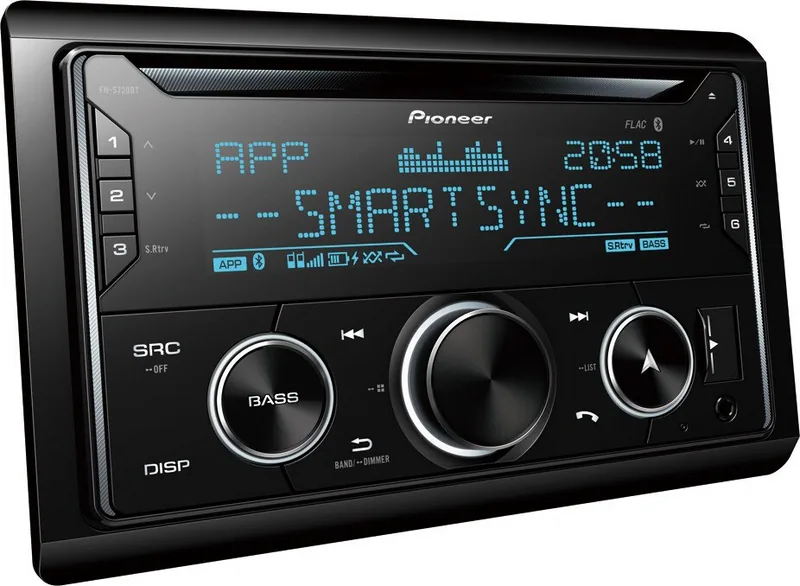
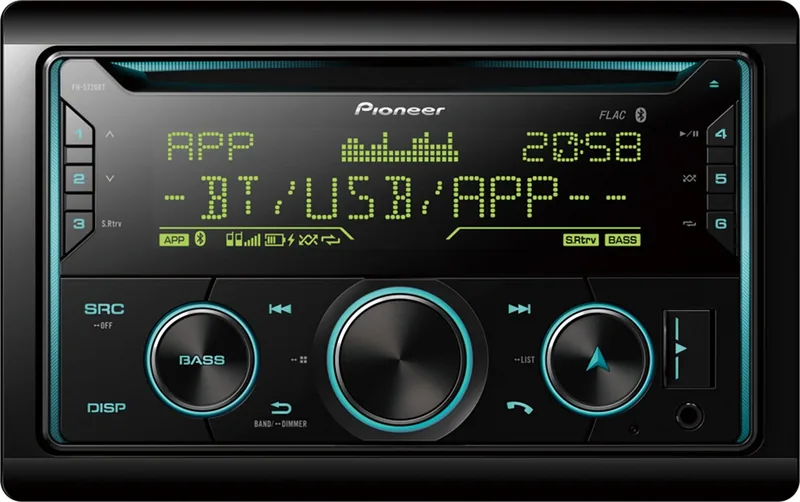
Pioneer FH-S720BT Manual
PDF manual · 261 Pages
English


Quick check
Incorrect answer, please try again.
Chat with your Pioneer FH-S720BT manual using AI
Get instant AI answers from your Pioneer FH-S720BT manual
Ask anything about the Pioneer FH-S720BT. Answers come from this manual, with the pages they are based on.
Ask a Question
Do you recommend FH-S720BT?
Yes NoFrequently Asked Questions
Yes, you can pair and connect up to two Bluetooth phones at the same time. This allows switching between caller audio and phonebook lists easily during use.
Is this answer helpful?
Yes, Spotify is supported when connected via iOS or Android devices. You need to install the Pioneer Smart Sync or Spotify app to enable full streaming control.
Is this answer helpful?
Insert your USB drive into the front USB port. Ensure it is formatted as FAT12, FAT16, or FAT32 for proper reading. Some file types like WAV are not supported for MTP.
Is this answer helpful?
Yes, you can connect a subwoofer in both network and standard modes. Adjust the subwoofer settings in the audio menu to set the phase and level according to your vehicle setup.
Is this answer helpful?
The unit supports the karaoke function but does not include a microphone. You must purchase a commercially available dynamic microphone and plug it into the AUX input jack.
Is this answer helpful?
Yes, the illumination settings allow you to change key and display colors. Choose from 12 preset colors or create a custom color using red, green, and blue adjustments.
Is this answer helpful?
You can reset the microprocessor to resolve operation issues or incorrect messages. Press the reset button with a pointed instrument to restart the system settings automatically.
Is this answer helpful?
Advantages and Disadvantages
Advantages

- Supports up to two Bluetooth phone connections simultaneously for call and audio management.
- Includes Spotify compatibility for direct music streaming when paired with a smartphone app.
- Offers a detailed 13-band graphic equalizer for precise audio customization in standard mode.
- Features a built-in karaoke function with adjustable microphone volume and vocal reduction.
- Compatible with USB mass storage devices and iPhone integration via MTP or AOA protocols.
Disadvantages

- Requires an external microphone for karaoke which is not included in the standard package.
- Bluetooth audio muting occurs automatically when a phone call is currently active.
- Some advanced app features are locked unless a Pioneer Smart Sync installation is completed.
- Physical button navigation may feel slow compared to modern touchscreen units.
- USB MTP connection does not support FLAC or WAV file formats for playback.
Product Specification
Type
CD Receiver, 2-DIN
Display
Dot-Matrix
Navigation
No
TMC
No
Tuner
FM, AM, LW
Media
CD (CD-R/RW), USB Storage
Audio Formats
AAC, FLAC, MP3, WAV, WMA
Power
4 x 50W Peak, MOSFET
Connections
3 x Pre-Out, 1 x AUX In (Front), 1 x USB (Front), Bluetooth
Features
Hands-free system, Remote control (optional), variable lighting, USB charging function, 13-Band Equalizer
Product Description
Experience Premium Audio with Pioneer FH-S720BT
Transform your driving routine with the Pioneer FH-S720BT car receiver. This unit offers seamless integration with modern devices, allowing you to enjoy music from various sources instantly. Whether you stream via Bluetooth, connect your smartphone, or play USB drives, the FH-S720BT ensures high-fidelity sound. The receiver is designed to fit standard DIN slots, ensuring it complements the interior of most vehicles effectively. It also supports advanced speaker wiring options for audiophiles.
Connectivity and Control
The device supports multiple connection methods for maximum flexibility. You can pair up to two Bluetooth phones simultaneously for hands-free calling and audio streaming. The receiver also features a dedicated AUX input for wired connections. For Apple users, iPhone integration allows media playback and control through the unit's interface. The interface is managed via a multi-control dial and navigation buttons, making it easy to adjust volume or change tracks without taking your eyes off the road. RDS Radio functions allow for traffic announcements and program type searches, enhancing the traditional radio experience with data features. A bright display window keeps you informed about stations and playback status at all times.
Audio Customization and Illumination
Sound quality is paramount. The unit includes advanced audio adjustments suitable for different speaker setups. You can switch between network mode and standard mode to optimize your speaker configuration whether you have a basic system or an advanced multi-amp setup. The equalizer settings allow you to tailor the sound profile, with options ranging from preset curves to custom adjustments using a 13-band graphic equalizer. Additionally, a sound retriever function enhances compressed audio files for richer sound without requiring a premium subscription. Bass boost controls add depth to your low-end frequencies significantly. You can also personalize the visual experience with customizable illumination settings for keys and the display using various colors.
Entertainment Features
Beyond music, this receiver supports streaming services like Spotify directly through connected mobile apps. You need the specific app installed to unlock full features. For fun on long trips, the built-in karaoke function lets you use an external microphone connected to the AUX jack. You can adjust microphone volume and reduce vocal levels in songs for a great singalong experience. The system reset feature ensures the microprocessor runs correctly after installation or if errors occur.
Important Notes
Ensure compatible iOS or Android versions are used for full app functionality. Always install the microphone safely to avoid obstruction while driving. Regular software updates via the system menu keep performance optimal. USB compatibility covers many formats allowing for vast music libraries. Avoid connecting devices directly without cables for safety.
This receiver is designed for easy installation and robust performance. It handles various audio formats including MP3 and WMA. Enjoy your favorite tunes with clarity and control on every journey.
Search for 67,732 Manuals online


Type-in Brand or Model