
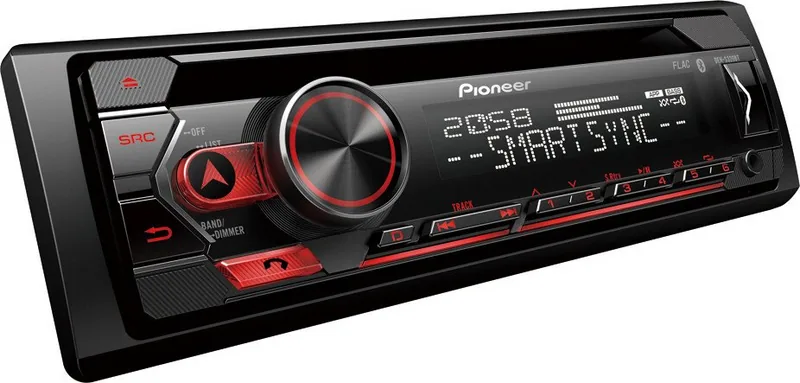
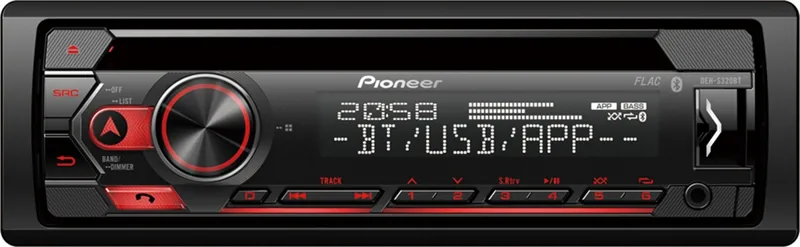
Pioneer DEH-S320BT Manual
PDF manual · 247 Pages
English


Quick check
Incorrect answer, please try again.
Chat with your Pioneer DEH-S320BT manual using AI
Get instant AI answers from your Pioneer DEH-S320BT manual
Ask anything about the Pioneer DEH-S320BT. Answers come from this manual, with the pages they are based on.
Ask a Question
Do you recommend DEH-S320BT?
Yes NoFrequently Asked Questions
Press SRC/OFF to display the radio menu, select [ADD DEVICE] to search, find the device in the list, select it, and confirm the pairing code on both the unit and device. Up to two phones can be connected.
Is this answer helpful?
FLAC files can be played from USB if not using MTP but FLAC cannot be connected via MTP connection due to protocol limitations. Ensure the file system is FAT12, FAT16, or FAT32.
Is this answer helpful?
You must connect an external dynamic microphone to the AUX input jack. Select the source, go to the menu, choose [MICROPHONE], set to [ON], and adjust [MIC VOL] to control the volume level.
Is this answer helpful?
The unit delivers 50 watts per channel at 4 ohms for standard setups. It supports a subwoofer with 70 watts at 2 ohms for the subwoofer channel when using the RCA output.
Is this answer helpful?
Yes, you can change display brightness using the [DIM SETTING] and [BRIGHTNESS] settings in the main menu. Options include sync with clock or manual adjustment from 1 to 10.
Is this answer helpful?
Turn off the unit and remove the front panel. After disconnecting cables, press the RESET button with a pointed instrument longer than 8 mm. This is needed for initial installation or strange messages.
Is this answer helpful?
Yes, Spotify is supported via Bluetooth or USB connection if the application is launched on the paired mobile device. A Premium account or compatible connection is required for full functionality.
Is this answer helpful?
Advantages and Disadvantages
Advantages

- Detachable front panel provides theft protection and enhances security for parked vehicles.
- Bluetooth connectivity supports two phones simultaneously for hands-free calling and audio streaming.
- Comprehensive audio tuning includes crossover filters, equalizer settings, and subwoofer control.
- USB and AUX inputs allow flexible playback of various local media files and devices.
- Radio reception supports RDS for traffic information and station details integration.
Disadvantages

- iPhone specific functions are limited or unavailable on this specific model as per documentation.
- USB MTP connection is not compatible with WAV and FLAC file formats for playback.
- Karaoke function requires a commercially available dynamic microphone separate from the unit.
- Bluetooth audio may be muted during phone calls or depending on connected device profiles.
- USB hubs are not supported and direct connection to the unit is required for stability.
Product Specification
Type
CD Receiver, 1-DIN
Display
Dot Matrix
Navigation
No
TMC
No
Tuner
FM, AM, LW
Media
CD (CD-R/RW), USB Storage
Audio Formats
FLAC, MP3, WAV, WMA
Power
4x 50W Peak, MOSFET
Connections
2x Preamp Output, 1x AUX In (Front), 1x USB (Front), Bluetooth
Anti-Theft
Removable Front Panel
Features
Hands-free, USB Charging, 13-Band Equalizer
Product Description
Experience Superior Car Audio with the Pioneer DEH-S320BT
Upgrading your vehicle entertainment system offers a significant improvement to your daily driving experience. The Pioneer DEH-S320BT stands out as a reliable option for drivers seeking a balance of security and multimedia flexibility. One feature is the detachable front panel, designed to prevent theft and protect the unit when parked. This physical security adds peace of mind alongside robust electronic performance. It allows users to remove the faceplate completely, ensuring components are not targeted by thieves while the vehicle remains unattended.
Connectivity remains at the forefront of modern car stereos. This unit supports Bluetooth connections for both hands-free telephone calls and wireless audio streaming. Users can manage phone books and call history directly through the receiver interface. Up to two Bluetooth phones can be connected simultaneously to handle calls effectively. For local media playback, the device accommodates USB devices and auxiliary inputs. This ensures compatibility with portable music players without relying solely on streaming services. The USB port allows for file exploration, letting users navigate folders and select tracks easily using the multi-control dial. Music files from various compressed formats are playable, enhancing library options.
Audio enthusiasts appreciate the customizable sound settings available on this receiver. Adjustments include crossover filters for specific speaker units, allowing precise tuning of front, rear, and subwoofer output. Equalizer settings provide flexibility to match personal listening preferences, with presets like Super Bass or Natural sound. The system also features time alignment and speaker level adjustments, ensuring sound reaches the listeners ears simultaneously from all angles. This level of control turns a standard listening experience into a tailored concert-like environment. Subwoofer phase and output levels can be manipulated to fit the acoustic properties of the vehicle interior.
Navigation and utility functions are integrated seamlessly. Radio reception includes RDS for traffic information and station details. The unit supports preset stations for quick access to favorite channels. Additionally, the interface features a clear display window that shows status indicators. While some smartphone integrations vary by model compatibility in this series, the core functionality prioritizes stable connection and ease of use. Proper installation involves securing the unit and managing cables to ensure the front panel detachment works smoothly without obstruction.
Maintenance is straightforward, with reset procedures available for microprocessor issues. Regular cleaning of the disc slot and disc surface ensures longevity. The receiver powers off via the source button, and volume control is intuitive. Overall, this stereo system provides a dependable foundation for in-vehicle audio needs, combining security, connectivity, and sound quality for the modern driver. For those searching for Pioneer DEH-S320BT Manual features, this overview clarifies the capabilities.
Search for 67,732 Manuals online


Type-in Brand or Model
Sarah Jenkins
5 months ago
Is this affordable device as high quality as earlier generations?
Manual.ly
5 months ago
Yes, this item maintains the expected high quality typical of Pioneer products. Reviews indicate that the build and performance remain strong despite the lower price point. It is designed for durability and regular use. If you need specific technical details or warranty information, our support team can assist you further.