
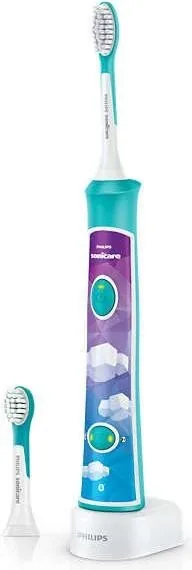


Philips Sonicare for Kids HX6322/04 Manual
PDF manual · 120 Pages
English



Quick check
Incorrect answer, please try again.
Chat with your Philips Sonicare for Kids HX6322/04 manual using AI
Get instant AI answers from your Philips Sonicare for Kids HX6322/04 manual
Ask anything about the Philips Sonicare for Kids HX6322/04. Answers come from this manual, with the pages they are based on.
Sonicare for Kids HX6322/04 Maintenance Schedule
Remove the brush head from the handle and rinse the connection with warm water at least once a week.
Replace Sonicare brush heads every 3 months to achieve optimal results. Replace sooner if signs of wear appear.
Rinse the brush head and bristles after each use with warm water.
Wipe the entire surface of the handle with a damp cloth after removing residual toothpaste from the metal shaft.
Unplug the charger and wipe the surface with a damp cloth to remove toothpaste or other residue.
Free maintenance reminders
Timed to your purchase date. Always free, unsubscribe anytime.
Ask a Question
Do you recommend Sonicare for Kids HX6322/04?
Yes NoFrequently Asked Questions
It takes at least 24 hours to fully charge the battery for optimal usage and performance levels.
Is this answer helpful?
Yes, but clean the brush head thoroughly after use to prevent plastic cracking from peroxide or baking soda ingredients.
Is this answer helpful?
It gently increases power over the first 14 brushings to help users get used to the sonic experience comfortably.
Is this answer helpful?
Replace Sonicare brush heads every 3 months to achieve optimal results and maintain hygiene standards effectively.
Is this answer helpful?
Yes, Sonicare is safe to use on braces, though brush heads wear out sooner when used on braces specifically.
Is this answer helpful?
No, do not clean the brush head, handle or charger in the dishwasher to avoid damage to the unit.
Is this answer helpful?
Children aged from 8 years and above can use it if supervised or instructed concerning use of the appliance safely.
Is this answer helpful?
Advantages and Disadvantages
Advantages

- Bluetooth connectivity allows app integration for tracking and fun.
- Easy-start feature gradually increases power for comfortable usage.
- KidPacer tunes guide brushing of all mouth quadrants effectively.
- Replaceable panel allows for personalization with child's favorite stickers.
- Two gentle modes suit different ages and sensitivity levels safely.
Disadvantages

- Charging takes up to 24 hours which may be inconveniently long.
- App dependency requires Bluetooth 4.0 or higher on mobile devices.
- Age recommendation suggests supervision for children under eight typically.
- Battery disposal requires removing internal components manually safely.
- Brush heads wear out faster when used on braces or restorations.
Product Specification
Type
Children's Sonic Toothbrush
Power Source
Battery Operation (Li-Ion)
Brush Head
Oval
Cleaning Modes
2
Timer
4 x 30 seconds
Features
App Control (Bluetooth), Melody Function, Charging Indicator Light, Battery Level Indicator
Battery Life
84 min (21 days)
Package Contents
Charging Station, 2 x Brush Heads (1 x for Kids Standard, 1 x for Kids Compact), 8 x Stickers
Product Description
Raising dental hygiene habits early is crucial for long-term oral health and confidence. The Philips HX6322/04 Sonicare for Kids Manual offers a comprehensive guide to getting started with smart brushing technology designed specifically for young users. This rechargeable toothbrush connects via Bluetooth to a compatible mobile app, effectively turning a daily routine into an engaging game for children. Parents can monitor brushing statistics remotely while children enjoy the interactive experience without feeling pressured or bored during the process.
The handle features a soft grip design for comfort during use. It includes a customizable sticker panel where you can apply favorite stickers to the replaceable front panel to make the device feel personal and owned by your child. Two distinct brushing modes cater to different age groups and experience levels within the family. Gentle mode offers full power suitable for older or independent brushers who require a standard clean. Conversely, Extra Gentle mode starts at one minute and slowly progresses to two minutes over time. This Easy-start feature helps children acclimate to the sonic vibrations without feeling uncomfortable or startled by sudden high intensity.
Cleaning efficiency is guided by the KidPacer feature embedded in the software. Short musical tunes alert the user to move to the next quadrant of the mouth, ensuring a thorough clean across all areas without missing spots. After completing four sections, a congratulatory tune signals the end of the session. The device automatically turns off to conserve battery life. Battery indicators flash on the button to show charging status or low power warnings. It requires up to 24 hours to fully charge for maximum effectiveness. Safety guidelines emphasize keeping the charger dry and away from water sources like bathtubs to prevent electrical hazards. Replacing brush heads every three months ensures optimal cleaning performance and prevents bacterial buildup. The unit is intended for children aged eight and above with adult supervision during maintenance tasks such as charging.
Maintenance is straightforward with simple cleaning instructions found within the guide. Do not place the handle in a dishwasher. Wipe surfaces with a damp cloth. Charging involves placing the handle directly on the base. Ensure the mains cord is original to avoid hazards. If damaged, discard the charger immediately. Medical advice should be sought if bleeding persists. This appliance complies with electromagnetic standards. Recycle the battery properly and do not throw in household waste. Proper disposal protects the environment. Support is available online if registration occurs. Check for guarantee restrictions such as wear and tear. Always use recommended parts for best results.
Search for 67,706 Manuals online


Type-in Brand or Model
Michaela Lynch
8 months ago
Does the companion app work reliably on older tablets, since some users reported crashes and connection issues?
Manual.ly
8 months ago
Thank you for your feedback. The app is optimized for modern smartphones, but some older tablets may show stability issues. We recommend updating your device operating system and reinstalling the app. The built-in timer and signals function perfectly without the app. Replacement brush heads are available for separate purchase on our website. We appreciate your support for our continuous improvements.