Timed to your purchase date. Always free, unsubscribe anytime.
M: QW-35-FL
Ask a Question
0/1000
Do you recommend Sonicare EasyClean HX6511/50?
YesNo
0
Sarah Miller
6 months ago
How long does the battery last on a single charge?
0
Manual.ly
6 months ago
Based on customer feedback, the battery life is excellent and lasts for several weeks on a full charge. It typically supports daily use for up to 4 weeks before needing a recharge.
M: qwen/qwen3.5-flash-20260224
M: qwen/qwen3.5-flash-20260224
0
Phyllis Denesik
6 months ago
I am concerned about the toothbrush being too harsh. Does it clean effectively while remaining comfortable, and how long does the battery last?
0
Manual.ly
6 months ago
Yes, this model is designed for sensitive gums while providing superior cleaning. It features a gentle brushing mode that many users find comfortable. Regarding the battery, it holds a charge for weeks, with typical users reporting up to a month on a single charge before needing to recharge.
M: qwen/qwen3.5-flash-20260224
M: qwen/qwen3.5-flash-20260224
Frequently Asked
Questions
A
It takes at least 24 hours to fully charge the battery if you want to keep it fully charged at all times. The charger must be fully plugged into a wall socket for the best results.
Is this answer helpful?
A
A solid green light means the battery is between 20 and 100 percent charged. A flashing green light indicates 5 to 19 percent. If it flashes green with three beeps after brushing, the battery is less than 5 percent and needs recharging.
Is this answer helpful?
A
Yes, the Sonicare is safe to use on braces. However, please note that brush heads wear out sooner when used on braces compared to natural teeth.
Is this answer helpful?
A
To deactivate Easy-start, press and hold the power on-off button for two seconds. You will hear one beep to indicate that the Easy-start feature has been deactivated.
Is this answer helpful?
A
The Sonicare toothbrush complies with safety standards for electromagnetic devices. However, if you have a pacemaker or other implanted device, contact your physician or the manufacturer of the implanted device prior to use.
Is this answer helpful?
A
For optimal results, replace Sonicare brush heads every three months. This ensures the bristles remain effective for plaque removal and cleaning.
Is this answer helpful?
A
No, do not place the brush head, the handle, and the charger in the dishwasher. Rinse the brush head and bristles after each use and let them air dry only.
Is this answer helpful?
M: qwen/qwen3.5-flash-20260224
Advantagesand
Disadvantages
Advantages
Easy-start feature gently increases power for new users
Smartimer automatically switches off after two minutes
Quadpacer timer signals every 30 seconds for even cleaning
Rechargeable battery with clear charge indicator lights
Safe for use on braces and dental restorations
VS
Disadvantages
Mains cord cannot be replaced if damaged
Charger must be completely dry before connecting to mains
Brush heads require replacement every three months
Battery removal process requires a screwdriver
Not intended for unsupervised use by children
M: qwen/qwen3.5-flash-20260224
Product
Specification
Type
Sonic toothbrush
Power source
Rechargeable (Li-Ion)
Brush head
Oval
Timer
4x 30 seconds
Features
Charging indicator
Battery life
56 min (14 days)
Package contents
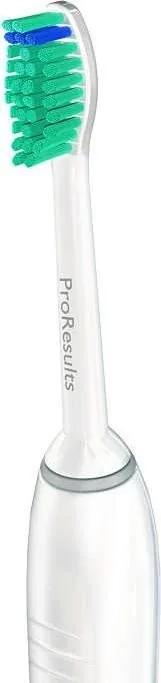
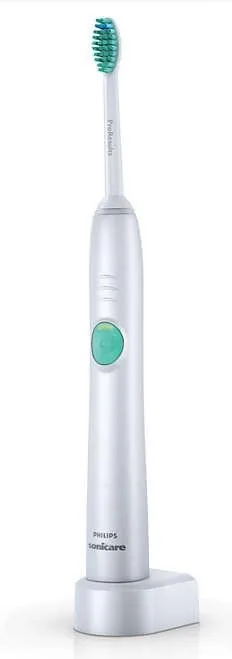
Charging station, 1x brush head (1x ProResults)
M: qwen/qwen3.5-flash-20260224
Product
Description
Welcome to Philips Oral Care
Congratulations on your purchase and welcome to Philips. To fully benefit from the support that Philips offers, register your product at www.philips.com/welcome. To ensure you get the most out of your new device, it is important to refer to the Philips HX6511/50 Sonicare EasyClean Manual for detailed setup and safety guidelines. Your journey begins with attaching the replaceable brush head to the handle, aligning the front of the brush head with the handle and pushing it onto the metal shaft. A small gap is normal between the components. Charging the device requires placing the handle on the charger plugged into a wall socket. Be sure the charger remains dry and away from water. The battery charge indicator provides clear signals about your power status. A solid green light means the battery is between 20 and 100 percent charged. A flashing green light indicates 5 to 19 percent battery life. If the light flashes green with three beeps after brushing, the battery is less than 5 percent and needs recharging immediately. It takes at least 24 hours to fully charge the battery if you want to keep it fully charged at all times.
Smart Features for Cleaning
The Smartimer ensures you brush for the recommended two-minute cycle. This automatic shutoff feature helps you maintain dental hygiene standards. The Quadpacer interval timer beeps you every 30 seconds to encourage you to move to the next section of your mouth. This ensures you cover outside top teeth, inside top teeth, outside bottom teeth, and inside bottom teeth evenly. Each section receives thirty seconds of attention. Safety is paramount. If you have a pacemaker or medical implants, consult your physician before use. Do not use for oral or gum surgery within the previous two months without dentist consultation. The appliance is for cleaning teeth, gums, and tongue only. For maintenance, never place the handle or brush head in a dishwasher. Rinse the brush head and bristles after each use and let them air dry. Clean the rest of the handle with a moist cloth and mild soap. Remove brush heads once a week to clean the connection. The Easy-start feature gently increases the power over the first 14 brushings. This ramps up intensity for new users. Each of the first 14 brushings must be at least one minute in length to advance through this cycle properly. You can deactivate this feature by pressing and holding the power button for two seconds. For optimal results, replace Sonicare brush heads every three months. When using the toothbrush, wet the bristles and apply a small amount of toothpaste. Place the bristles against the teeth at a slight angle towards the gumline. Press the power on-off button to switch on. Apply light pressure to maximize effectiveness and let the Sonicare toothbrush do the brushing for you. Do not scrub hard. Gently move the brush head slowly across teeth in a back and forth motion. This allows the longer bristles to reach between your teeth. You may also brush your tongue with the toothbrush switched on or off as preferred. The Sonicare is safe to use on braces and dental restorations like fillings and crowns. However, brush heads wear out sooner when used on braces. If you experience discomfort or pain, stop using the appliance and consult your doctor. If you have excessive bleeding after using this toothbrush or it continues after one week, consult your dentist. Clean the brush head and handle thoroughly with soap and water if you use whitening toothpaste containing peroxide or baking soda. Otherwise plastic may crack. After 2 minutes, the Smartimer automatically switches off the toothbrush. To pause or stop brushing during the cycle, press the on-off button again within 30 seconds for the Smartimer to pick up where it left off. If you need service or information, visit the Philips website or contact the Philips Consumer Care Centre in your country. The terms of the international guarantee do not cover brush heads or damage caused by misuse. Normal wear and tear including chips, scratches, and discoloration are excluded.




Sarah Miller
6 months ago
How long does the battery last on a single charge?
Manual.ly
6 months ago
Based on customer feedback, the battery life is excellent and lasts for several weeks on a full charge. It typically supports daily use for up to 4 weeks before needing a recharge.