
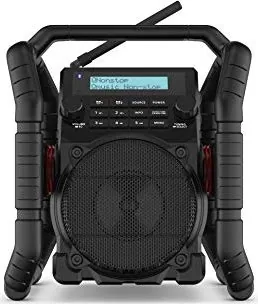
PerfectPro UBox 500R Manual
PDF manual · 191 Pages
English



Quick check
Incorrect answer, please try again.
Chat with your PerfectPro UBox 500R manual using AI
Get instant AI answers from your PerfectPro UBox 500R manual
Ask anything about the PerfectPro UBox 500R. Answers come from this manual, with the pages they are based on.
UBox 500R Maintenance Schedule
Recharge rechargeable batteries at least every 2 months to maintain capacity. Ensure the Battery Select switch is set to CHARGE NiMH ON.
Clean metal contacts of batteries and charger inside the radio from time to time using contact spray.
Replace batteries immediately if they are damaged, deformed, leaking, or show signs of reduced power and distortion.
Free maintenance reminders
Timed to your purchase date. Always free, unsubscribe anytime.
Ask a Question
Do you recommend UBox 500R?
Yes NoDo you recommend UBox 500R?
Yes NoFrequently Asked Questions
Ensure the radio is switched off and connected to an AC mains socket. Set the battery compartment switch to the NiMH position. When charging, the battery charge indicator LED will flash green. It will show a steady green light when the battery charging process is complete, which usually takes around 5 to 7 hours.
Is this answer helpful?
Yes the device has an IP65 rating protecting against splashing water. However for outdoor use during rainy days use battery power. Avoid using the DC input in wet conditions to prevent moisture from entering the radio through the socket.
Is this answer helpful?
The effective operation range between the system and the paired device is approximately 10 meters or 30 feet. Any obstacle between the system and the device can reduce this operational range significantly. Ensure devices are within close proximity for best connectivity.
Is this answer helpful?
No the radio is only designed to work with USB flash memory devices. It does not support external hard disk drives or any other type of USB device. Large file sizes or high memory USB devices may take longer to read due to processing requirements.
Is this answer helpful?
There are 5 memory presets for each DAB and FM waveband stored in the device. You can preset stations by pressing and holding a preset button until the display shows confirmation. The station list can be managed using the station order and prune functions.
Is this answer helpful?
Yes. When setting the alarm you can choose the source for the alarm. Select Buzzer or Last Listen or a specific preset station. If the radio station is not found it will switch to the buzzer option automatically.
Is this answer helpful?
Advantages and Disadvantages
Advantages

- IP65 rating provides excellent protection against dust and water splashing.
- Built-in rechargeable battery charger allows convenient power management.
- Supports DAB, FM and Bluetooth for versatile audio streaming options.
- USB playback supports multiple file formats like MP3 and WMA files.
- Dual alarm functions ensure you can wake up with radio or buzzer.
Disadvantages

- AC power adapter is not included with the radio purchase.
- Non-rechargeable batteries must be purchased separately for usage.
- Manual is very large and covers multiple languages which may confuse some.
- Bluetooth range may be reduced by physical obstacles between devices.
- External hard drives are not compatible with the USB socket port.
Product Specification
Power Source
6x AA Battery, Mains Power (110-230V)
Output Power
7W
Tuner
FM, DAB+
Connections
AUX In (3.5mm), USB, Bluetooth
Features
Carrying Handle, 5 Memory Presets
Safety
Splash Resistance, Shock Resistance, Dust Protection, IP64
Dimensions (WxHxD)
7.09x9.84x7.87 inches
Weight
6.39 lbs
Package Contents
Power Adapter, Battery
Product Description
Discover the Ultimate Worksite Audio Solution
The PerfectPro UBox 500R Construction Radio stands out as a highly reliable companion for demanding environments. This robust device is engineered to withstand dust and water, ensuring continuous operation where lesser units fail. Users who prioritize durability will appreciate the IP65 rating which protects against splashing water and dust ingress effectively. Whether on a busy construction job site or in a wet outdoor area, this radio maintains performance without compromise. It is designed to last in conditions that would damage standard electronics.
Advanced Audio Experience
Listen to your favorite radio channels with exceptional crystal clarity. The built-in DAB tuner allows for superior digital sound quality and significantly easier station selection compared to analog options. Wireless connectivity is completely seamless with robust Bluetooth streaming capabilities for modern phones. You can play high-quality music directly from your smartphone or tablet without wires. The radio connects quickly and provides a stable link within a ten meter range typically. Additionally, the USB port supports various popular audio file formats including MP3 and WMA. This flexibility means you are never without entertainment or critical information while working.
Power and Operational Convenience
Managing power is intuitive with multiple practical options available to the user. The unit accepts six AA batteries for portability or can run on stable AC power for stationary use. Rechargeable NiMH batteries can be charged directly inside the device enclosure without external tools. The manual provides detailed instructions to ensure safe charging practices are always followed properly. You do not need to worry about the PerfectPro UBox 500R Construction Radio Manual for battery changes as the process is straightforward and clearly documented. Two separate alarm clocks allow you to start your day precisely when needed with specific wake up settings. Sleep timers help conserve power during late nights or for background listening sessions.
Essential Features for Professionals
Customization is key for adapting audio to different noisy environments easily. The equalizer settings let you adjust bass and treble to your personal preference for optimal listening enjoyment. Loudness mode ensures audio is heard even at low volume settings for clarity. The digital display shows time and date and signal strength clearly for quick reference. Station presets save your favorite channels for instant quick access without searching. Safety warnings are prominent on the back to prevent damage from improper handling or modifications. This comprehensive device covers every need of a modern professional and busy hobbyist. Experience superior sound and legendary reliability with this unit today.
The PerfectPro UBox 500R is more than just a sound source. It integrates a digital clock that self-sets via radio signals. This reduces the need for manual time adjustments during the week. The device features an auxiliary input for connecting legacy audio sources. This ensures compatibility with older devices. Safety is prioritized with a warning that opening the casing voids the warranty. This encourages users to keep the unit sealed to maintain protection. The speaker is robust enough for impact. The manual suggests avoiding heat sources to prolong battery life. Following care instructions ensures years of service.
Search for 67,732 Manuals online


Type-in Brand or Model