
PerfectPro Rockpro Manual
PDF manual · 162 Pages
English



Quick check
Incorrect answer, please try again.
Chat with your PerfectPro Rockpro manual using AI
Get instant AI answers from your PerfectPro Rockpro manual
Ask anything about the PerfectPro Rockpro. Answers come from this manual, with the pages they are based on.
Rockpro Maintenance Schedule
Recharge the built-in battery after each use to obtain optimal working life, even if only partially discharged.
If not used for an extended period, always charge the built-in battery fully before storing.
Ask a Question
Do you recommend Rockpro?
Yes NoFrequently Asked Questions
The lithium polymer battery typically lasts between 12 to 16 hours on a medium volume setting. Factors like volume level, music type, and ambient temperature can affect this duration. Bass heavy music consumes more energy and shortens playback time slightly.
Is this answer helpful?
Yes, the USB socket provides 5V/0.5A power to charge a mobile phone. This function works in all operating modes including standby. However, charging a phone may drain the radio's internal battery more quickly than standard usage.
Is this answer helpful?
Yes, it has an IP65 rating protection against splashing water when running on battery power alone. You must not use the AC power adapter in wet conditions. Keep the rubber cover closed on the sockets to prevent moisture entry.
Is this answer helpful?
Use the setup wizard by pressing the power button and selecting Yes. Navigate to the network list to find your SSID. If WPS is supported, select the button or PIN option. Otherwise, enter the WPA or WEP key manually using the tuner control to scroll through characters.
Is this answer helpful?
No, the alarm function only works when the unit is connected to AC mains power. If running on battery, the device enters standby and shuts down after 30 seconds to save power. Therefore, alarms will not trigger in battery mode.
Is this answer helpful?
The radio supports MP3, WMA, AAC, FLAC, and WAV formats. It does not support DRM protected files or WMA Lossless formats. USB drives must be formatted in FAT or FAT 32 systems to function correctly with the device.
Is this answer helpful?
No, the warranty becomes void if the device cabinet is opened or any modifications are made. The manufacturer does not accept liability for damage resulting from improper handling. Repairs should only be done by qualified service personnel.
Is this answer helpful?
Advantages and Disadvantages
Advantages

- Long battery life provides up to 16 hours of continuous playback.
- Durable IP65 rating protects against water splashes when on battery.
- Extensive connectivity includes WiFi, Bluetooth, and USB support.
- Customizable EQ modes suit different music genres and preferences.
- Forty memory presets allow quick access to favorite stations.
Disadvantages

- Warranty becomes void if the casing is opened or modified.
- USB charging drains the main battery faster when active.
- Alarms function only when connected to AC power not battery.
- USB drives cannot be formatted with exFAT or NTFS systems.
- Complex setup required for manual network encryption entry.
Product Specification
Power Source
Battery 11.1V 12Ah Li-Ion, Mains Power (110-230V)
Output Power
2 x 15W
Tuner
FM, DAB, DAB+, Internet Radio
Ports
AUX In (3.5mm), USB, Bluetooth, Wi-Fi 802.11b/g/n
Features
Carrying Handle, Clock, 10 Memory Slots, USB Charging Port, Battery Charging Function, Stereo Speakers
Safety
Splash Resistant, Shock Resistant, Dust Resistant, IP65
Dimensions (WxHxD)
12.80x9.84x8.46 in
Weight
7.72 lbs (incl. Battery)
Package Contents
Battery, AUX In Cable
Product Description
Comprehensive Review of the PerfectPro Rockpro Construction Radio
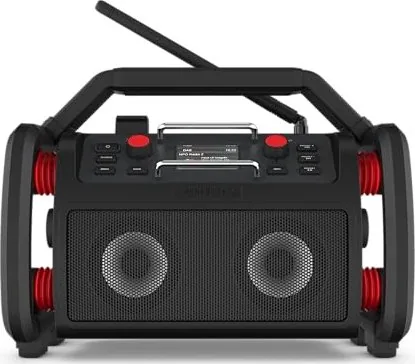
The PerfectPro Rockpro Construction Radio stands out as a versatile companion for both indoor workshops and outdoor environments. Designed with durability in mind, this unit offers robust performance for active listeners seeking reliable audio. The sleek casing protects internal components while providing easy access to essential controls. A powerful battery system ensures extended usage without frequent recharging. Users can enjoy up to sixteen hours of playback on a single charge depending on volume levels and audio type. Bass heavy tracks may consume more energy but the lithium polymer battery maintains consistent power delivery. Cleaning should only be done using a dry cloth to avoid electrical damage. This makes it ideal for job sites where conditions can be rugged.
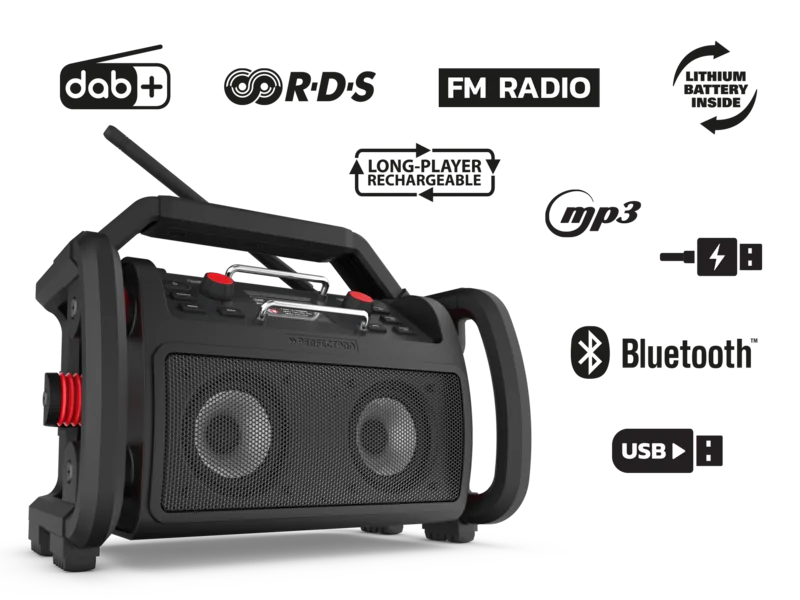
Connectivity options are extensive offering flexibility for modern needs. WiFi connectivity enables internet radio streaming with automatic time updates from the network. Bluetooth 4.1 pairing allows wireless playback from smartphones or tablets instantly. Spotify Connect integration means users can control music directly from their mobile apps without physical interaction. The built-in microchip handles multiple presets making station switching seamless. Forty memory slots store favorite DAB and FM stations for quick access during busy days. Network setup requires entering encryption keys manually if WPS is not available. The signal reception depends heavily on antenna positioning.
Audio quality is enhanced through customizable equalizer settings catering to various tastes. Modes include Jazz, Rock, Pop, Classic, Movie, and News for tailored sound profiles. The dual stereo speakers deliver clear highs and deep lows suitable for large spaces. A 3.5mm AUX-IN socket provides wired connectivity for older devices needing analog signals. Charging a mobile phone via the USB port is possible while playing music though this drains the main battery faster. Safety guidelines emphasize keeping the unit dry during operation on mains power. The product supports multiple frequency bands including DAB and FM radio ranges for global variety.
The setup wizard simplifies initial configuration including language selection and timezone adjustments. Alarm functions allow wake-up schedules using either radio or buzzer tones. However, alarms only wake the device when connected to AC power not battery mode. Remote control functionality through the UNDOK app offers further convenience for users managing audio while away from the unit. Warranty coverage extends two years covering defects but excludes opening the casing or unauthorized modifications. Regular inspection of the antenna ensures optimal signal reception in all areas. Avoid placing near heat sources to maintain longevity. It is suggested to keep the device plugged into AC power during storms. These details help users understand the PerfectPro Rockpro Construction Radio Manual benefits regarding safety and features.
Search for 67,732 Manuals online


Type-in Brand or Model