
PerfectPro DABBox Manual
PDF manual · 83 Pages
English



Quick check
Incorrect answer, please try again.
Chat with your PerfectPro DABBox manual using AI
Get instant AI answers from your PerfectPro DABBox manual
Ask anything about the PerfectPro DABBox. Answers come from this manual, with the pages they are based on.
DABBox Maintenance Schedule
Recharge the batteries at least every two months to maintain capacity.
Clean the metal contacts of the batteries and charger inside the radio from time to time with contact spray.
Free maintenance reminders
Timed to your purchase date. Always free, unsubscribe anytime.
Ask a Question
Do you recommend DABBox?
Yes NoFrequently Asked Questions
Press the Source button for Bluetooth mode. Select DABBOX 3 on your device. Enter 0000 if prompted. Once connected, you can stream audio.
Is this answer helpful?
Yes, the radio runs on batteries or mains power. Rechargeable batteries can be charged while the device is powered on or in standby mode.
Is this answer helpful?
It has a 2-year limited warranty excluding batteries and unauthorized modifications made by the user which void coverage.
Is this answer helpful?
It has an IP54 rating protecting against dust and water splashes, but it is not designed for submersion in water.
Is this answer helpful?
Yes, via the USB port using a cable connected to a PC with compatible software from the official website.
Is this answer helpful?
It requires 4x C size UM-2 batteries or rechargeable Ni-MH equivalent batteries for power.
Is this answer helpful?
Yes, a 3.5mm Aux socket allows connecting external audio players like CD players or MP3 players.
Is this answer helpful?
Advantages and Disadvantages
Advantages

- Durable construction resistant to dust and water splashes suitable for outdoor work.
- Supports both DAB and FM tuning with extensive station memory capabilities.
- Bluetooth 5.0 connectivity enables easy music streaming from smartphones.
- Flexible battery options allow use with rechargeable or standard C-size cells.
- Adjustable tone controls for treble and bass customization.
Disadvantages

- Opening the device casing automatically voids the manufacturer warranty.
- Charging time can be lengthy depending on battery capacity used.
- Reception quality depends heavily on antenna positioning and location.
- Bluetooth range is limited to approximately 10 meters without obstacles.
- Not all broadcast features are compatible with every radio station signal.
Product Specification
Power Source
4x C Battery, AC Power (110-230V)
Output Power
3-7W
Tuner
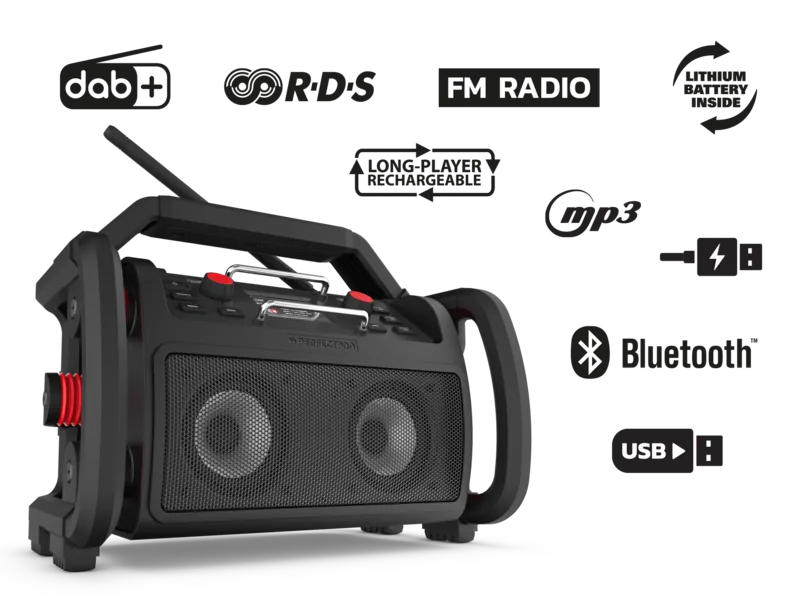
FM, DAB, DAB+
Connectivity
AUX In (3.5mm), Bluetooth
Features
Carrying Handle, 5 Memory Slots
Safety
Splash-Proof, Shock-Proof, Dust-Proof, IP54
Dimensions (WxHxD)
12.20x9.06x7.48 inches
Weight
6.61 lbs
Package Contents
Power Supply
Product Description
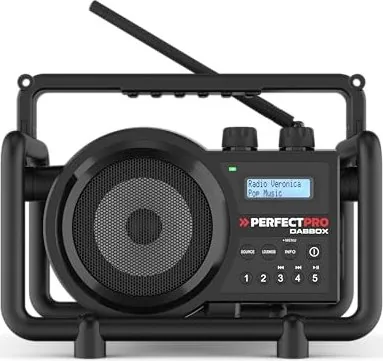
Discover the PerfectPro DABBox Construction Site Radio Manual Experience
The construction industry demands equipment that withstands harsh conditions while delivering clear audio without interruption. The PerfectPro DABBox Construction Site Radio stands out for its durability and advanced digital features found in modern broadcast. Whether you are managing a site or enjoying outdoor activities, this unit provides reliable entertainment. The system supports both DAB and FM bands, ensuring access to the widest range of stations possible. Users appreciate the robust build quality designed to resist dust and water, making it ideal for varied environments where standard electronics might fail.
Advanced Connectivity and Sound Quality
Sound clarity is paramount on a loud site where background noise is constant. This radio features a powerful five-inch speaker capable of delivering high-quality volume that cuts through machinery din. Battery power is flexible, using standard C-size cells or rechargeable Ni-MH setups for convenient portability. The Bluetooth 5.0 connectivity allows seamless streaming from smartphones directly to the speaker system. This modern feature ensures you stay connected to news without needing a physical tether. The digital display offers clear visibility of track names, signal strength icons, and clock time settings for scheduling breaks.
Customization and Long-Term Reliability
Setting up the device is straightforward with intuitive controls for manual tuning and volume adjustment easily. Preset buttons save your favorite channels for quick access during operation without searching. The ability to adjust treble and bass levels adds personalization to your listening experience so it suits your preference. Regular maintenance ensures longevity, though caution is advised regarding the warranty terms found in the documentation provided. Opening the casing will void coverage, so professional servicing is recommended for internal hardware issues. Dynamic Range Control settings help manage audio levels in different environments. Keeping the charge indicator green confirms healthy power levels for extended shifts throughout the day.
Important Usage Notes
Remember to consult the official PerfectPro DABBox Construction Site Radio Manual for detailed pairing steps regarding mobile devices. Avoid exposing the device to extreme heat sources or prolonged submersion despite its IP54 rating against moisture. Always utilize dry cloths for cleaning the exterior surfaces to prevent corrosion or damage to plastic parts. Charging cycles vary based on battery capacity, typically taking several hours to reach full potential for storage. Regular software updates keep functionality optimized for better reception and system stability over time. Please ensure cables are stored properly when not in use to avoid damage.
Final Performance Insights
This tool represents a significant investment for professionals needing dependability in tough conditions. The auxiliary input socket adds flexibility for legacy devices. Language settings allow operation in multiple tongues. Ensuring proper antenna positioning maximizes digital signal pickup. Overall, the engineering prioritizes user safety and operational efficiency for daily tasks. This ensures consistent performance regardless of location.
Notes:
- Warranty void if opened.
- Use dry cloth only.
- Battery life varies.
- Update software regularly.
- Check antenna placement.
Search for 67,732 Manuals online


Type-in Brand or Model