
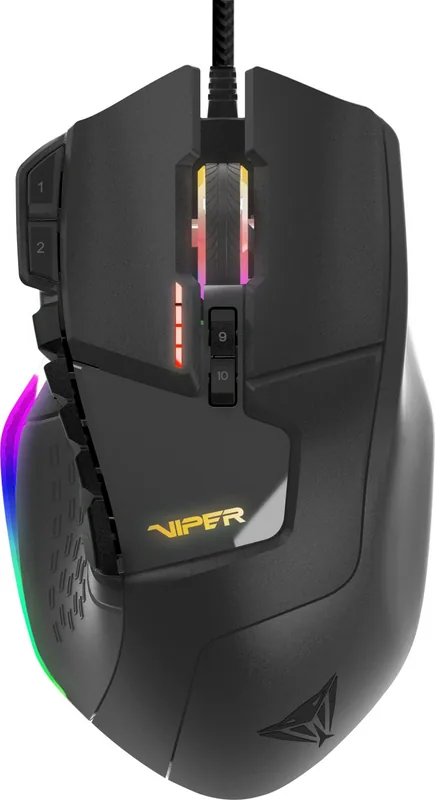
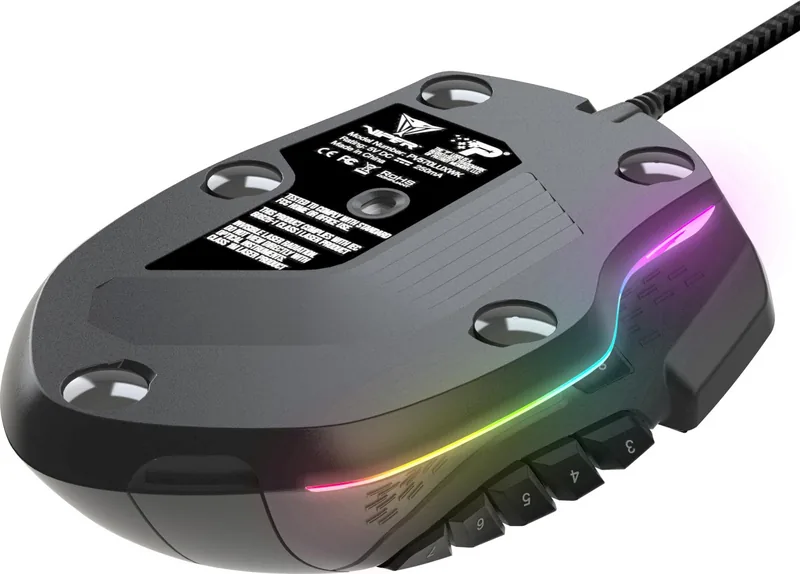
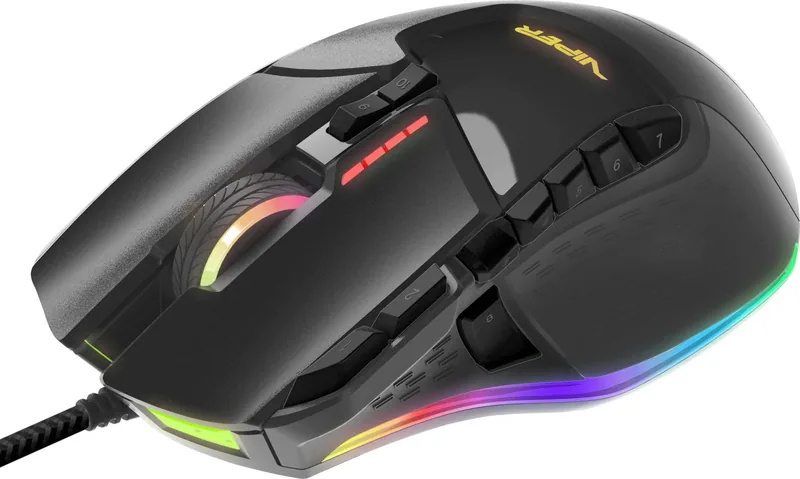
Patriot Viper V570 RGB Blackout Edition Manual
PDF manual · 12 Pages
English



Quick check
Incorrect answer, please try again.
Chat with your Patriot Viper V570 RGB Blackout Edition manual using AI
Get instant AI answers from your Patriot Viper V570 RGB Blackout Edition manual
Ask anything about the Patriot Viper V570 RGB Blackout Edition. Answers come from this manual, with the pages they are based on.
Ask a Question
Do you recommend Viper V570 RGB Blackout Edition?
Yes No
Lena Hartmann
7 months ago
My Patriot Viper V570 sometimes does not load my RGB settings after I boot my PC. It stays off or only turns red. How can I make the chosen RGB profile apply every time?

Manual.ly
7 months ago
This usually happens when the V570 driver/software finishes loading after startup, or the wrong lighting profile is active. Please install the correct Patriot Viper software specifically for the V570 Blackout (not a different Viper model). Open the software, select your RGB colors/lighting mode and profile, then save/apply the settings. If there is an option like 'apply on startup' or 'start with Windows', enable it so the software is ready before the mouse initializes. Also ensure you run the software at least once with admin permissions and keep the software running if your model stores settings only in the PC profile. Finally, update the software and USB drivers, and avoid having multiple Viper software versions installed.

Devonte Lowe
5 months ago
Does the Patriot Viper V570 support weight customization and RGB lighting, and is it suitable for left-handed users?
Manual.ly
5 months ago
Yes, the Patriot Viper V570 includes a weight kit allowing you to adjust the mouse's heaviness according to your preference. It features fully customizable RGB lighting with seven LEDs and multiple profiles via dedicated software. However, please note that the design places six thumb buttons on the right side, making the mouse unsuitable for left-handed users.
Sarah Kowalski
6 months ago
I noticed some reviews mention driver issues with RGB settings after booting. Is this a known problem?
GamerDave2023
6 months ago
Are there common issues with the RGB lighting not loading correctly at startup? Users mention it lights up red or stays off unless configured after booting.
Manual.ly
6 months ago
Yes, we have received feedback regarding RGB initialization. Please update the Patriot Viper Software to the latest version. When configuring colors and effects, make sure to click the Save button inside the application to ensure settings are stored in the mouse firmware. This prevents reliance on driver loading sequences which can sometimes fail. Additionally, try disabling any other mouse software that might conflict with the lighting settings during startup.
Archie Owen
5 months ago
Does the RGB lighting sometimes fail to load after startup, and can the mouse be customized with weights and programmable buttons?
Manual.ly
5 months ago
The V570 offers adjustable weights, configurable DPI levels, polling rate, RGB lighting, macros, and profiles through its dedicated Viper software. Some users report that RGB settings may occasionally not load correctly after booting, causing the mouse to appear unlit or red. Restarting the software or reapplying the saved profile may help. Please note that the mouse is designed for right-handed users.
Kira O'Kon
5 months ago
Does the mouse reliably keep its RGB lighting settings after restarting the PC?
Manual.ly
5 months ago
The RGB lighting and profiles are configured through the dedicated Viper V570 software. Some users report that their saved lighting setting may occasionally not load immediately after boot, showing no light or red lighting instead. Updating or reinstalling the V570-specific driver/software and saving the profile again may help.
Frequently Asked Questions
The mouse has four default DPI levels: 800, 1600, 2400, and 3200 DPI. With Viper software, each level can be customized from 50 to 12,000 DPI. X and Y sensitivity can also be adjusted independently.
Is this answer helpful?
Holding the sniper button temporarily changes the mouse to a 400 DPI precision setting. Releasing the button returns the mouse to its previous DPI level, which is useful for careful aiming and detailed cursor placement.
Is this answer helpful?
The V570 offers 13 programmable buttons and five gaming profiles. Buttons can be assigned mouse actions, keyboard inputs, advanced functions, saved macros, or key-cycle commands through Viper software.
Is this answer helpful?
Yes. Seven RGB lighting zones can be customized with up to 16.8 million colors. Lighting options include custom colors, breathing or always-on illumination, wave effects, reverse waves, and random color modes.
Is this answer helpful?
Yes. The adjustable weight compartment allows up to 34.2 grams of additional weight. This lets you change the balance and overall feel to better match your grip style and preferred mouse movement.
Is this answer helpful?
The V570 supports a USB polling rate of up to 1000 Hz. A higher polling rate sends mouse position data to the computer more frequently, supporting responsive cursor movement during games.
Is this answer helpful?
Advantages and Disadvantages
Advantages

- Hybrid FPS+MMO layout combines a thumb-accessible sniper button with 13 programmable controls.
- Laser sensor supports software-adjustable sensitivity from 50 to 12,000 DPI and a temporary 400 DPI sniper mode.
- Five profiles, macro editing, key cycles, and RGB customization provide extensive personalization.
- Adjustable weight system adds up to 34.2 g, while rubber grips and ceramic feet support comfort and glide.
Disadvantages

- Full DPI, macro, profile, and RGB customization requires installing Viper software.
- The laser sensor and feature-rich button layout may be more than casual users need.
- Ceramic feet perform best with a quality mouse pad, adding a possible accessory requirement.
- Removable weights need careful storage and should be kept away from children.
Product Specification
Suitability
right-handed
Buttons
13 (total), 2 (main), 4 (top), 6 (left), 1 (scroll wheel click)
Scroll Wheel
1 x 2-way
Tracking
laser
Resolution
12,000 dpi, adjustable
Sensor
PixArt ADNS-9800
Switches
mechanical switches, Omron
Lighting
RGB
Connection
wired (5.91 ft), USB
Power Supply
USB
Dimensions (W x H x D)
3.15 x 1.73 x 5.24 in
Approximate Volume
7.51 cu in (approximate shape)
Weight
5.61 oz (+1.2 oz)
Special Features
thumb rest, weight compartment, onboard memory, braided cable
Product Description
Patriot Viper V570 RGB Blackout Edition Laser Gaming Mouse USB Manual
The Patriot Viper V570 RGB Blackout Edition Laser Gaming Mouse USB is built for players who want one wired mouse to handle fast FPS action, demanding MMO commands, and everyday desktop precision. Its hybrid FPS+MMO layout combines an ergonomic shape with a conveniently placed sniper button near the thumb, helping users switch to a lower sensitivity setting when a precise shot or careful selection matters most.
At its core is an Xtreme Precision laser sensor with adjustable sensitivity from 50 to 12,000 DPI through Viper software. Four default DPI stages offer quick switching at 800, 1600, 2400, and 3200 DPI, while the dedicated sniper control temporarily drops sensitivity to 400 DPI. A 1000 Hz polling rate, 16-bit data path, and tracking speed rated up to 150 inches per second support responsive movement across fast-paced games and high-resolution displays.
Built for Personal Control
Customization is a major strength of the V570. It provides 13 programmable buttons across five gaming profiles, allowing players to assign mouse actions, keyboard commands, multimedia controls, advanced functions, macros, and key cycles. Profiles can be renamed and color-coded, making it easier to separate setups for different games, character classes, or productivity tasks.
The macro editor supports recording and editing keyboard, mouse, scroll, delay, and movement commands. Macros can run once, loop until stopped, or repeat while a button is held. This makes the mouse especially useful for players who rely on repeatable command sequences, while the key-cycle feature can rotate through up to five keyboard inputs from an assigned mouse button.
RGB Lighting and Adjustable Balance
Seven independently programmable RGB lighting zones let the Blackout Edition match a gaming setup with up to 16.8 million colors. Available effects include custom lighting, wave patterns, reverse wave patterns, and two random-color modes. Users can choose breathing illumination or steady lighting for each customizable zone.
Comfort can also be tailored through the adjustable weight system. The removable weight compartment supports up to 34.2 grams of added weight, helping users refine the balance and feel of the mouse. Rubberized side grips, finger grooves, and ceramic feet complete the design. The ceramic feet are intended to provide smooth, durable glide, particularly when paired with a quality mouse pad.
Notes
The Patriot Viper V570 RGB Blackout Edition Laser Gaming Mouse USB Manual highlights a plug-and-play USB connection, with Viper software providing access to button assignments, DPI tuning, profiles, macros, polling-rate settings, and lighting controls. Avoid directing the invisible Class 1M laser toward eyes, and keep the removable weights away from children.
Search for 67,706 Manuals online


Type-in Brand or Model
Julian Koch
6 months ago
Does this mouse support weight customization for different grip styles?
Manual.ly
6 months ago
Yes, the package includes a storage magazine with weights. You can install them into the mouse to increase the total mass or remove them for a lighter feel. This allows you to tailor the weight to your individual needs and preference.