

Party Light & Sound PARTY-8COMBI Manual
PDF manual · 24 Pages
English



Quick check
Incorrect answer, please try again.
Chat with your Party Light & Sound PARTY-8COMBI manual using AI
Get instant AI answers from your Party Light & Sound PARTY-8COMBI manual
Ask anything about the Party Light & Sound PARTY-8COMBI. Answers come from this manual, with the pages they are based on.
PARTY-8COMBI Maintenance Schedule
If unused for a long period, keep the battery at about 40% capacity and check or recharge it once per month.
Recharge regularly after each use; do not wait until the battery is discharged completely.
Free maintenance reminders
Timed to your purchase date. Always free, unsubscribe anytime.
Ask a Question
Do you recommend PARTY-8COMBI?
Yes NoFrequently Asked Questions
Turn the speaker on to enter Bluetooth pairing (voice prompt "Power On" and LED shows BLUE). Enable Bluetooth on your device, search for and select "PARTY-COMBI". After successful pairing the speaker will announce the connection and auto-reconnect to previously paired devices.
Is this answer helpful?
The internal 2000mAh lithium battery gives about 2 hours at 100% volume with LEDs on, and roughly 4 hours at 80% volume with LEDs off. Charge via the supplied micro-USB cable to a 5V USB source; the charging LED is RED while charging and turns off when full. Fully charge before first use and recharge regularly; avoid deep discharges.
Is this answer helpful?
Yes—connect a wired mic to the 6.35mm MIC IN, then adjust mic volume with VOL MIC. To reduce feedback or loud pops when connecting, turn the ECHO control fully left (minimum) before plugging in the microphone, then adjust echo and mic volume as needed.
Is this answer helpful?
The speaker supports Bluetooth wireless streaming, USB stick (USB input), TF/micro-SD card playback, and a 3.5mm AUX input for wired sources. Playback modes include repeat one, repeat all, and random play; controls cover play/pause, next/previous track and mode switching.
Is this answer helpful?
The speaker is intended for indoor use in dry environments only and should not be exposed to water or extreme temperatures. It can be mounted on conventional stands with a shaft diameter up to 36.83 mm and a support capacity up to 6.8 kg—ensure the stand is stable and rated accordingly.
Is this answer helpful?
Charge the battery fully before first use, recharge after each use, and avoid complete discharge to prevent loss of capacity. If unused for long periods, store at ~40% charge and check monthly. Batteries are explicitly not covered by warranty, so follow care instructions to avoid damage.
Is this answer helpful?
Use the supplied micro-USB cable and plug the standard USB-A end into any 5V USB power source such as a computer USB port, power bank or a 5V USB wall adapter. Ensure the adapter provides stable 5V output; the speaker shows RED during charging and the LED goes off when charging is complete.
Is this answer helpful?
Advantages and Disadvantages
Advantages

- Bluetooth 5.0 with automatic reconnection and multiple playback modes (Bluetooth, USB, TF, AUX).
- Built-in LED Derby and woofer lighting for party atmosphere with independent light controls.
- Dedicated mic input with echo and mic volume controls for karaoke or announcements.
- Portable rechargeable battery (2000mAh) delivering up to ~4 hours at moderate volume.
- Stand-mountable design and compact footprint (235 x 210 x 385 mm, 2.4 kg).
Disadvantages

- Short runtime at max volume with LEDs on—about 2 hours—limits extended outdoor use.
- Battery not covered by warranty; improper charging/storage can damage capacity.
- Approved for indoor/dry environments only; not splash- or water-resistant.
- Limited low-frequency extension (starts around 80 Hz), so bass depth is modest.
- No included wall USB adapter; charging requires a separate 5V USB power source.
Product Specification
Frequency Range
80Hz-18kHz
Speakers
1 (1x 8" Woofer)
Tuner
FM
Audio Connections
AUX In (0.14in Jack), Mic In (0.25in Jack)
Other Connections
USB-A, Card Reader (microSD)
Wireless
Bluetooth 5.0
Power Supply
Li-Ion Battery (2000mAh), USB
Playback Time
2h
Karaoke Functions
Echo
Special Features
Light Effects, incl. Microphone
Dimensions
9.25x15.16x8.27in (WxHxD)
Weight
5.29lb
Product Description
Party Light & Sound PARTY-8COMBI Manual
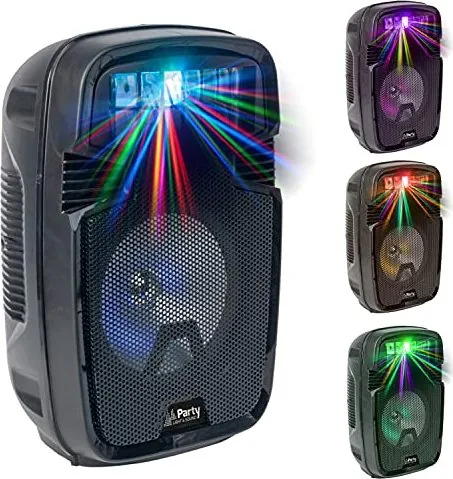
The Party Light & Sound PARTY-8COMBI is a portable 8" (20 cm) active speaker that combines Bluetooth playback, wired inputs and bright LED lighting effects for small events, karaoke and mobile parties. Designed for indoor use, it integrates a rechargeable 2000mAh lithium battery, Derby-style top lights and LED illumination on the woofer to deliver both sound and atmosphere without complex setup. The unit supports Bluetooth 5.0 (A2DP/HFP/HSP), USB and TF playback, plus a 3.5mm AUX input and a 6.35mm microphone jack for live vocal use.
Its controls are straightforward: a power switch that activates Bluetooth pairing and voice prompts, an LED display showing modes, dedicated buttons for mode, track navigation and play/pause, volume and mic level knobs, and separate LED and Derby light toggles. The speaker can be mounted on conventional stands (shaft up to 36.83 mm) and includes a micro-USB charging port; the charging indicator lights red while charging and turns off when full. Battery runtime is rated around 2 hours at full volume with LEDs on and up to 4 hours at reduced volume with LEDs off.
Practical features make it versatile for casual DJs, presenters and small gatherings: automatic reconnection to paired devices, an echo control for microphone effects, selectable playback modes (single, all, random), and a simple AUX override that disconnects Bluetooth when engaged. Built-in safety guidance covers operating temperature limits (+5°C to +35°C), moisture avoidance, and careful battery handling to preserve capacity and warranty.
The PARTY-8COMBI’s spec sheet lists a frequency response of 80 Hz–18 kHz, signal-to-noise ratio over 70 dB, Bluetooth RF power under 1 dBm, dimensions of 235 x 210 x 385 mm and a weight of 2.4 kg. It ships with an AUX cable, micro-USB charging lead and quick guide. Disposal guidance follows EU WEEE rules for environmentally responsible recycling.
Notes:
- Charge fully before first use and recharge regularly; avoid full deep discharge to prevent permanent capacity loss. Batteries are not covered by warranty.
- For mic use, reduce echo when connecting to prevent feedback.
- Use indoors only; keep away from water and extreme temperatures.
- Ensure the stand can support up to 6.8 kg before mounting.
Search for 67,706 Manuals online


Type-in Brand or Model