
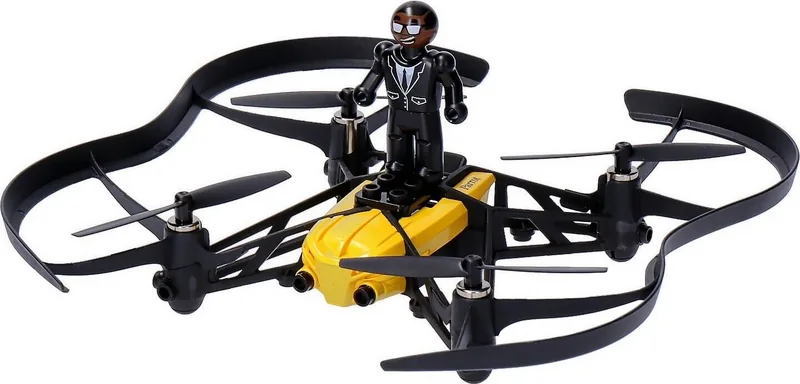
Parrot Minidrones Airborne Cargo Travis Manual
PDF manual · 20 Pages
English



Quick check
Incorrect answer, please try again.
Chat with your Parrot Minidrones Airborne Cargo Travis manual using AI
Get instant AI answers from your Parrot Minidrones Airborne Cargo Travis manual
Ask anything about the Parrot Minidrones Airborne Cargo Travis. Answers come from this manual, with the pages they are based on.
Ask a Question
Do you recommend Minidrones Airborne Cargo Travis?
Yes No
Lena König
9 months ago
My Parrot mini drone sometimes starts to spin or drift after certain flight maneuvers. What can I do to help it stabilize and regain control?

Manual.ly
9 months ago
If the drone starts to tumble or "trudeln" after a maneuver, stop making aggressive inputs and give it a moment to recover in a steady hover position. Make sure the app is up to date and follow the quick startup steps (connect, update, then power on the flight controller). For best stability, use it indoors or in calm wind and avoid flying too close to walls or obstacles. Also check the battery is sufficiently charged and fully seated, then restart the drone if the behavior repeats. If it still cannot stabilize after restarting, re-check the controller setup and recalibration steps in the app before the next flight.
Video Manual
Parrot MiniDrone (Travis)
Frequently Asked Questions
Travis requires a smartphone or tablet that supports Bluetooth 4.0 (Bluetooth Low Energy). Use the FreeFlight3 app from the App Store or Google Play to connect and control the drone.
Is this answer helpful?
With a 2.4 A charger the battery charges in about 25 minutes; via a PC USB connection it takes roughly 1.5 hours. Flight autonomy is about 7 minutes with protective hulls and about 9 minutes without hulls.
Is this answer helpful?
Travis can carry up to 14 grams. When adding weight ensure it is evenly distributed across both sides to maintain balance and flight stability.
Is this answer helpful?
Connect your smartphone to Travis via the FreeFlight3 app and use the internal storage menu to transfer or delete files. Alternatively, insert the battery and connect Travis to a PC with the provided USB cable; the drone appears as a USB drive.
Is this answer helpful?
Safety features include an emergency stop that cuts motors, an optional safety shutdown for propeller impacts, configurable max altitude and tilt limits, and an LED status sequence for initialization and battery warnings. Use the protective hull indoors.
Is this answer helpful?
In the control screen open the Looping icon, select a stunt (forward/reverse/left/right looping), then double-tap the phone display to execute the chosen manoeuvre.
Is this answer helpful?
Updates can be applied via USB by downloading the update file to a PC or directly through the FreeFlight3 app by selecting the Update option. Ensure the battery is inserted and sufficiently charged before updating.
Is this answer helpful?
Advantages and Disadvantages
Advantages

- Compact, lightweight design ideal for indoor flying and beginners.
- Quick battery recharge (≈25 minutes with 2.4 A charger) and removable LiPo battery.
- Multiple control modes (Normal, Advanced, Joystick) for different skill levels.
- Integrated vertical camera with onboard storage; easy transfer via app or USB.
- Configurable safety and flight parameters: max height, tilt, speeds, and safety shutdown.
Disadvantages

- Short flight time (≈7–9 minutes depending on hulls) limits session length.
- Very limited payload capacity (max 14 g) restricts practical cargo use.
- Bluetooth Low Energy pairing requires the FreeFlight3 app; not visible in standard Bluetooth lists.
- Vulnerable to wind and poor weather; not suitable for outdoor flights in adverse conditions.
- Small size means limited stability and range compared with larger drones.
Product Specification
Type
Ready-to-fly model
Frequency
Bluetooth
Range
65.62 ft
Runtime
9min
Max. flight speed
11.19 mph
Camera
yes
Flight modes
Hover
Special features
App control (iOS, Android)
Dimensions
7.09x7.28x1.57 in (LxWxH)
Weight
0.12 lb (C0)
Scope of delivery
USB charging cable, Battery
Product Description
Parrot Minidrones Airborne Cargo Drone Travis — Compact Cargo Flyer
The Parrot Minidrones Airborne Cargo Drone Travis is a lightweight, nimble quadcopter designed for short recreational flights and small cargo tasks. Built around Parrot's FreeFlight3 ecosystem, Travis pairs with smartphones and tablets using Bluetooth Low Energy and offers intuitive control modes, basic camera functions, and a simple payload capability. Its small form factor and removable protective hulls make it suitable for indoor flights and beginner pilots while still offering enough responsiveness for intermediate users.
Travis initializes quickly when placed on a flat surface and indicates readiness with a sequence of LED colors. Battery handling is straightforward: a removable LiPo cell charges in roughly 25 minutes with a 2.4 A charger or about 1.5 hours via USB. Flight times vary from approximately 7 minutes with protective hulls to about 9 minutes without them. The drone can carry up to 14 g of payload—sufficient for micro deliveries or lightweight accessories—provided weight is evenly distributed.
Control happens through the FreeFlight3 app, which displays the flight interface, joysticks, trim and safety controls. There are three main control modes: Normal, Advanced, and Joystick (which uses on-screen joysticks and enables simultaneous video capture). Normal mode offers tilt-based smartphone steering; Advanced adds quick rotation maneuvers; Joystick provides precise virtual sticks and automatic video saving. Preprogrammed aerobatics (forward/reverse loopings and left/right loops) are selectable and can be executed with gestures.
Safety features include an emergency stop that immediately cuts motor power (use only in true emergencies), an optional safety shutdown for propeller strikes, and configurable maximum altitude and tilt limits to reduce risk. Settings also let you adjust vertical and rotational speed limits, left-handed controls, and Bluetooth network name. Firmware updates are available via USB or the FreeFlight3 app.
The onboard vertical camera stores photos and videos in internal memory; media can be transferred to the phone through the app or to a PC by connecting Travis as a USB drive (battery inserted). The drone requires Bluetooth 4.0-capable devices and works with iOS and Android through FreeFlight3.
Travis is intended for users aged 14 and up. Operators must observe local aviation rules, avoid hazardous environments (water, strong wind, high-voltage areas), and always keep visual line of sight. Careful battery handling and proper charging practices are essential to prevent damage and ensure safety.
Notes:
- Use the external hull indoors to protect propellers and surroundings.
- Ensure even payload distribution when carrying items (max 14 g).
- Keep firmware and app updated for best performance.
- Avoid flying in adverse weather or near restricted locations.
Search for 67,706 Manuals online


Type-in Brand or Model
Leonie K.
10 months ago
My kids bought this mini Parrot drone for school. After some flight maneuvers it sometimes starts spinning (trudeln) and has trouble recovering. What should we do?
Manual.ly
10 months ago
If the drone gets into a spin after aggressive maneuvers, try these steps: First, make sure the battery is fully charged and follow the charging instructions. Update the firmware in the app before flying. For the first start (and after crashes), place it on a flat, stable surface and power on to let it stabilize. In flight, avoid sudden full-stick inputs and start with gentle movements until it is stable. If it still struggles, land, power off, and restart on a clear open area. Also check that no propellers are loose or damaged. These measures usually help it regain stable flight quickly.