
Park Tool DC-1 Manual
PDF manual · 4 Pages
English



Quick check
Incorrect answer, please try again.
Chat with your Park Tool DC-1 manual using AI
Get instant AI answers from your Park Tool DC-1 manual
Ask anything about the Park Tool DC-1. Answers come from this manual, with the pages they are based on.
DC-1 Maintenance Schedule
Clean with a dry, soft, cotton cloth. Do not use water or cleaning solutions.
Turn off the device when not in use to save battery power.
Remove battery cover and replace SR44 button cell with positive side facing out.
Ask a Question
Do you recommend DC-1?
Yes NoFrequently Asked Questions
It is used for precise measuring of parts and components, including internal widths, external diameters, depths, and stepped or differential measurements. It is especially useful in bike repair and general workshop tasks.
Is this answer helpful?
Press the mm/inch button to toggle between metric and inch-based readings. This makes it easier to work with different parts, standards, and reference measurements without recalculating manually.
Is this answer helpful?
ZERO resets the display to 0.00 at the current jaw position. This helps with differential measurements, comparison checks, and measuring relative changes instead of only absolute dimensions.
Is this answer helpful?
It offers fine resolution and strong repeatability for detailed work. Accuracy varies by measuring range, with the best performance at shorter lengths and slightly wider tolerances as the measurement range increases.
Is this answer helpful?
Keep it clean, dry, and protected from dirt, moisture, and extreme temperatures. Wipe it with a dry, soft cotton cloth and avoid water or cleaning solutions.
Is this answer helpful?
Replace the SR44 button cell when the display flashes or shows weak battery behavior. If the display fails to respond, checking the battery connection is a good first step.
Is this answer helpful?
Advantages and Disadvantages
Advantages

- Stainless steel components and ABS housing add durability for shop use.
- Large LCD screen improves readability during quick measurements.
- Switches between metric, decimal, and fractional inch formats.
- Measures internal, external, depth, and differential dimensions.
- ZERO function makes repeat checks and comparison measurements easy.
Disadvantages

- Limited to 150 mm / 6 inches, so it is not for larger parts.
- Needs careful handling to maintain calibration and accuracy.
- Must be kept dry and clean; moisture can affect performance.
- Battery-powered design requires occasional SR44 replacement.
Product Specification
Material
Plastic, Stainless steel
Measuring range
0-5.91 in, Graduation 0.0004 in
Product Description
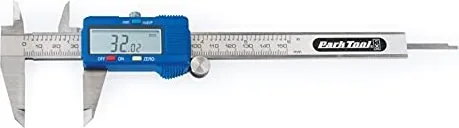
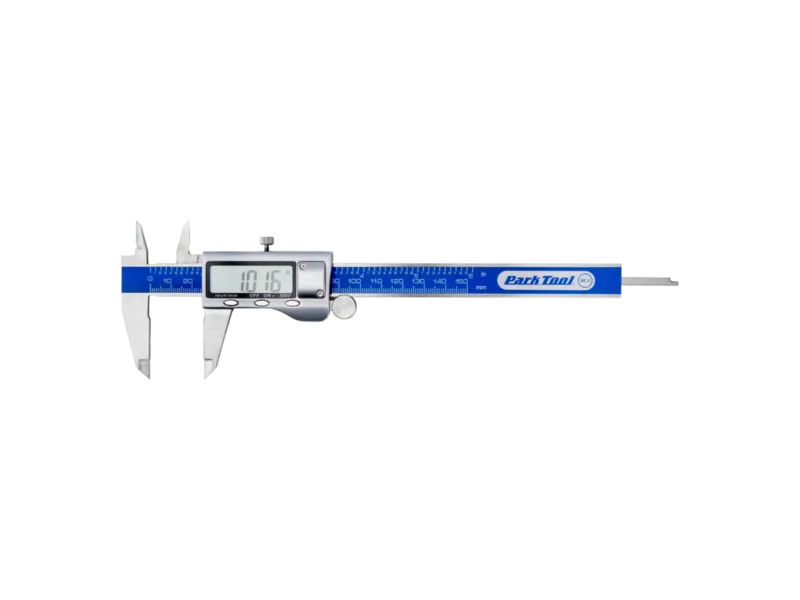
Park Tool DC-1 Digital Caliper
The Park Tool DC-1 Digital Caliper is a compact precision tool made for riders, mechanics, and anyone who needs fast, dependable measurements. Built with stainless steel parts and a rugged ABS body, it feels like a shop-ready instrument rather than a delicate gadget. Its design balances durability with accuracy, making it a practical choice for everyday workshop use.
At the center of the DC-1 is a large LCD display that makes readings easy to see at a glance. With the press of a button, users can switch between millimeters and inches, while the ZERO function allows quick resetting for differential measurements. That means the caliper is useful not only for basic sizing, but also for comparing parts, checking fit, and measuring internal, external, and depth dimensions with confidence.
One of the standout features is its measurement versatility. The DC-1 measures up to 150 mm / 6 inches and offers fine resolution for detailed work. It also supports decimal, metric, and fractional inch displays up to 1/128", which is especially helpful when working across different standards or matching older components. For anyone reading the Park Tool DC-1 Digital Caliper Manual, the operation is straightforward: loosen the lock, power on, select units, zero the display, and measure with light pressure.
The caliper is also designed with maintenance in mind. Keeping it clean, dry, and away from extreme conditions helps preserve accuracy over time. Battery replacement is simple, and the device provides clear warning signs when power is low. If the readings seem off, the troubleshooting guidance points to common fixes such as checking battery placement or cleaning the sensor area with compressed air.
Notes
- Best suited for precision workshop tasks and component checks
- Avoid moisture, dirt, and harsh cleaning products
- Turn it off when not in use to extend battery life
- Replace the SR44 button cell when the display begins flashing
Overall, the Park Tool DC-1 Digital Caliper combines practical accuracy, easy operation, and solid construction in a tool that feels purpose-built for real mechanical work. It is a smart addition to any bench where exact measurements matter.
Search for 67,706 Manuals online


Type-in Brand or Model