
Papalook PA920 Manual
PDF manual · 45 Pages
English



Quick check
Incorrect answer, please try again.
Chat with your Papalook PA920 manual using AI
Get instant AI answers from your Papalook PA920 manual
Ask anything about the Papalook PA920. Answers come from this manual, with the pages they are based on.
Ask a Question
Do you recommend PA920?
Yes NoFrequently Asked Questions
The PA920 supports multiple resolutions including 2048x1536, 1920x1080, 1280x720, 640x480 and 320x240, typically at up to 30 frames per second depending on the chosen video format (YUY2 or MJPG/H.264) and host capabilities.
Is this answer helpful?
Yes. The webcam is plug-and-play on Windows (XP through Windows 10 and later), macOS 10.6 and above, Chrome OS, and Android 5.0+. In most cases you can connect the micro-USB cable and the OS will recognize the device without extra drivers.
Is this answer helpful?
Adjust microphone levels through your OS sound settings: on Windows use Control Panel → Sound → Recording and select the USB Audio Device to change levels. To disable the mic, open Device Manager, find the USB Audio Device under audio controllers, and disable or stop it.
Is this answer helpful?
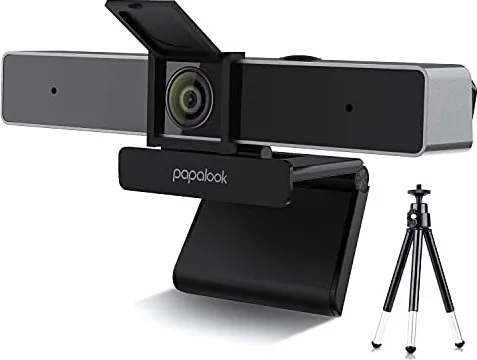
The PA920 includes a foldable flexible clip for securely attaching to monitors and a threaded hole on the bottom to mount a standard tripod (a lightweight tripod is included) for desk placement and angled positioning.
Is this answer helpful?
Papalook recommends AMCAP for quick preview and capture; it allows you to select preview, choose video capture pins, set capture directories, and start/stop recording. You can also use common video conferencing apps or third-party webcam software that supports your platform.
Is this answer helpful?
For reliable 1080p recording, recommended specs include a 2.4GHz Intel Core 2 Duo (or better), 2GB RAM, DirectX 9.0–compatible VGA, USB 2.0 port, and around 1GB free disk space for captured files; lower specs may limit performance.
Is this answer helpful?
Yes. The PA920 is covered by a one-year manufacturer warranty. For warranty details, return procedures, and support resources, visit papalook.com or contact their support email provided on the website.
Is this answer helpful?
Advantages and Disadvantages
Advantages

- Bright f/1.8 aperture and 3.0MP 1/3" CMOS sensor for improved low-light capture.
- Dual built-in omnidirectional microphones for simple voice pickup in calls and streams.
- Plug-and-play compatibility across Windows, macOS, Chrome OS, and Android 5.0+.
- Multiple video formats (YUY2, MJPG/H.264) and resolutions up to 2048x1536 at 30fps.
- Flexible clip plus included lightweight tripod for versatile mounting options.
Disadvantages

- USB 2.0 interface may limit bandwidth compared with modern USB 3.0 webcams.
- Built-in microphones are convenient but not as clear as a dedicated external mic.
- 1080p performance depends on host system; older PCs may struggle with high-res capture.
- Limited advanced controls in bundled software; third-party tools may be required for tweaks.
- Specifications note possible changes without notice; product details may vary by batch.
Product Specification
Type
Webcam
Image Sensor
1x 1/3" CMOS
Resolution
2592x1944 Pixels (30fps)
Viewing Angle
90°
Wireless
N/A
Camera Cover
Flip mechanism
Microphone
integrated (stereo)
Speaker
N/A
Lighting
N/A
Power Supply
via USB
Mounting
Mounting clip, with 1/4" thread
Package Contents
Camera, Tripod, USB-C to USB-A Adapter
Manufacturer Warranty
1 Year
Product Description
Papalook PA920 1080p HD Webcam Manual
The Papalook PA920 1080p HD Webcam offers a straightforward, value-focused solution for video calls, streaming, and basic content capture. Built around a 1/3" 3.0MP CMOS sensor and a bright f/1.8 aperture, the PA920 delivers clear 1080p video and usable low-light performance down to around 5 lux. Dual built-in microphones capture ambient sound for meetings and casual streaming, while a flexible clip and included lightweight tripod provide stable mounting options for monitors or desks.
Setup is plug-and-play across major platforms: Windows (XP through Windows 10 and later), macOS (10.6+), Chrome OS, and Android 5.0+. The camera supports multiple video formats (YUY2, MJPG/H.264) and resolutions up to 2048x1536 at 30fps, with common defaults such as 1920x1080 and 1280x720. A micro-USB cable is included for power and connection; no special drivers are usually required.
The PA920 is compatible with typical webcam utilities and recording tools—Papalook suggests AMCAP for quick previewing and capture. AMCAP lets you preview, select video capture pins, set capture directories, and start/stop video capture without installing complex software. Microphone control and troubleshooting are handled through the host OS: Windows sound settings let you set the USB audio device as the recording input and adjust levels, while Device Manager can disable the mic if needed.
Hardware highlights include a 90° horizontal field of view, omnidirectional microphones rated around 32dB SPL, USB 2.0 interface, and a max working current under 250mA. The webcam supports common photo formats (JPG) and typical operating temperatures (-10°C to 45°C). System recommendations for smooth 1080p recording suggest at least an Intel Core 2 Duo 2.4GHz CPU, 2GB RAM, DirectX 9.0–compatible VGA, and sufficient disk space.
Papalook backs the PA920 with a one-year manufacturer warranty and provides support via their website. The product is intended for users needing dependable, easy-to-use video capture for conferencing, remote work, basic streaming, and casual recording.
Notes
- Includes webcam, micro-USB cable, lightweight tripod, and quick guide.
- Supports multiple resolutions and formats; defaults to 640x480 preview and higher capture settings.
- For best audio/video results, adjust microphone levels in OS sound settings and verify preview in capture software.
- Features and specifications may change without notice.
Search for 67,706 Manuals online


Type-in Brand or Model