
Papalook AF925 Manual
PDF manual · 67 Pages
English



Quick check
Incorrect answer, please try again.
Chat with your Papalook AF925 manual using AI
Get instant AI answers from your Papalook AF925 manual
Ask anything about the Papalook AF925. Answers come from this manual, with the pages they are based on.
Ask a Question
Do you recommend AF925?
Yes NoFrequently Asked Questions
The webcam supports video up to 1920 x 1080 at 30 fps in MJPEG mode. It also supports 1280 x 720, 640 x 480, and 320 x 240 options for different applications and bandwidth needs.
Is this answer helpful?
Yes. The webcam includes autofocus, which is designed to keep the image clearer as the subject changes distance from the lens.
Is this answer helpful?
Yes. Its foldable flexible clip can grip the edge of a computer monitor. It can also sit on a flat desk or attach to a universal tripod through the mounting point on the bottom.
Is this answer helpful?
Listed compatibility includes Windows XP and later, macOS 10.6 and later, Chrome OS, and Android 5.0 and later. App support may vary by device and operating system version.
Is this answer helpful?
Yes. It has a built-in omnidirectional microphone. Volume can be adjusted in the computer's sound settings, and the USB audio device can be disabled when external audio equipment is preferred.
Is this answer helpful?
Windows 10 users can select the webcam in the Camera app and use its photo or video controls. On older Windows systems, compatible capture software such as AMCAP can be used for previewing, photos, and recording.
Is this answer helpful?
Advantages and Disadvantages
Advantages

- Full HD 1920 x 1080 video at up to 30 fps in MJPEG mode.
- Autofocus and an F/2.0 lens support clear framing and lower-light use.
- Flexible clip, desktop placement, and tripod mounting provide setup options.
- Broad support for Windows, macOS, Chrome OS, and Android devices.
Disadvantages

- The 65-degree viewing angle may be narrow for groups or wide room shots.
- Built-in omnidirectional audio may capture surrounding room noise.
- Full HD recording requires a USB 2.0 port and stronger computer hardware.
- Some older Windows workflows may require separate capture software.
Product Specification
Type
Webcam
Image sensor
1x 1/2.7" CMOS 2.0 MP
Resolution
1920 x 1080 pixels (30 fps)
Compression/Codecs
MJPEG, YUY2
Wireless
N/A
Focusing
Autofocus
Microphone
Integrated
Speaker
N/A
Lighting
N/A
Power supply
Via USB
Mount
Mounting clip
Product Description
Webcam A20/AF925 (various brand names) - Read, Download & Print Free
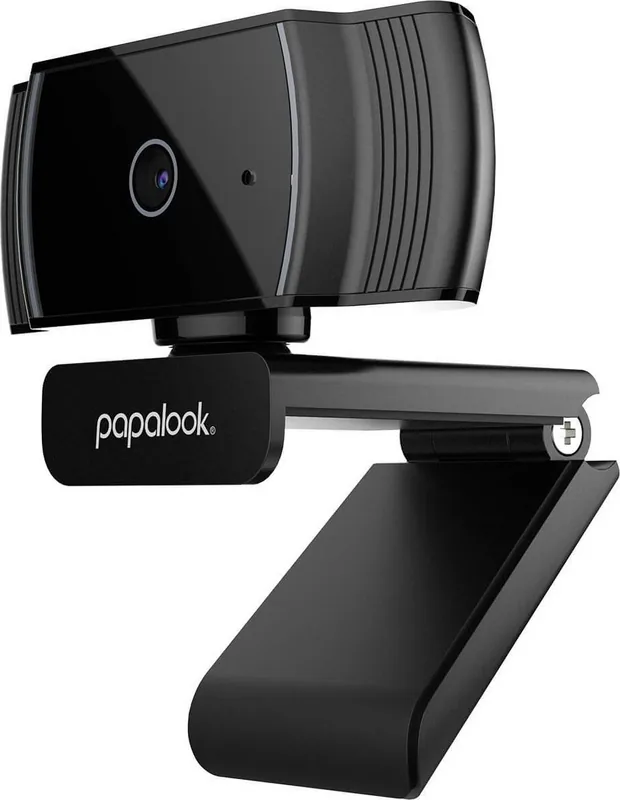
The Webcam A20/AF925 is a versatile 1080P USB webcam designed for video calls, remote work, online learning, streaming, and simple desktop recording. Sold under various brand names, including Papalook AF925, this model combines Full HD video, autofocus, and a built-in microphone in a compact camera that connects through USB 2.0. Its straightforward plug-and-play approach makes it a practical option for users who want an external camera without a complicated setup.
Clear Full HD Video and Autofocus
At its core, the A20/AF925 uses a 2.0MP 1/2.7-inch CMOS image sensor and supports video resolutions up to 1920 x 1080 at 30 fps in MJPEG mode. It also supports 1280 x 720, 640 x 480, and 320 x 240 resolutions for applications that need lower bandwidth or smaller video sizes. Autofocus helps keep the subject sharper when moving closer to or farther from the camera, making the webcam useful for meetings, demonstrations, and casual content capture.
The F/2.0 lens is intended to support usable video in lower-light environments, with the product information citing operation at illuminance as low as 5 lux. A horizontal viewing angle of 65 degrees provides a balanced framing for one person at a desk while avoiding the overly wide look found on some webcams.
Flexible Placement and Everyday Audio
A foldable flexible clip lets the webcam rest on a monitor edge or stand on a flat desktop surface. The bottom mounting point can also be used with a universal tripod, giving users more freedom to position the camera for presentations, tabletop shots, or alternate viewing angles. An integrated omnidirectional microphone captures nearby speech, and microphone volume can be adjusted through the operating system's audio settings.
Compatibility covers Windows XP, Vista, 7, 8, and 10 or later, macOS 10.6 or later, Chrome OS, and Android 5.0 or later. On Windows 10, the Camera app can be used for photos and recordings, while Mac users can select the webcam in Photo Booth. Older Windows systems can use compatible capture software such as AMCAP for previewing and recording.
Notes
- Full HD recording benefits from a USB 2.0 port, 2 GB of RAM, and adequate storage space.
- Actual performance can vary with lighting, software settings, USB bandwidth, and host device capability.
- Specifications and compatibility may differ slightly between brands or production versions.
Search for 67,732 Manuals online


Type-in Brand or Model