
Panasonic PT-RCQ10 Manual
PDF manual · 265 Pages
English


Quick check
Incorrect answer, please try again.
Chat with your Panasonic PT-RCQ10 manual using AI
Get instant AI answers from your Panasonic PT-RCQ10 manual
Ask anything about the Panasonic PT-RCQ10. Answers come from this manual, with the pages they are based on.
PT-RCQ10 Maintenance Schedule
Have your dealer clean the inside of the projector after approximately 20,000 operating hours to prevent fire caused by accumulated dust.
Wipe dirt and dust from the exterior with a soft, dry cloth. If stubborn, use a damp cloth then dry thoroughly.
Wipe dirt and dust from the lens front with a soft, clean cloth without applying excessive force.
Ask a Question
Do you recommend PT-RCQ10?
Yes NoFrequently Asked Questions
The Panasonic PT-RCQ10 delivers a high luminance of 10,000 lumens when set to Normal mode. This ensures bright and vivid images even in well-lit commercial environments.
Is this answer helpful?
Yes, the projector supports 360-degree projection. It can be mounted on ceilings, walls, or placed on tables using the appropriate settings in the menu to adjust the image orientation automatically.
Is this answer helpful?
No, the PT-RCQ10 features a dust-resistant optical engine design that eliminates the need for a standard air filter, significantly reducing maintenance costs and effort over time.
Is this answer helpful?
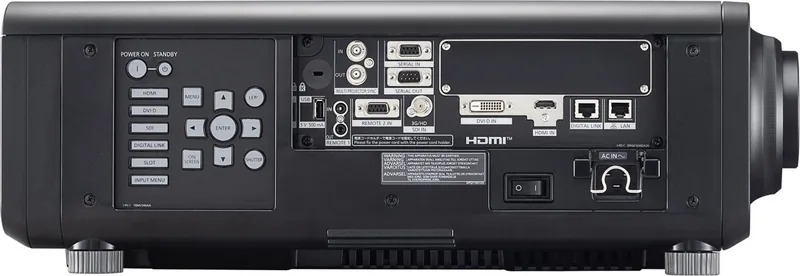
Standard inputs include HDMI, DVI-D, SDI, and DIGITAL LINK. Users can also expand connectivity by installing optional interface cards into the SLOT NX slot for additional HDMI or DisplayPort inputs.
Is this answer helpful?
No, the PT-RCQ10 is designed strictly for indoor use. Exposure to rain, moisture, or direct sunlight can damage the internal components and void the warranty.
Is this answer helpful?
DIGITAL LINK allows the transmission of video, audio, network, and control signals through a single HDBaseT-compatible cable, simplifying wiring and reducing clutter in complex installations.
Is this answer helpful?
The projector supports various software including Smart Projector Control, Multi Monitoring & Control Software, and Geometric & Setup Management Software for remote control and image calibration.
Is this answer helpful?
Advantages and Disadvantages
Advantages

- Ultra-high brightness of 10,000 lumens for clear visibility in any lighting condition
- Supports 360-degree rotation for flexible ceiling, wall, or table mounting
- Dust-resistant optical engine reduces maintenance requirements and downtime
- DIGITAL LINK technology simplifies installation with single-cable transmission
- Smooth Pixel Drive technology delivers exceptionally sharp and realistic images
Disadvantages

- Requires qualified technician for ceiling installation and safety compliance
- High initial investment compared to traditional lamp-based projectors
- Some advanced features require optional accessories like specific lenses or cards
- Laser light source may have a longer warm-up time for optimal focus stability
- Complex menu navigation may require time to master for new users
Product Specification
Type
DLP, 1x 0.67"
Light Source
Phosphor Laser
Resolution (Displayable)
WUXGA (1920x1200)
Resolution (Native)
WUXGA (1920x1200)
Brightness
-/-10500/- ANSI Lumens (High/Standard/Eco)
Contrast
10,000:1
Lens Shift
Motorized
Video Connections
1x HDMI In, HDCP 2.2, 1x VGA In, 1x DVI-D In, 1x 3G-SDI In, 1x Component Video In
Additional Connections
1x USB, 1x RJ-45, HDBaseT, 2x RS-232
Lamp Life
20,000/24,000/- Hours (Standard/Eco/Eco+)
Noise Level
43/40 dB(A) (Standard/Eco)
Power Consumption
1,100/508 W (Standard/Eco)
Product Description
Discover the Panasonic PT-RCQ10: Professional Laser Projection Excellence
The Panasonic PT-RCQ10 represents a pinnacle in professional visual technology, designed specifically for demanding commercial and institutional environments. This high-performance projector leverages advanced laser light source technology to deliver exceptional brightness and contrast ratios that standard lamps simply cannot match. With a luminance of 10,000 lumens and a dynamic contrast ratio reaching 10,000:1, it ensures crystal clear images even in brightly lit rooms or large venues.
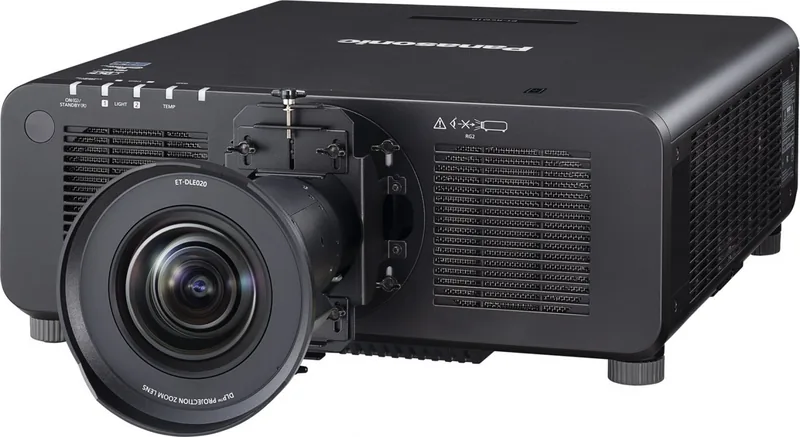
One of the standout features of this unit is its versatility in installation. The PT-RCQ10 supports 360-degree projection capabilities, allowing it to be mounted on ceilings, walls, or placed horizontally on tables without compromising image quality. This flexibility is enhanced by a wide range of optional interchangeable lenses, catering to various throw distances and room configurations. Whether you need a short-throw lens for tight spaces or a long-throw lens for vast auditoriums, the system adapts seamlessly.
Image fidelity is paramount, and the PT-RCQ10 utilizes SMOOTH PIXEL DRIVE technology to minimize pixelation and create an incredibly realistic viewing experience. The optical engine is built to resist dust accumulation, reducing maintenance needs over time. Furthermore, the inclusion of DIGITAL LINK support allows for simplified cabling, transmitting video, audio, power, and control signals over a single Ethernet cable. This feature streamlines complex setups significantly.
Connectivity is robust, featuring HDMI, DVI-D, SDI, and DIGITAL LINK inputs as standard. For expanded functionality, the SLOT NX slot accommodates optional interface cards, enabling users to add DisplayPort or additional HDMI inputs as needed. The projector also integrates with Art-Net protocols for precise lighting and stage control synchronization, making it ideal for live events and architectural installations.
Security and management are prioritized with built-in password protection, network security features, and compatibility with Crestron RoomView and other monitoring software. The ability to switch to backup signal inputs instantly ensures uninterrupted operation during critical presentations. With a long lifespan for its solid-state light sources and efficient thermal management, the PT-RCQ10 offers reliability and cost-effectiveness for professional users who demand the best performance from their visual systems.
Search for 67,706 Manuals online


Type-in Brand or Model