
Panasonic PT-FRQ50 Manual
PDF manual · 219 Pages
English


Quick check
Incorrect answer, please try again.
Chat with your Panasonic PT-FRQ50 manual using AI
Get instant AI answers from your Panasonic PT-FRQ50 manual
Ask anything about the Panasonic PT-FRQ50. Answers come from this manual, with the pages they are based on.
PT-FRQ50 Maintenance Schedule
Pull the power plug out from the wall outlet and wipe it with a dry cloth regularly to prevent dust buildup which can cause fire.
Ask your dealer about cleaning inside the projector every 20,000 hours of usage as an estimated duration to prevent fire due to accumulated dust.
Wipe off dirt and dust with a soft, dry cloth. If dirt is persistent, soak the cloth with water and wring thoroughly before wiping.
Wipe off dirt and dust from the front surface of the lens with a soft clean cloth. Do not use excessive force or cloths soaked in oil/water.
Ask a Question
Do you recommend PT-FRQ50?
Yes NoFrequently Asked Questions
The PT-FRQ50 uses Panasonic QUAD PIXEL DRIVE technology to display images at 3,840 x 2,160 pixels. The technology enhances projected resolution by shifting pixels in both horizontal and vertical directions.
Is this answer helpful?
The projector can provide up to 5,200 lumens when configured in Dynamic picture mode with specified light output and contrast settings. Actual brightness varies according to operating mode, environmental conditions, and selected settings.
Is this answer helpful?
Yes. The PT-FRQ50 supports 360-degree installation, including ceiling, table, portrait, front-projection, and rear-projection configurations. Its zoom, lens shift, and geometry tools help adapt the image to the installation space.
Is this answer helpful?
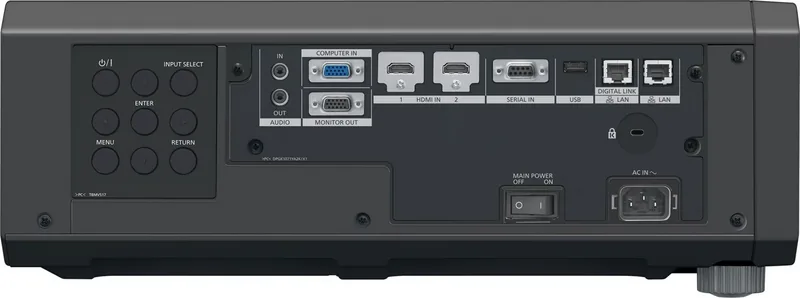
Connections include HDMI 1, HDMI 2, COMPUTER IN, MONITOR OUT, AUDIO IN, AUDIO OUT, USB, LAN, DIGITAL LINK/LAN, and RS-232C. These support common AV sources, control systems, networking, and selected USB functions.
Is this answer helpful?
Wireless networking is supported when the optional Panasonic AJ-WM50 series wireless module is connected. The module uses the 2.4 GHz band and should be configured with appropriate network security settings.
Is this answer helpful?
In Normal mode, the estimated time until brightness declines to about half can be approximately 20,000 hours. Eco mode can extend the estimate to approximately 24,000 hours, depending on usage and environment.
Is this answer helpful?
Advantages and Disadvantages
Advantages

- QUAD PIXEL DRIVE produces detailed 3,840 x 2,160 projection for sharp text, graphics, and video.
- Up to 5,200 lumens and 20,000:1 contrast support bright, high-impact commercial presentations.
- 2x zoom, lens shift, geometry correction, and 360-degree placement enable flexible installation.
- DIGITAL LINK, HDMI, LAN, RS-232C, PJLink, Art-Net, and web control support integrated AV systems.
- Laser light source offers long estimated operating life and reduced maintenance requirements.
Disadvantages

- Maximum brightness and contrast figures depend on specific picture mode and operating settings.
- Optional hardware is required for wireless LAN connectivity and certain installation configurations.
- 4K input over DIGITAL LINK has distance and transmitter compatibility limitations.
- Professional installation is recommended for ceiling mounting, network setup, and complex cable runs.
- Laser brightness declines over time, and internal servicing may be needed after extended use.
Product Specification
Type
DLP, 1 x 0.65"
Light source
Laser
Resolution (supported)
Ultra HD (3840 x 2160)
Resolution (native)
Full HD (1920 x 1080)
Brightness
-/5,200/4,100 ANSI lumens (High/Standard/Eco)
Contrast
20,000:1
Image diagonal
40.16-300 in
Throw ratio
1.46:1-2.93:1
Lens shift
manual, vertical -48% to +71%, horizontal -27% to +34%
Video connections
2 x HDMI In, HDCP 2.3, 1 x VGA In, 1 x VGA Out
Audio connections
1 x Stereo Line In (RCA), 2 x Audio Jack In, 1 x Audio Jack Out
Other connections
1 x USB, 1 x RJ-45, HDBaseT, 1 x RS-232
Features
4K upscaling
Lamp life
20,000/24,000/- hours (Standard/Eco/Eco+)
Noise level
35/28 dB(A) (Standard/Eco)
Power consumption
390/310 W (Standard/Eco)
Dimensions
19.61 x 6.61 x 19.37 in (W x H x D)
Weight
35.49 lb
Product Description
Panasonic PT-FRQ50 - Read, Download & Print Free
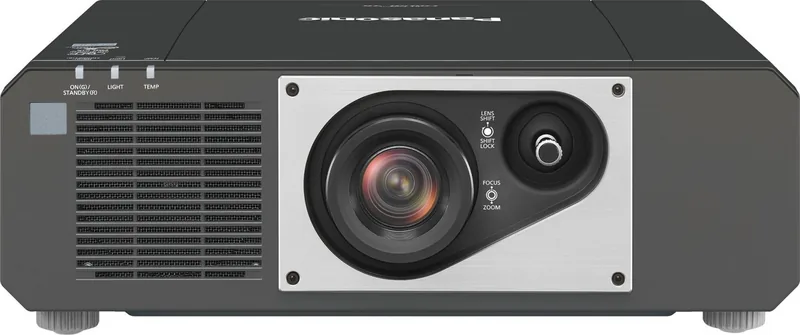
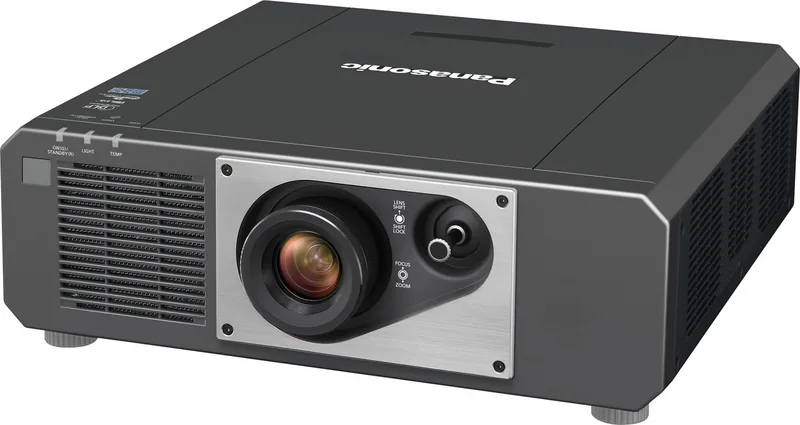
The Panasonic PT-FRQ50 is a professional DLP projector built for presentations, education, entertainment venues, and flexible commercial installations. It combines a compact design with advanced laser projection technology, making it a strong choice for users who need detailed images, dependable operation, and versatile placement options. Panasonic PT-FRQ50 - Read, Download & Print Free offers a practical overview of the features that help this projector support demanding visual environments.
Bright 4K-Style Projection
Using Panasonic QUAD PIXEL DRIVE technology, the PT-FRQ50 delivers a projection resolution of 3,840 x 2,160 pixels. This technology shifts pixels horizontally and vertically to create clear, high-resolution imagery suitable for text, graphics, video, and detailed visual content. With up to 5,200 lumens of brightness and a 20,000:1 contrast ratio in specified modes, it is designed to produce vivid images with strong depth and definition.
The projector also supports smooth motion performance through a 240 Hz drive for compatible HDMI inputs and signals up to 1080/240p. This can be especially useful for fast-moving video, live events, sports content, and interactive applications where fluid movement matters.
Flexible Installation and Connectivity
The Panasonic PT-FRQ50 is engineered for adaptable installation. Its 2x zoom, lens shift controls, geometric adjustment, and 360-degree installation capability allow it to fit a wide variety of room layouts. It can be used on a table, mounted to a ceiling, installed in portrait orientation, or positioned for front and rear projection.
Connection options include two HDMI inputs, COMPUTER IN, DIGITAL LINK/LAN, LAN, USB power output, audio connections, and RS-232C control. DIGITAL LINK supports transmission of video, audio, Ethernet, and serial control through a single twisted-pair cable installation. Optional wireless networking is available with a compatible Panasonic wireless module.
Designed for Long-Term Use
A laser light source helps reduce maintenance needs compared with conventional lamp-based projection. In Normal mode, the estimated operating time can reach approximately 20,000 hours before brightness falls to around half of its original level. Eco mode can extend the estimated operating time to approximately 24,000 hours while reducing light output.
Quiet operation is another practical advantage. In Quiet mode, the projector can operate at approximately 28 dB, helping reduce distractions in classrooms, meeting rooms, galleries, and other noise-sensitive spaces. Network control, PJLink, Art-Net, HDMI-CEC, web-based management, and Panasonic monitoring software provide useful tools for professional system management.
Notes
- Use the projector indoors with adequate airflow around its ventilation openings.
- Avoid looking directly into the projection beam and follow all laser safety guidance.
- Ceiling installation and DIGITAL LINK cabling should be completed by qualified professionals.
Search for 67,732 Manuals online


Type-in Brand or Model