
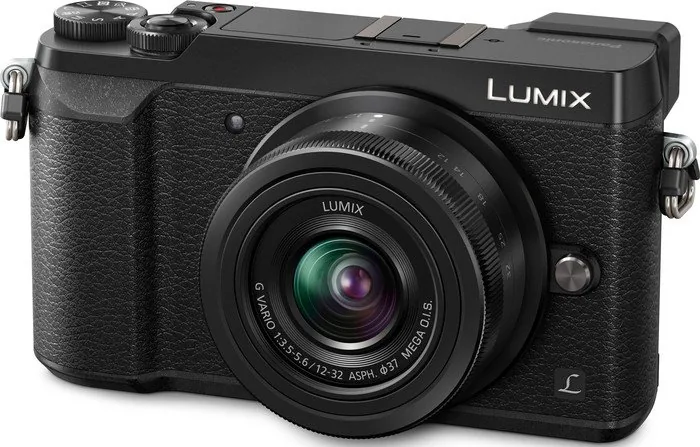
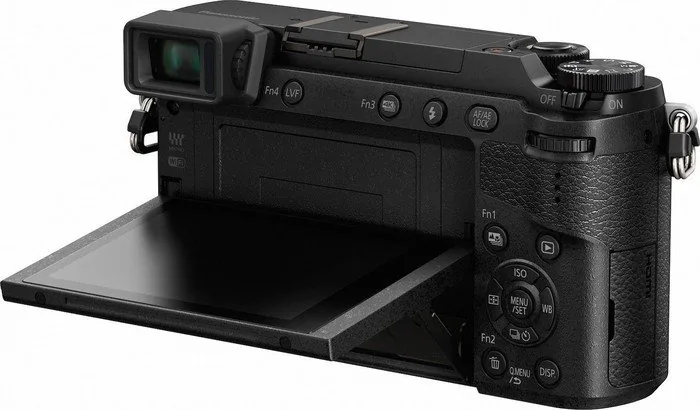
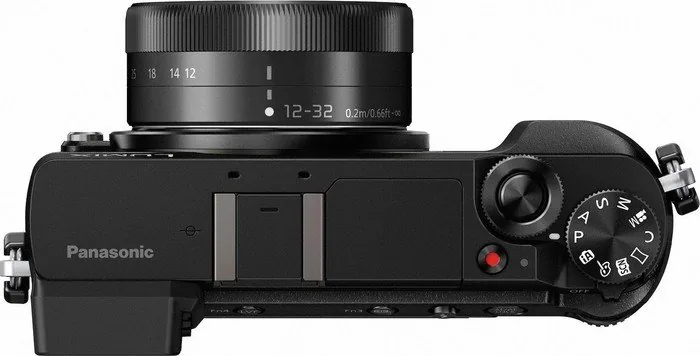
Panasonic Lumix DMC-GX80 Manual
PDF manual · 338 Pages
English


Quick check
Incorrect answer, please try again.
Chat with your Panasonic Lumix DMC-GX80 manual using AI
Get instant AI answers from your Panasonic Lumix DMC-GX80 manual
Ask anything about the Panasonic Lumix DMC-GX80. Answers come from this manual, with the pages they are based on.
Ask a Question
Do you recommend Lumix DMC-GX80?
Yes NoFrequently Asked Questions
Continuous recording stops after approximately 29 minutes and 59 seconds. This limit is in place to manage file sizes and prevent overheating issues during extended capture sessions.
Is this answer helpful?
To record 4K video effectively, you should use SDHC or SDXC cards that support UHS Speed Class 3. Lower class cards may not sustain the required data writing speeds for quality recording.
Is this answer helpful?
You can charge the battery using the enclosed AC adapter or via USB connection to a computer. Ensure the camera is powered off or in standby mode during the charging process to avoid errors.
Is this answer helpful?
Yes, this camera allows the use of Micro Four Thirds lenses. Some advanced auto-focus or stabilization features may be limited or deactivated depending on the specific lens manufacturer and model used.
Is this answer helpful?
The touchscreen allows for quick menu navigation, focus point selection via tap, and exposure optimization. It also supports pinch gestures for zooming during playback of images and video.
Is this answer helpful?
Yes, the camera features a 5-Axis Hybrid Image Stabilizer. This system compensates for hand shake, ensuring sharper photos and smoother video even when shooting handheld in low light conditions.
Is this answer helpful?
Under CIPA standards using the recommended accessory battery pack, you can expect approximately 290 shots per charge. Replacing with original parts helps maintain this performance level.
Is this answer helpful?
Advantages and Disadvantages
Advantages

- Supports 4K video recording and 4K Photo mode for extracting still frames from video sequences.
- Features a 5-Axis Hybrid Image Stabilizer to correct camera shake during handheld shooting.
- Includes Wi-Fi connectivity for remote control and seamless image transfer to smartphones.
- Has a tiltable touchscreen display for flexible shooting angles at various heights.
- Utilizes Dual Control Wheels for quick adjustments of aperture and shutter speed.
Disadvantages

- Recorded video duration is limited to approximately thirty minutes due to file size management.
- Battery life supports roughly 290 shots per charge depending on usage conditions.
- Memory cards for 4K video must meet UHS Speed Class 3 requirements for optimal performance.
- Certain advanced functions may not be available when using video recording modes.
- Lens functionality varies, and some features may be disabled depending on the attached lens.
Product Specification
Type
Mirrorless
Effective Megapixels
16.0 MP
Sensor
Four-Thirds, Live MOS 0.68x0.51 in, 3.77um Pixel Size, without anti-aliasing filter
Autofocus
Contrast-detection, 49 Points
Resolutions
Max. 4592x2584 (16:9) / 4592x3064 (3:2) / 4592x3448 (4:3) / 3424x3424 (1:1) Pixels (JPEG / RAW)
Lens Mount
Micro Four Thirds, Crop Factor 2.0
Image Stabilization
Optical, compensates up to 3 Shutter Stops
Display
3.0 in LCD, Live View, Touchscreen, 1.04 Million Pixels, Tilting
Viewfinder
Electronic, 2.76 Million Pixels, 100% View Coverage, 0.70x Magnification
Flash
Built-in and Flash Shoe
Flash Sync
1/160s, 1st Curtain Sync, 2nd Curtain Sync
Video Recording
MPEG-4, 3840x2160@25p (16:9), 1920x1080@50p (16:9)
Sensitivity (ISO)
200-25600, Expands to 100-25600
Shutter Speed
1/4000-60s (Mechanical), 1/16000-1s (Electronic)
Continuous Shooting
Max. 8 Frames/sec
Memory Card
SD / SDHC / SDXC (UHS-I)
Connections
USB 2.0 (Charging), HDMI
Wireless
Wi-Fi 4 (WLAN 802.11b/g/n)
Power Supply
Li-ion Battery (DMW-BLG10E), External Power Optional
Dimensions (WxHxD)
4.80 x 2.78 x 1.73 in
Weight
13.51 oz
Weight with Battery and Card
15.03 oz
Manufacturer Warranty
2 Years
Product Description
Mastering the Panasonic Lumix DMC-GX80
The DMC-GX80 represents a significant step forward in mirrorless photography. It offers a robust build equipped with advanced imaging technology suitable for both beginners and serious hobbyists. To fully utilize the potential of this device, many enthusiasts refer to the official Panasonic Lumix DMC-GX80 Manual for detailed instructions. This resource covers essential operations from basic setup to complex creative modes.
Video and Photo Capabilities
One of the primary advantages is the support for 4K video recording formats. This allows videographers to capture high-resolution content with impressive detail. The camera also features 4K Photo mode, which extracts individual stills from video sequences. This feature is ideal for action shots where a single frame is perfect. However, recording times are limited to manage file sizes effectively, often stopping after approximately thirty minutes. Users must plan their shoots accordingly.
Stabilization and Controls
Image stability is crucial for handheld shooting. The system includes a 5-Axis Hybrid Image Stabilizer that corrects shake during movement. This ensures crisp images even in low light. The touchscreen display is tiltable, offering flexibility for various angles. Operators can control the aperture and shutter speed using dual dials located on the top plate. Touch focusing allows users to tap the screen to set the focus point instantly. This intuitive design reduces the time spent on adjustments.
Connectivity and Lenses
Modern workflows require seamless data transfer. Wi-Fi connectivity enables remote control via smartphone applications. You can transfer images to social media or store them on cloud services directly. Compatible lenses such as the H-FS12032 and H-H020A expand the focal range significantly. Memory card speeds must match requirements, specifically UHS Speed Class 3 for 4K video. The camera battery lasts for roughly 290 shots per charge depending on usage.
Detailed Setup Instructions
Beginners often need guidance on initial configuration. Setting the date and time is the first step after purchasing. You can also adjust menu preferences to suit personal habits. The guide explains how to format cards safely to prevent data loss. Troubleshooting tips address common issues like condensation or lens errors. By following the structured advice, maintaining the camera becomes much easier. Photography becomes accessible to everyone willing to learn the tools provided by the Panasonic Lumix DMC-GX80 Manual.
Maintenance and Power
Proper battery care ensures longevity. The camera supports charging via USB or an AC adapter. Always use original parts to avoid damage. The LCD screen requires a soft cloth for cleaning. Avoid exposing the lens to dust and moisture. Following these maintenance tips will keep your equipment in top condition.
Conclusion
In summary, this camera balances performance with usability. Whether shooting landscapes or portraits, it delivers high standards consistently. Explore every function to enhance your creative output.
Search for 67,706 Manuals online


Type-in Brand or Model