
Panasonic Home Safety Starter Kit Plus Manual
PDF manual · 24 Pages
English


Quick check
Incorrect answer, please try again.
Chat with your Panasonic Home Safety Starter Kit Plus manual using AI
Get instant AI answers from your Panasonic Home Safety Starter Kit Plus manual
Ask anything about the Panasonic Home Safety Starter Kit Plus. Answers come from this manual, with the pages they are based on.
Home Safety Starter Kit Plus Maintenance Schedule
Regularly remove dust from the AC adaptor or power plug by pulling it from the outlet and wiping with a dry cloth to prevent fire.
Wipe the product's outer surface with a soft moist cloth. Do not use benzine, thinner, or abrasive powder.
Ask a Question
Do you recommend Home Safety Starter Kit Plus?
Yes NoFrequently Asked Questions
It provides a central hub for building a connected home safety system. You can link compatible cameras, sensors, smart plugs, and handsets, then manage them through the Home Network app for alerts and remote control.
Is this answer helpful?
Yes. The system is designed to grow with your needs. You can add compatible indoor cameras, outdoor cameras, motion sensors, window or door sensors, smart plugs, and cordless handsets as your setup expands.
Is this answer helpful?
Yes, the Home Network app is used for setup, registration, and remote access. It connects your mobile device to the hub and lets you control and monitor the system from your phone or tablet.
Is this answer helpful?
Yes, but a compatible microSD card is required for recording. The card is inserted into the hub, which stores image data from supported cameras.
Is this answer helpful?
The hub will not operate during a power failure, and telephone features will also stop working. For that reason, a corded backup phone is recommended if telephone access is important.
Is this answer helpful?
Up to eight mobile devices can be registered to the hub. However, only the first four registered mobile devices can use phone features.
Is this answer helpful?
It includes helpful safety and security features, but users should still set strong passwords, enable wireless encryption, and keep mobile devices protected with a screen lock for better security.
Is this answer helpful?
Advantages and Disadvantages
Advantages

- Expandable hub-based system supports cameras, sensors, smart plugs, and handsets.
- Home Network app makes monitoring and control convenient from mobile devices.
- Cameras and sensors can trigger recordings, alerts, and other automations.
- Smart plug support adds everyday control plus power-use tracking and protection.
Disadvantages

- Initial setup requires Wi-Fi configuration and app registration before use.
- Performance depends on wireless signal quality and router placement.
- The system is an auxiliary safety tool, not guaranteed full property protection.
- Camera recording needs a compatible microSD card, which is not included.
Product Specification
Type
Set
Standard
DECT ULE, WLAN (802.11b/g/n)
Function
Gateway, Central unit, Opening/closing sensor, Warning function, Motion
Topology
Star
Special features
Controllable via app
Set includes
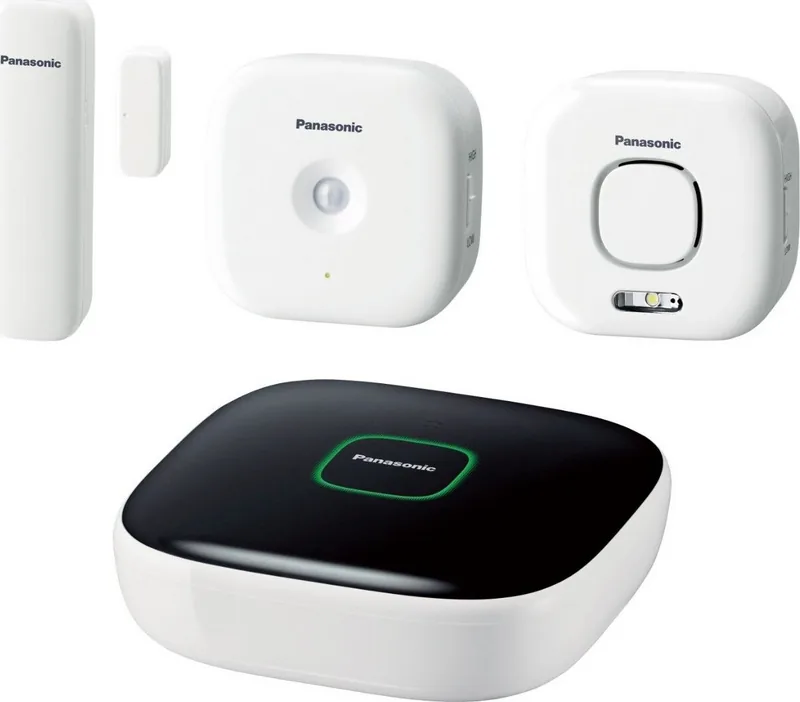
1x Actuator, 2x Sensor, 1x Central unit
Product Description
Panasonic Home Safety Starter Kit Plus Set
The Panasonic Home Safety Starter Kit Plus Set is a practical way to build a connected home safety setup without turning everyday life into a complicated tech project. At the center of the system is a smart hub that links compatible devices through a wireless network and the Home Network app, giving you a simple place to manage cameras, sensors, handsets, and smart plugs.
What stands out most is how expandable the system feels. You can start with the hub and basic essentials, then add indoor or outdoor cameras, motion sensors, window and door sensors, or smart plugs as your needs grow. That makes the kit appealing for families who want a flexible setup that can adapt to apartments, larger homes, or multi-room coverage over time.
The hub is designed to work as the control center. Once connected to your router and mobile device, it supports remote access, device registration, and notification features that help you stay aware of what is happening at home. Cameras can monitor live activity and record footage, while sensors can trigger actions such as alerts, lighting changes, or camera recording. Smart plugs add another useful layer by allowing scheduled or sensor-based control of plugged-in devices.
Another benefit is the balance between convenience and reassurance. The system supports several mobile devices, so different family members can stay connected, and the setup flow is straightforward enough for many users to complete with app guidance. For people searching for the Panasonic Home Safety Starter Kit Plus Set Manual, the main idea is clear: this is an app-driven, modular home safety ecosystem built for everyday confidence.
Notes
- Works best when the hub is placed centrally and away from interference.
- A microSD card may be needed for camera recording.
- The system offers useful alerts and control, but it is not a full replacement for professional security.
- Router access, Wi-Fi settings, and mobile registration are essential for first-time use.
Search for 67,706 Manuals online


Type-in Brand or Model