

Palmer Studimon 5 Manual
PDF manual · 40 Pages
English



Quick check
Incorrect answer, please try again.
Chat with your Palmer Studimon 5 manual using AI
Get instant AI answers from your Palmer Studimon 5 manual
Ask anything about the Palmer Studimon 5. Answers come from this manual, with the pages they are based on.
Ask a Question
Do you recommend Studimon 5?
Yes NoFrequently Asked Questions
For nearfield monitoring, the optimal distance is approximately one meter from the listening position. The monitors should form an equilateral triangle with the listener's head, with tweeters at ear height.
Is this answer helpful?
While unbalanced cables like mono jack plugs can be used, balanced cabling with shielded XLR cables is strongly recommended to reduce susceptibility to interference and ensure the best sound quality.
Is this answer helpful?
Each monitor measures 190 mm in width, 268 mm in height, and 215 mm in depth. They weigh approximately 3.84 kg each.
Is this answer helpful?
Yes, but commercial use is subject to national accident prevention rules. Users must be aware of potential health risks associated with high volumes and avoid prolonged exposure above 90 dB to prevent hearing damage.
Is this answer helpful?
Replace the fuse only with one of the same type and rating as specified on the housing. If the fuse blows repeatedly, contact an authorized service center immediately rather than attempting further repairs yourself.
Is this answer helpful?
The monitor includes protection circuits for overheating. If the surface becomes hot, wait at least 10 minutes for it to cool down before handling or transporting the device to ensure safety.
Is this answer helpful?
Advantages and Disadvantages
Advantages

- Bi-amping technology delivers precise and dynamic sound reproduction
- Magnetically shielded drivers prevent interference with other equipment
- Balanced XLR and TRS inputs ensure high-quality signal transmission
- Robust construction using birch plywood and MDF for durability
- Wide frequency response from 70 Hz to 20 kHz covers all audio needs
Disadvantages

- Requires separate stands to avoid mechanical coupling issues
- High volume usage may pose hearing risks if exposure is prolonged
- Not suitable for tropical climates due to specific operating limits
- Maximum altitude limit of 2000 meters restricts high-elevation use
- Fuse replacement must be done by authorized personnel only
Product Specification
Principle
2-way
Tweeter
1x 0.75"/19.1mm
Woofer
1x 5"/127mm
Frequency range
70Hz-20kHz (-3dB)
Power
60W RMS
SPL max.
103dB
Dimensions
7.48x10.55x8.46in (WxDxH)
Weight
8.71lbs
Product Description
Discover the Palmer Studimon 5 Pair: Precision in Every Note
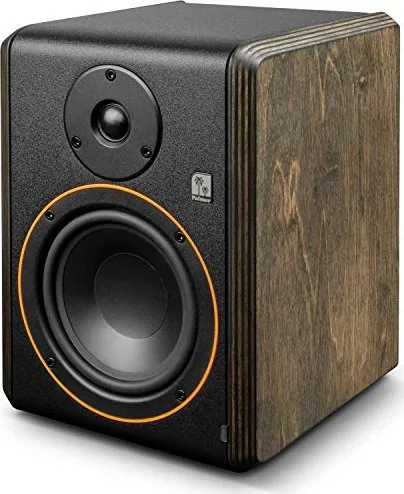
The Palmer Studimon 5 Pair represents a significant leap forward for home studios and professional mixing environments alike. These compact yet powerful nearfield monitors are engineered to deliver a sound that is both accurate and dynamic, making them an ideal choice for critical listening tasks. By utilizing advanced bi-amping technology, each speaker houses dedicated amplifiers for low and high frequencies, ensuring that every detail of your mix is reproduced with clarity.
At the heart of the Studimon 5 lies a magnetically shielded 5-inch woofer paired with a 0.75-inch silk dome tweeter. This combination allows for extended low-frequency performance without sacrificing the crispness of the highs. The bass reflex port further enhances the depth of the sound, providing a rich auditory experience that fills the room without distortion. Whether you are producing electronic music or recording acoustic instruments, these monitors offer the transient response necessary to capture the nuance of your performance.
Installation is straightforward, designed to fit seamlessly into any studio setup. The optimal listening position forms an equilateral triangle between the two speakers and the listener, with the tweeters aligned at ear height. This positioning ensures a homogeneous stereo image, allowing you to hear exactly what was recorded. The units feature balanced XLR and 6.35 mm inputs, which minimize interference and maintain signal integrity over long cable runs. A volume control on the front panel provides easy access to adjust levels quickly during sessions.
Durability and safety are paramount in the design of the Studimon 5. The enclosure is crafted from sturdy birch plywood and MDF, finished in a sleek black coat that resists scratches and wear. Safety features include protection against short circuits and overheating, ensuring reliable operation even during extended use. The power LED indicator provides immediate visual feedback on the status of the unit. With a maximum sound pressure level of 110 dB, these monitors can handle loud passages without breaking a sweat, making them suitable for demanding professional applications.
Important Usage Notes
To achieve the best results, avoid placing the monitors in corners or near reflective surfaces that could cause unwanted resonances. Always ensure adequate ventilation around the unit to prevent overheating. If the device has been exposed to extreme temperature changes, allow it to acclimate to room temperature before powering it on. Regular cleaning with a dry cloth will keep the exterior looking pristine. Remember to disconnect the power when not in use to extend the lifespan of the internal components.
Search for 67,732 Manuals online


Type-in Brand or Model