
Oversteel Aeris Manual
PDF manual · 47 Pages
English



Quick check
Incorrect answer, please try again.
Chat with your Oversteel Aeris manual using AI
Get instant AI answers from your Oversteel Aeris manual
Ask anything about the Oversteel Aeris. Answers come from this manual, with the pages they are based on.
Ask a Question
Do you recommend Aeris?
Yes NoFrequently Asked Questions
No, the Oversteel Aeris RGB does not come with a power supply. You must purchase an ATX power supply separately, ensuring it is up to 180mm in length.
Is this answer helpful?
The case supports MicroATX and Mini-ITX motherboard types, providing flexibility for compact builds or mid-tower configurations.
Is this answer helpful?
Yes, the case supports radiators up to 240mm at the front and top positions, or up to 120mm at the rear for liquid cooling systems.
Is this answer helpful?
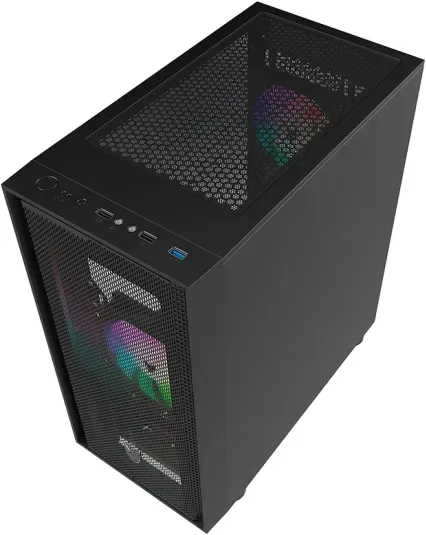
The front I/O includes one USB 3.0 connector and two USB 2.0 connectors, plus headphone and microphone ports for audio devices.
Is this answer helpful?
You can install graphics cards with a maximum length of 330mm, allowing for most modern high-performance video cards to fit inside.
Is this answer helpful?
Advantages and Disadvantages
Advantages

- Included RGB fans for immediate visual impact.
- Supports up to 240mm radiators at top and front.
- Magnetic dust filters reduce cleaning frequency.
- Tempered glass side panel offers premium aesthetic.
- Supports long graphics cards up to 330mm.
Disadvantages

- Power supply unit must be purchased separately.
- Only one USB 3.0 port available on front panel.
- Tempered glass panel requires careful handling during assembly.
- No rear panel dust filter mentioned in specs.
- CPU cooler height limited to 170mm maximum.
Product Specification
External
N/A
Internal
2x 2.5"/3.5" (Horizontal, Drive Rails), 2x 2.5"
Ports
1x USB-A 3.0 (5Gb/s), 1x USB-A 2.0 (480Mb/s), 1x 3.5mm Jack (Line-In/Out)
PCI Slots
4
Fans (Front)
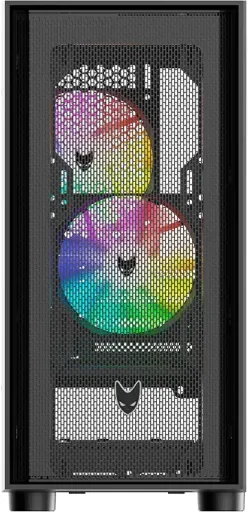
1x 4.72" (RGB Backlight) or 3x 4.72" (optional) or 2x 5.51" (optional)
Fans (Rear)
1x 4.72" (RGB Backlight)
Fans (Left)
N/A
Fans (Right)
N/A
Fans (Top)
2x 4.72" (optional) or 2x 5.51" (optional)
Fans (Bottom)
N/A
Fans (Other)
N/A
Radiator Sizes
4.72"/9.45" front, 4.72"/9.45" top, 4.72" rear
Motherboard
up to mATX
Supported Motherboards
Mini-ITX (6.7"x6.7") / mATX (9.6"x9.6")
Power Supply
ATX (max. 7.09" depth)
Power Supply Position
bottom
CPU Cooler
max. 6.69" height
Graphics Cards
max. 12.99"
Lighting
RGB Header, integrated LED controller, lit fans
Dimensions (WxHxD)
8.07"x16.22"x13.39"
Volume
1752.59 cu in
Weight
10.80 lbs
Case Type
Mini-Tower
Front
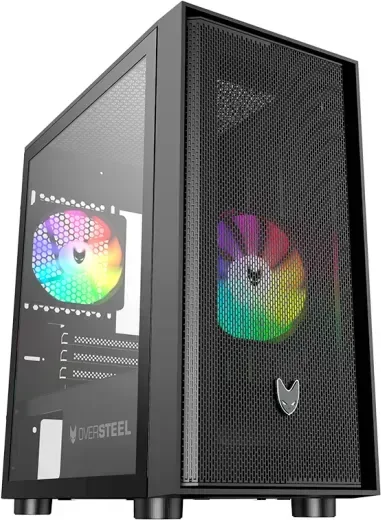
Mesh
Top
partially enclosed, mostly fan grille, dust filter on outside
Bottom
partially enclosed, fan grille, dust filter on outside
Left
solid, glass
Right
solid
Rear
partially enclosed, fan grille top right, PCI Slots (4x horizontal)
Front I/O Position
Case Side: top, Height: Front, Position: center
Features
Cable management, dust filters, glass viewing window
USB Labeling
Left
Product Description
Oversteel Aeris RGB: Elevating Your Gaming Setup
The Oversteel Aeris RGB case brings a blend of style and performance to your desktop gaming environment. Designed for enthusiasts, this tower supports a vast range of components while maintaining excellent airflow. Constructed with 0.6mm SPCC steel and a large tempered glass side panel, the build quality feels durable yet modern for any room setup. The black finish complements most component colors including white PC builds if painted.
Cooling and Airflow Dynamics
Performance is key when running games at high temperatures over long hours. The front panel features a heavy mesh design allowing optimal air intake vital for system stability. Users can install three 120mm fans in the front including one RGB unit right out of the box. The rear panel provides an additional 120mm RGB fan for efficient exhaust. For extreme cooling needs enthusiasts can implement custom liquid cooling loops. You can fit a 240mm radiator at the front or top sections, or a 120mm unit at the back. This ensures your CPU stays cool under heavy gaming loads.
Expansion and Storage Capabilities
Inside the chassis there is room for significant upgrades. The motherboard tray supports MicroATX and ITX form factors efficiently. Drive bays accommodate two 2.5-inch SSDs and two 3.5-inch hard drives. Long graphic cards up to 330mm fit easily without obstruction. There are four expansion slots available for additional PCIe cards. Front I/O includes one USB 3.0 port, two USB 2.0 ports, and audio jacks for your gaming headset and microphone.
Build and Assembly Experience
Assembly is straightforward with clear labeling on screw holes. The tempered glass side panel requires careful handling. A special 90-degree hinge mechanism allows safe removal and installation repeatedly. Magnetic dust filters on the top and bottom help keep loose debris from entering the system internally. Accessory bags include necessary standoffs and screws for various component mounting needs.
This chassis is a solid choice for gamers prioritizing aesthetics and ventilation. Its external dimensions measure 340mm by 205mm by 412mm vertically. Total weight sits at 4.9kg during shipping. Power supply units up to 180mm fit in the bottom enclosure compartment easily.
Important Installation Note
Power supply and graphics cards are not included in the standard box. Verify compatibility with your specific components before purchase. Ensure proper cable management for best airflow efficiency inside the case. RGB lighting requires controller connections.
Search for 67,732 Manuals online


Type-in Brand or Model