
Optoma ZU606TSTe Manual
PDF manual · 67 Pages
English



Quick check
Incorrect answer, please try again.
Chat with your Optoma ZU606TSTe manual using AI
Get instant AI answers from your Optoma ZU606TSTe manual
Ask anything about the Optoma ZU606TSTe. Answers come from this manual, with the pages they are based on.
Ask a Question
Do you recommend ZU606TSTe?
Yes NoFrequently Asked Questions
Ensure you use the recommended ceiling mount kit. Verify that the mounting screws meet the M4*5 specification and are at least 5mm long. Maintain a minimum distance of 10cm between the ceiling and the projector bottom. Ensure proper ventilation clearance around all air vents to prevent overheating.
Is this answer helpful?
The Optoma ZU606TSTe has a native resolution of 1920 x 1200 (WUXGA). It supports various input resolutions up to 4K UHD, but will scale them to fit its native panel. For 3D content, it recommends a resolution of 1920 x 1080 at 60Hz for optimal performance.
Is this answer helpful?
Yes, the projector supports network control via RJ-45. You can manage settings, view status, and even turn the device on or off using web browsers or compatible control systems like Crestron, Extron, PJLink, and AMX. Telnet and HTTP protocols are also supported for custom integrations.
Is this answer helpful?
It is recommended to clean the dust filter once every three months. If the projector is used in a particularly dusty environment, you should check and clean it more frequently to maintain proper cooling and extend the life of the light source.
Is this answer helpful?
Yes, the Optoma ZU606TSTe supports 3D viewing using DLP Link technology. You will need compatible active shutter glasses. The projector supports frame sequential formats and works best with 1080p signals at 60Hz. Note that 4K resolution is not supported in 3D mode.
Is this answer helpful?
If the internal temperature becomes critical, the temperature LED will glow red and the operation LED will blink red. The projector will automatically shut down to protect itself. Wait at least 30 seconds before attempting to restart. Ensure air vents are clear and ambient temperature is within the operating range.
Is this answer helpful?
Advantages and Disadvantages
Advantages

- Native WUXGA resolution for crisp text and detailed images
- Versatile installation options including ceiling and rear projection
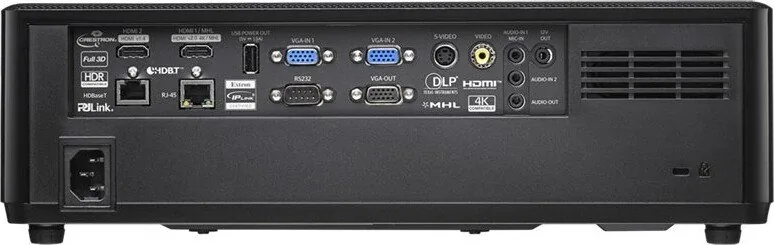
- Comprehensive connectivity with HDMI, VGA, and HDBaseT ports
- Advanced geometric correction and lens shift capabilities
- Network management for remote control and monitoring
Disadvantages

- Lamp replacement may require professional service
- Remote control range limited by line-of-sight requirements
- No built-in smart TV apps or streaming services
- Dust filter access requires turning off power first
- Fan noise may be noticeable in very quiet environments
Product Specification
Type
DLP
Light Source
Phosphor Laser
Resolution (Displayable)
WUXGA (1920x1200)
Resolution (Native)
WUXGA (1920x1200)
Brightness
6,300 ANSI Lumens (High/Standard/Eco)
Contrast
300,000:1
Image Diagonal
4.37-14.34 ft
Projection Distance
2.92-9.61 ft
Projection Ratio
0.79:1
Lens Shift
Motorized
Video Inputs
2x HDMI 1.4a In, MHL, 2x VGA In, 1x VGA Out, 1x Composite Video In, 1x S-Video In
Audio Inputs
1x 3.5mm Audio In, 1x 3.5mm Audio Out
Other Inputs
1x USB, 1x RJ-45, HDBaseT, 1x RS-232
Features
3D ready (active), HDR, Built-in Speaker (2x 10W)
Lamp Life
30,000 hours (Standard/Eco/Eco+)
Noise Level
33 dB(A) (Standard/Eco)
Power Consumption
389 W (Standard/Eco)
Dimensions
14.72x4.61x11.89 in (WxDxH)
Weight
12.13 lbs
Product Description
Unlocking the Full Potential of the Optoma ZU606TSTe Projector
The Optoma ZU606TSTe stands as a premier choice for professionals and enthusiasts seeking high-performance projection. This device delivers stunning visual clarity with its native WUXGA resolution, ensuring that every detail in presentations, movies, or gaming sessions is rendered with exceptional sharpness. The projector is designed to handle complex environments, offering versatile installation options including front, rear, ceiling, and high-mount configurations. Its robust build quality supports demanding applications while maintaining a sleek and compact form factor.
One of the standout features of this model is its advanced connectivity suite. Users can easily connect a wide array of devices through multiple HDMI ports supporting HDCP 2.2, VGA inputs, and HDBaseT capabilities. This flexibility allows for seamless integration into modern home theaters and corporate boardrooms alike. The inclusion of MHL support further enhances compatibility with mobile devices, enabling direct streaming from smartphones and tablets without additional adapters.
Image customization is effortless thanks to the comprehensive On-Screen Display menu. From adjusting brightness and contrast to fine-tuning color temperature and gamma curves, users have granular control over their viewing experience. The built-in geometric correction tools allow for quick adjustments to correct keystone distortion, ensuring a perfectly rectangular image regardless of the installation angle. Additionally, the projector supports 3D content via DLP Link technology, bringing immersive depth to compatible media sources.
Maintenance is straightforward with accessible dust filters that should be cleaned regularly to ensure optimal airflow and lamp longevity. Safety protocols are embedded throughout the design, featuring automatic shutdown mechanisms if overheating is detected. The unit also includes network management capabilities, allowing administrators to monitor status and control settings remotely via web interfaces or third-party systems like Crestron and AMX.
Whether used for educational lectures, business meetings, or home entertainment, the Optoma ZU606TSTe provides reliability and performance that exceeds expectations. Its ability to adapt to various lighting conditions and screen sizes makes it a versatile tool for any setting.
Important Notes
- Always ensure adequate ventilation around air intake and exhaust vents.
- Remove batteries from the remote control during long periods of non-use.
- Use only manufacturer-approved accessories to maintain warranty validity.
Search for 67,706 Manuals online


Type-in Brand or Model