
Optoma ZU506Te Manual
PDF manual · 73 Pages
English



Quick check
Incorrect answer, please try again.
Chat with your Optoma ZU506Te manual using AI
Get instant AI answers from your Optoma ZU506Te manual
Ask anything about the Optoma ZU506Te. Answers come from this manual, with the pages they are based on.
Ask a Question
Do you recommend ZU506Te?
Yes NoFrequently Asked Questions
The Optoma ZU506Te uses a native WUXGA resolution of 1920 x 1200 at 60 Hz. It is suited to detailed business presentations, widescreen computer output, and video playback.
Is this answer helpful?
Yes. Compatible HDMI inputs can accept selected 4K signals. The projector displays content using its native WUXGA imaging system. 4K input is not supported when 3D mode is active.
Is this answer helpful?
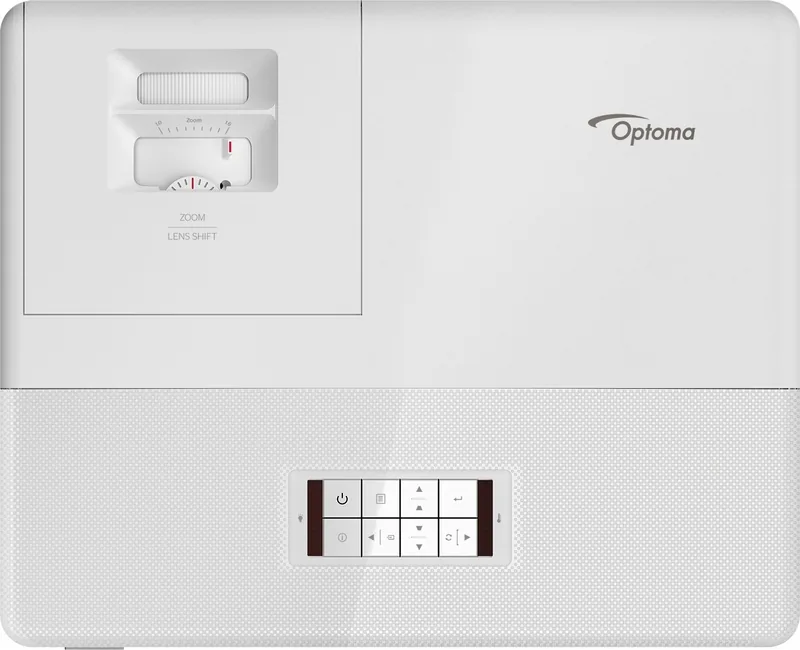
Users can adjust image size with manual zoom, sharpen it with manual focus, and reposition it with vertical lens shift. Keystone correction, four-corner correction, image shift, digital zoom, and edge masking provide additional setup flexibility.
Is this answer helpful?
Yes. Its RJ-45 connection supports browser-based management and control protocols including Crestron, Extron, PJLink, AMX Device Discovery, Telnet, and HTTP. DHCP or manually assigned network settings can be used.
Is this answer helpful?
The projector supports front projection, rear projection, ceiling-front projection, and ceiling-rear projection. It should be mounted or placed securely with adequate ventilation clearance around the air openings.
Is this answer helpful?
Keep vents clear, clean the chassis with a soft dry cloth, and never use abrasive cleaners or solvents. In dusty environments, clean the optional dust filter about every three months or more often when necessary.
Is this answer helpful?
Advantages and Disadvantages
Advantages

- Native WUXGA 1920 x 1200 resolution supports detailed presentation and widescreen content.
- Extensive image tools include manual zoom, focus, vertical lens shift, keystone correction, four-corner correction, and image shift.
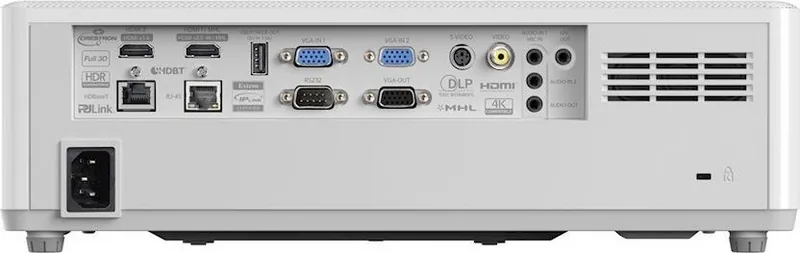
- Broad connectivity includes HDMI, VGA, video, USB power, RS232, LAN, audio, and optional HDBaseT depending on configuration.
- Network management supports web control, Crestron, Extron, AMX Device Discovery, PJLink, Telnet, and HTTP.
- Supports multiple image modes, HDR processing, DLP-Link 3D, IR 3D, and a built-in 10 W speaker.
Disadvantages

- Some ports, including HDBaseT, second VGA, and S-Video, are available only on the 15 IO configuration.
- 3D mode does not support 4K resolution and requires compatible 3D hardware and input timing.
- Manual zoom and manual focus require physical adjustment during installation.
- The projector requires unobstructed ventilation and may need more frequent filter cleaning in dusty locations.
- Non-standard mounting orientations can affect performance and may void warranty coverage.
Product Specification
Type
DLP
Light source
Phosphor laser
Resolution (displayable)
WUXGA (1920 x 1200)
Resolution (native)
WUXGA (1920 x 1200)
Brightness
-/5,500/- ANSI lumens (High/Standard/Eco)
Contrast ratio
300,000:1
Image diagonal
2.43-25 ft
Projection distance
3.28-32.81 ft
Throw ratio
1.40:1-2.24:1
Lens shift
Manual, vertical -103% +118%
Video connections
1x HDMI 2.0 In, 1x HDMI 1.4a In, MHL, 2x VGA In, 1x VGA Out, 1x Composite Video In, 1x S-Video In
Audio connections
2x 3.5 mm audio In, 1x 3.5 mm audio Out
Other connections
1x USB, 1x RJ-45, HDBaseT, 1x RS-232
Special features
3D ready (active), integrated speaker (2x 10 W)
Lamp life
30,000/-/- hours (Standard/Eco/Eco+)
Noise level
-/31 dB(A) (Standard/Eco)
Power consumption
341/190 W (Standard/Eco)
Dimensions
14.72 x 4.61 x 11.89 in (W x H x D)
Weight
12.13 lb
Product Description
Optoma ZU506Te Manual: Flexible Laser Projection for Professional Spaces
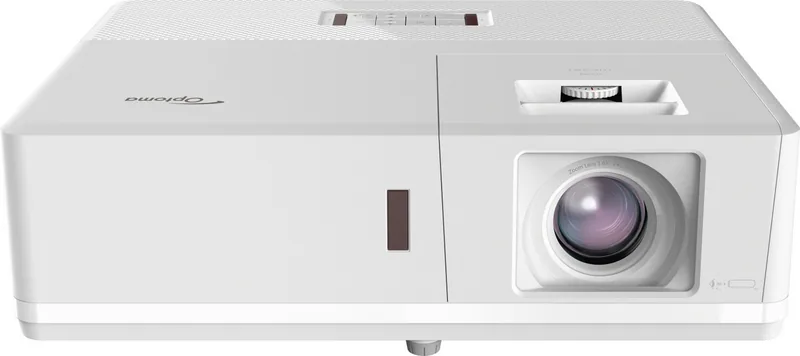
The Optoma ZU506Te is a versatile DLP laser projector designed for presentations, classrooms, meeting rooms, entertainment spaces, and installations that require dependable image performance. This Optoma ZU506Te Manual overview highlights practical capabilities that help users set up, adjust, connect, and manage the projector with confidence.
Clear Image Adjustment and Display Control
The projector supports a native WUXGA resolution of 1920 x 1200 at 60 Hz, providing a detailed widescreen workspace for business content, video, and visual presentations. It also accepts a broad range of input resolutions, including Full HD and selected 4K signals through compatible HDMI connections. Multiple picture modes, including Presentation, Bright, Cinema, Game, sRGB, HDR, and DICOM SIM, allow the image to be tailored to the content and environment.
Manual zoom, focus, adjustable feet, and vertical lens shift help simplify physical alignment. For installations where the projector cannot be placed perfectly square to the screen, users can apply vertical or horizontal keystone correction, four-corner correction, image shift, zoom, and edge masking. These tools make it easier to create a clean, properly proportioned image in real-world rooms.
Connectivity for Modern Systems
The Optoma ZU506Te includes HDMI, VGA, composite video, audio inputs and output, USB power, RS232, and RJ-45 networking. Selected configurations add connections such as HDBaseT, a second VGA input, and S-Video. This range of connectivity supports computers, media players, control systems, and longer-distance installation needs.
Network capabilities support browser-based control and compatibility with Crestron, Extron, AMX Device Discovery, and PJLink. Administrators can monitor status, configure network settings, and control key projector functions remotely. HDMI Link features can also coordinate power behavior with compatible connected devices.
Built for Adaptable Installation
Front, rear, ceiling-front, and ceiling-rear projection modes provide installation flexibility. The projector can create large images across a wide range of projection distances, while its 10 W built-in speaker provides convenient sound for straightforward presentation setups. It also supports DLP-Link and IR 3D options for compatible content and glasses.
Notes
- Maintain clear ventilation space around air inlets and outlets.
- Use the projector within a 5 to 40 degrees C operating environment.
- Allow the cooling fan cycle to finish before disconnecting power.
- Clean the optional dust filter regularly in dusty environments.
The Optoma ZU506Te combines flexible image controls, broad connectivity, remote management, and laser projection technology for demanding professional display applications.
Search for 67,706 Manuals online


Type-in Brand or Model