
Optoma ZU500TST Manual
PDF manual · 51 Pages
English



Quick check
Incorrect answer, please try again.
Chat with your Optoma ZU500TST manual using AI
Get instant AI answers from your Optoma ZU500TST manual
Ask anything about the Optoma ZU500TST. Answers come from this manual, with the pages they are based on.
Ask a Question
Do you recommend ZU500TST?
Yes NoFrequently Asked Questions
It is a professional DLP laser projector designed for presentations, installed AV systems, and long-term use in business or education settings. It emphasizes flexibility, control, and image tuning.
Is this answer helpful?
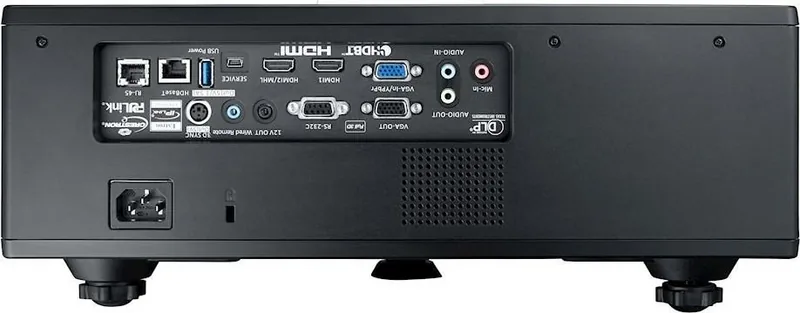
It supports a wide range of inputs and control ports, including HDMI, VGA, HDBaseT, RS232, LAN, USB, audio in/out, and more. This makes it easy to integrate into many AV setups.
Is this answer helpful?
Yes. The projector supports ceiling mounting, but the manual recommends using proper mounting hardware and keeping enough clearance for heat dissipation and safe operation.
Is this answer helpful?
Yes, it includes 3D support with several 3D format options. Users should follow the safety guidance carefully, especially for children, sensitive viewers, and extended viewing sessions.
Is this answer helpful?
Use the projector’s lens shift, focus, zoom, keystone, and 4-corner correction features. These tools help correct placement issues and fit the image to different screens.
Is this answer helpful?
Yes. The projector supports LAN control, browser-based access, and compatibility with systems like Crestron RoomView and PJLink, which is helpful for remote management.
Is this answer helpful?
Advantages and Disadvantages
Advantages

- Laser light source supports dependable, low-maintenance operation for frequent use.
- Wide connectivity makes it easy to connect PCs, video sources, and network systems.
- Lens shift, zoom, and geometric correction help with flexible installation.
- Remote and browser-based control options are useful for managed environments.
Disadvantages

- Advanced setup may feel complex for users who want a simple plug-and-play device.
- 3D viewing requires care and may not suit every audience or environment.
- Optional dust filter adds a maintenance step in dusty locations.
- Best results may depend on proper mounting, room setup, and image calibration.
Product Specification
Type
DLP
Light source
Phosphor Laser
Resolution (displayable)
WUXGA (1920x1200)
Resolution (native)
WUXGA (1920x1200)
Brightness
5,300 ANSI lumens (High/Standard/Eco)
Contrast
300,000:1
Image diagonal
2.46-25.46 ft
Projection distance
2.92-9.61 ft
Projection ratio
0.79:1
Lens Shift
manual, vertical -10% +20%, horizontal -10% +10%
Video connections
1x HDMI 1.4a In, 1x VGA In, 1x VGA Out
Audio connections
2x Jack Audio In, 1x Jack Audio Out
Other connections
2x USB, 1x RJ-45, HDBaseT, 1x RS-232
Special features
3D ready (active), integrated speaker (2x 10W)
Light source lifespan
20,000 hours (Standard/Eco/Eco+)
Noise level
28 dB(A) (Standard/Eco)
Power consumption
480 W (Standard/Eco)
Color
black
Dimensions
15.94x6.26x15.24 in (WxHxD)
Weight
24.25 lb
Manufacturer warranty
5 years
Product Description
Optoma ZU500TST Black: A Compact Laser Projector Built for Demanding Spaces
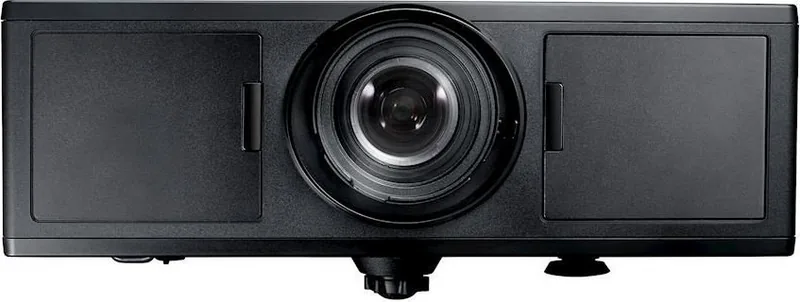
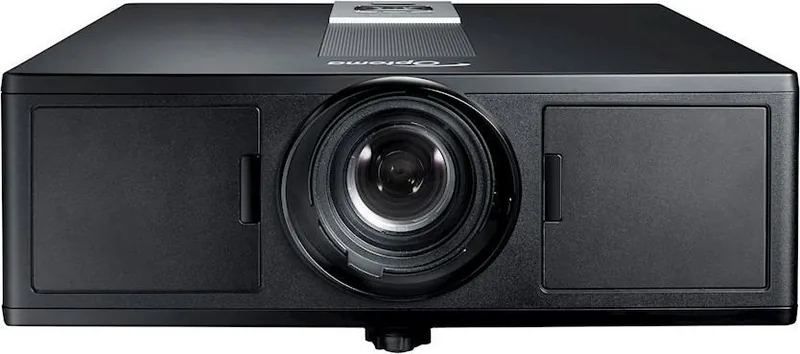
If you’ve been searching for the Optoma ZU500TST black Manual to understand what this projector can do, the big picture is clear: this is a professional DLP laser projector designed for reliable, high-performance display work. It combines a rugged build, flexible installation options, and a feature set that fits classrooms, meeting rooms, training spaces, and large presentation environments.
Designed for flexibility
One of the strongest qualities of the Optoma ZU500TST black is how adaptable it is. The projector supports multiple input types, including HDMI, VGA, HDBaseT, RS232, USB, LAN, and audio connections, making it easy to integrate into modern AV setups. It also offers network control tools, browser-based management, and support for Crestron RoomView, which is valuable for IT teams and administrators who need centralized control.
Strong image control and presentation tools
The projector includes a full set of image adjustments such as brightness, contrast, gamma, color temperature, aspect ratio, digital zoom, and geometric correction. These tools help fine-tune the image for different screen sizes and room layouts. Its lens shift, focus, and zoom controls further improve placement flexibility, while the 360-degree orientation support opens up more mounting and installation possibilities.
Built for long-term use
As a laser projector, the ZU500TST is positioned for dependable operation with reduced maintenance compared with traditional lamp-based models. The manual emphasizes safety, cooling behavior, and dust-filter care, which shows that the projector is meant for consistent use over time. It also includes 3D support, PIP/PBP options, and audio controls, making it suitable for both standard presentations and richer multimedia experiences.
Practical notes
The black finish gives it a clean, professional look that blends well into business and education environments. If you want a projector that prioritizes control, installation freedom, and durable performance, the Optoma ZU500TST black stands out as a solid choice.
Notes
- Keep ventilation clear for stable performance.
- Use the correct mounting hardware if installing overhead.
- Review laser and 3D safety guidance before regular use.
- Clean the optional dust filter regularly in dusty rooms.
Search for 67,706 Manuals online


Type-in Brand or Model