
Optoma ZU1100 Manual
PDF manual · 101 Pages
English



Quick check
Incorrect answer, please try again.
Chat with your Optoma ZU1100 manual using AI
Get instant AI answers from your Optoma ZU1100 manual
Ask anything about the Optoma ZU1100. Answers come from this manual, with the pages they are based on.
Ask a Question
Do you recommend ZU1100?
Yes NoFrequently Asked Questions
The ZU1100 is intended for professional large-screen installations, including venues, exhibitions, lecture spaces, control rooms, and multi-projector applications. Its setup features and laser safety guidance indicate that it is not designed for typical home use.
Is this answer helpful?
Yes. The projector supports compatible interchangeable lenses covering several throw ratios, including ultra-short, short, standard, and long-throw choices. Lens selection affects projector placement, image size, and applicable laser safety classification.
Is this answer helpful?
Yes. It includes advanced warping, blending width controls, overlap grid settings, gamma adjustment, and black-level controls. These tools help combine adjacent projected images into a larger, more continuous display.
Is this answer helpful?
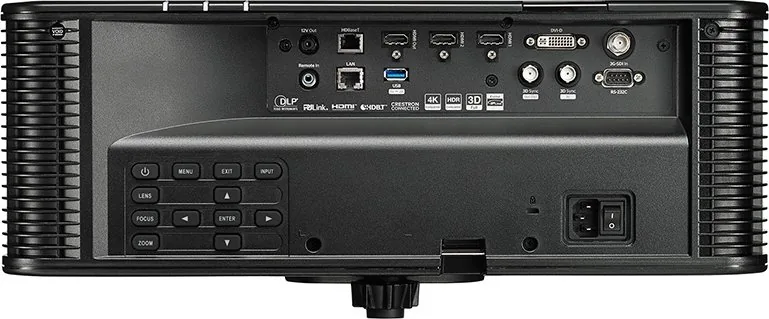
Available connections include two HDMI inputs, DVI-D, 3G-SDI, HDBaseT, Ethernet, RS-232C, 3D sync input and output, remote input, a 12 V trigger, and HDMI output. The USB Type-A port is for 5 V, 2 A power only.
Is this answer helpful?
Yes. Network management and control options include Crestron, PJLink, Extron, AMX, Telnet, and HTTP. Ethernet and HDBaseT network interface options are provided, depending on the installation configuration.
Is this answer helpful?
Do not look into the beam or allow direct beam exposure. Install the projector above head height and beyond children's reach. The BX-CTA13 long-throw lens can change the product classification to Risk Group 3, requiring additional professional safety precautions.
Is this answer helpful?
Advantages and Disadvantages
Advantages

- Interchangeable lens options support ultra-short, short, standard, and long-throw installation needs.
- Advanced warping, blending, black-level adjustment, and four-corner correction support multi-projector displays.
- Extensive connectivity includes HDMI, DVI-D, 3G-SDI, HDBaseT, Ethernet, RS-232, and 3D sync.
- Network protocols including Crestron, PJLink, Extron, AMX, Telnet, and HTTP aid professional AV control.
- Backup input switching can automatically change to a second compatible source after signal loss.
Disadvantages

- Professional installation is recommended because lens setup, alignment, and safety requirements can be complex.
- The projector is not intended for private household use.
- Laser safety classification depends on the lens, with BX-CTA13 potentially requiring Risk Group 3 precautions.
- Some automatic image calibration features require an external optional camera.
- 2D-Ultra low-latency mode limits support for 3D, picture-in-picture, and 4K at 30 Hz.
Product Specification
Type
DLP, 1 x 0.67 in.
Light source
Phosphor laser
Resolution (displayable)
WUXGA (1920 x 1200)
Resolution (native)
WUXGA (1920 x 1200)
Brightness
-/9,600/- ANSI lumens (High/Standard/Eco)
Contrast ratio
2,000,000:1
Lens shift
Motorized
Video connections
2 x HDMI 2.0 In, 1 x DVI-D In, 1 x 3G-SDI In, 1 x Component Video In
Other connections
1 x USB, 1 x RJ-45, HDBaseT, 1 x RS-232
Lamp life
20,000/-/- hours (Standard/Eco/Eco+)
Noise level
40/38 dB(A) (Standard/Eco)
Power consumption
-/360 W (Standard/Eco)
Dimensions
19.06 x 8.19 x 20.83 in. (W x H x D)
Weight
46.30 lb
Product Description
Optoma ZU1100 - Read, Download & Print Free
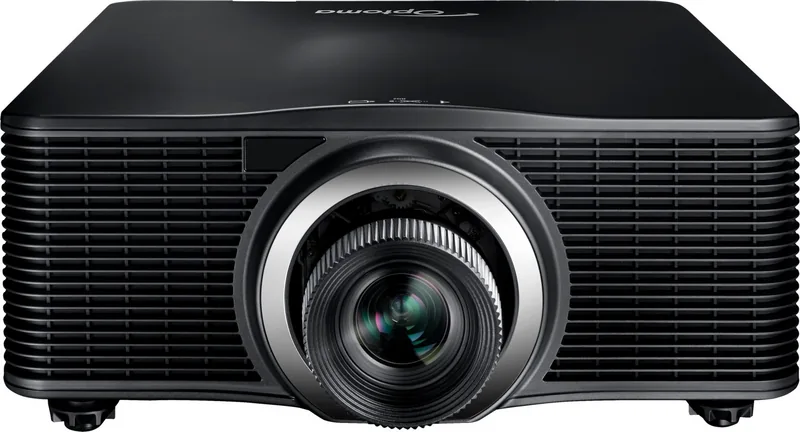
The Optoma ZU1100 is a professional laser projector designed for demanding large-screen installations where flexible placement, dependable control, and detailed image adjustment matter. It supports interchangeable lenses, allowing installers to match the projector to a wide range of room sizes, projection distances, and mounting requirements. With options spanning ultra-short to long-throw lenses, the ZU1100 can suit venues such as auditoriums, museums, exhibitions, lecture halls, control rooms, and multi-projector displays.
Flexible installation for complex spaces
The projector is built for professional environments rather than casual home use. It supports 360-degree orientation, ceiling installation, adjustable feet, motorized focus, zoom, and lens shift. Lens memory can save up to five positioning setups, helping teams return to repeatable configurations. Advanced center-axis adjustment is also available for installers who need to improve focus uniformity across the full projected image.
Image alignment tools make the ZU1100 especially useful when a standard rectangular projection is not enough. Its display controls include keystone correction, pincushion correction, four-corner adjustment, digital zoom, edge masking, and advanced warping grids. Built-in blending settings and black-level controls support larger seamless images created with multiple adjacent projectors.
Professional connectivity and control
The Optoma ZU1100 provides broad signal and control connectivity, including HDMI, DVI-D, 3G-SDI, HDBaseT, Ethernet, RS-232, 3D sync connections, and a 12 V trigger. HDMI output can pass a signal to another display device. Network control options include Crestron, PJLink, Extron, AMX, Telnet, and HTTP, making the projector suitable for centrally managed AV systems.
The projector can automatically detect sources, perform quick resynchronization, and use backup input switching when two compatible sources are connected. This can help maintain display continuity in live events, exhibitions, and other installations where signal loss is disruptive. Picture-in-picture and picture-by-picture modes also enable simultaneous viewing of two connected sources.
Image tools and operating features
A detailed on-screen menu offers presentation, bright, cinema, HDR, sRGB, blending, 3D, and user-configurable picture modes. Operators can adjust brightness, contrast, sharpness, gamma, color temperature, white balance, color management, dynamic contrast, and wall-color compensation. It also supports 3D formats and DLP-Link or external 3D synchronization options.
Notes
- Use only compatible Optoma lenses and follow lens-specific installation guidance.
- Laser safety requirements vary by installed lens, including possible Risk Group 3 classification with the BX-CTA13 lens.
- Install above head height and outside the reach of children, and never look into the projection beam.
Search for 67,706 Manuals online


Type-in Brand or Model