
Optoma ZK507-W Manual
PDF manual · 77 Pages
English



Quick check
Incorrect answer, please try again.
Chat with your Optoma ZK507-W manual using AI
Get instant AI answers from your Optoma ZK507-W manual
Ask anything about the Optoma ZK507-W. Answers come from this manual, with the pages they are based on.
Ask a Question
Do you recommend ZK507-W?
Yes NoFrequently Asked Questions
It supports multiple physical installation positions (front, rear, and ceiling variants) and provides on-device controls for image height, zoom, focus, and lens shift. This helps you align the image to your screen without major rework of mounting locations.
Is this answer helpful?
Yes. The display modes include HDR handling and HDR/HLG processing, plus HDR SIM for enhancing non-HDR content. Gamma, contrast, and color options can be adjusted based on the selected picture mode and signal type.
Is this answer helpful?
The projector is 3D ready using DLP-Link. To use 3D, you need 3D glasses compatible with DLP-Link, and your input must meet the supported frame rate and resolution expectations. The 3D menu lets you select formats such as SBS, Top and Bottom, and Frame Sequential.
Is this answer helpful?
The projector includes an internal speaker option with Auto/On/Off control, plus mute and volume settings. You can also configure audio input routing and whether audio out is enabled for external sound systems.
Is this answer helpful?
Yes. It includes LAN networking with a web interface for management. The menus support DHCP or manual IP settings, and network control options include integrations such as Crestron, Extron, PJLink, AMX, Telnet, and HTTP control channels.
Is this answer helpful?
Yes. You can enable password security so the projector prompts for a password at startup. There is also a security timer mechanism that requires re-entry after a set usage duration, plus settings for projector ID control.
Is this answer helpful?
The projector tracks filter usage hours and provides filter reminders and reset options when you clean or replace the dust filter. Cleaning is recommended periodically, especially in dusty environments, and the guidance also stresses keeping intake and exhaust vents unobstructed.
Is this answer helpful?
Advantages and Disadvantages
Advantages

- Flexible installation with zoom, focus, lens shift, and multiple mount orientations for easier screen alignment.
- Strong image controls including HDR modes, gamma selection, color temperature, color gamut, and CMS calibration.
- Convenient connectivity for AV and control, including HDMI (4K/MHL on HDMI 2), VGA, audio in/out, LAN, and RS232.
- Network management features support web control and common third-party control protocols.
- 3D-ready support with DLP-Link options and configurable 3D formats.
Disadvantages

- Laser safety requires careful handling and strict avoidance of direct beam viewing.
- 3D operation has specific signal requirements (frame rate and supported resolutions).
- Some advanced options depend on the current mode selections (for example, HDR/3D/DICOM SIM related menu limits).
- Dust filter maintenance is region-dependent but still important for consistent performance.
Product Specification
Type
DLP
Light source
Phosphor Laser
Resolution (displayable)
Ultra HD (3840x2160)
Resolution (native)
Full HD (1920x1080)
Brightness
-/5000/- ANSI Lumen (High/Standard/Eco)
Contrast
300,000:1
Screen diagonal
26.38-302.36in
Projection distance
4.27-30.51ft
Throw ratio
1.39:1-2.22:1
Lens Shift
manual, vertical -10% +15%, horizontal -0% +0%
Video connections
1x HDMI 2.0 In, 1x HDMI 1.4a In, 1x VGA In, 1x VGA Out
Audio connections
1x Digital Audio Out (optical), 1x Jack Audio In, 1x Jack Audio Out
Other connections
2x USB, 1x RJ-45, 1x RS-232
Features
3D ready (active), integrated speaker (2x 5W)
Lamp life
20000/-/- hours (Standard/Eco/Eco+)
Noise level
30/-dB(A) (Standard/Eco)
Power consumption
368/274W (Standard/Eco)
Dimensions
19.61x5.55x13.02in (WxHxD)
Weight
21.62lb
Product Description
Optoma ZK507-W Manual: A Flexible, Network-Ready Laser Projector for Bright, Detailed Displays
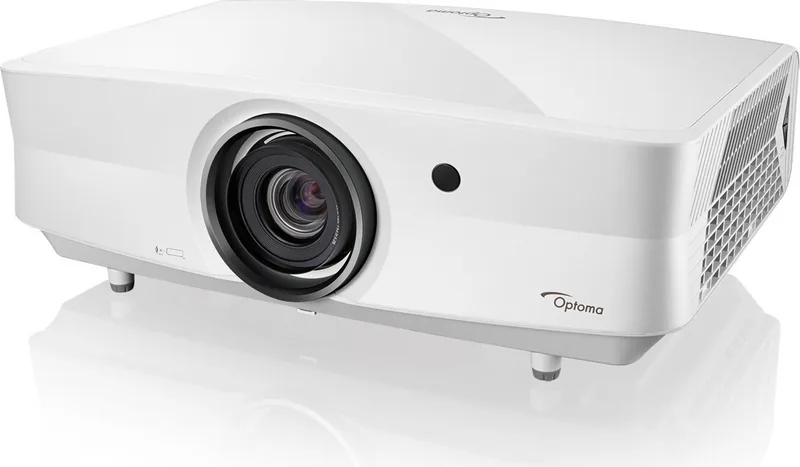
The Optoma ZK507-W is a laser DLP projector designed for users who want clean setup control, rich image options, and convenient remote management. With a feature set that supports presentations, gaming, and home theater use, it is built to deliver sharp, vibrant visuals while giving you the tools to fine-tune performance for different rooms and sources.
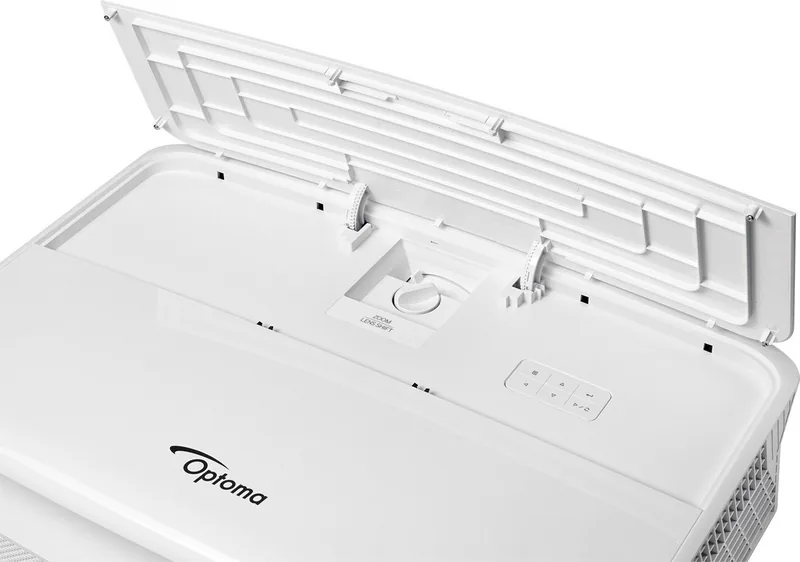
Setup is streamlined thanks to practical physical controls like focus, zoom, and lens shift, plus flexible mounting positions (front/rear and ceiling variants). You can adjust image size and alignment using the projector's zoom lever, lens shift dial, and elevator feet, making it easier to match your screen placement and viewing angle without excessive repositioning. For signal convenience, the projector supports multiple inputs including HDMI (with HDMI 2 supporting 4K/MHL), VGA, and additional connectivity for audio and control.
On the image side, the display menus offer advanced tuning for dynamic contrast, gamma, color temperature, color gamut, and CMS (color management system). HDR-focused modes help you handle modern HDR content and simulated HDR enhancement for non-HDR media. If you need 3D effects, the ZK507-W includes 3D-ready features using DLP-Link, with configurable 3D formats and sync options.
Beyond image quality, the Optoma ZK507-W Manual highlights operational features that matter in everyday use. Built-in speaker and audio mute/volume controls provide convenient sound for smaller spaces. For installations that require management, the projector includes LAN networking with a web interface plus support for common control ecosystems. Security options allow password protection, and operational settings like direct power, auto power off, sleep timer behavior, and projector ID help administrators manage multiple units.
Finally, maintenance considerations are clearly addressed. The projector includes filter usage tracking and guidance for cleaning, plus reminders around safe operation. Because it uses a built-in class laser module, safe viewing practices and correct handling steps are essential.
Key results (most important takeaways)
- Lens shift, zoom, and focus controls help achieve accurate screen placement without drastic re-mounting.
- Picture customization covers HDR and simulated HDR, gamma, color temperature, and CMS tuning.
- Network support enables web control and integration with external management systems.
- 3D ready performance uses DLP-Link with selectable 3D formats and sync control.
- Security, timers, and filter usage tracking simplify long-term operation and installation management.
Notes
- Use safe viewing practices for laser light: do not stare into the beam.
- Keep intake and exhaust vents clear and respect required clearance in enclosed installations.
- Allow the cooling cycle to finish after powering off before disconnecting power.
Search for 67,706 Manuals online


Type-in Brand or Model