
Optoma ZH520 Manual
PDF manual · 70 Pages
English



Quick check
Incorrect answer, please try again.
Chat with your Optoma ZH520 manual using AI
Get instant AI answers from your Optoma ZH520 manual
Ask anything about the Optoma ZH520. Answers come from this manual, with the pages they are based on.
ZH520 Maintenance Schedule
Turn off and unplug projector. Remove dust with compressed air. Wipe gently with a special lens cloth. Do not use alkaline/acidic cleaners.
If optional filter is enabled, reset counter after cleaning/replacing. Reminder available at 300h, 500h, 800h, or 1000h intervals.
Remove old battery and install new CR2025 battery with positive side up if remote stops working or battery leaks.
Ask a Question
Do you recommend ZH520?
Yes NoFrequently Asked Questions
You can select the preferred projection mode such as front, rear, or ceiling-top using the on-screen display menu under the display settings.
Is this answer helpful?
The cooling fans continue to operate for about 10 seconds after powering off. You must wait until the power LED turns solid red before unplugging.
Is this answer helpful?
Yes, you can control it via web browser using the LAN interface or through third-party systems like Crestron, Extron, and PJLink.
Is this answer helpful?
Use a compressed air tank for dust and a special cloth for wiping. Do not use alcohol or solvents and never touch the lens with bare hands.
Is this answer helpful?
Yes, it supports DLP-Link 3D technology. Compatible 3D glasses are required to experience the 3D effects on supported inputs.
Is this answer helpful?
The remote control uses a CR2025 3V battery. Ensure the positive side faces up when installing the battery.
Is this answer helpful?
An optional dust filter may vary by region. Consult your local agent regarding availability and installation for filter maintenance reminders.
Is this answer helpful?
Advantages and Disadvantages
Advantages

- Low input lag of 8.6ms in gaming mode for responsive performance
- Versatile mounting options including front, rear, and ceiling configurations
- Robust network control with support for Crestron and PJLink
- Laser light source ensures long-lasting performance without bulb replacement
- Support for 3D content using DLP-Link technology for immersive viewing
Disadvantages

- Requires 30 cm clearance around vents to prevent overheating during use
- Lens cleaning is restricted to special cloths to avoid coating damage
- Safety warnings require users to never stare directly into the projector beam
- Cooling cycle must complete before disconnecting power to protect components
- Remote control requires CR2025 batteries which must be installed correctly
Product Specification
Type
DLP, 1x 0.65"
Light Source
Phosphor-Laser
Resolution (displayable)
Full HD (1920x1080)
Resolution (native)
Full HD (1920x1080)
Brightness
- / 5,500 / - ANSI Lumens (High / Standard / Eco)
Contrast
3,000,000:1
Screen Size
2.59-26.84ft
Throw Ratio
1.13:1-1.47:1
Lens Shift
No
Video Inputs
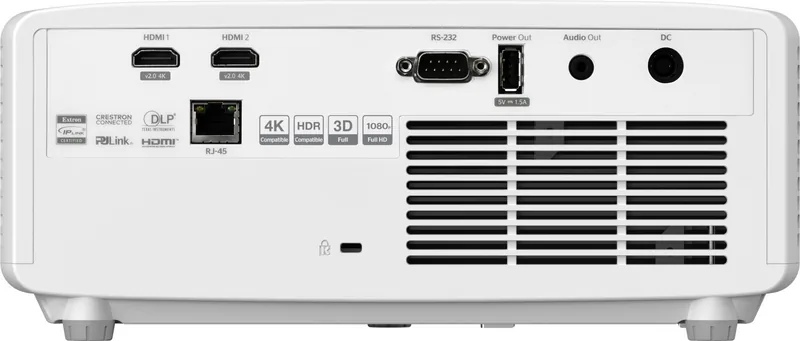
2x HDMI 2.0 In
Audio Outputs
1x 3.5mm Audio Out
Additional Ports
1x USB-A, 1x RJ-45, 1x RS-232
Features
3D ready (active), integrated speaker (1x 15W), vertical projection axis
Lamp Life
20,000 / - / - hours (Standard / Eco / Eco+)
Noise Level
31 / 29 dB(A) (Standard / Eco)
Power Consumption
205 / 128W (Standard / Eco)
Color
White
Dimensions
10.79x4.25x8.50in (WxHxD)
Weight
7.50 lbs
Manufacturer Warranty
3 Years
Product Description
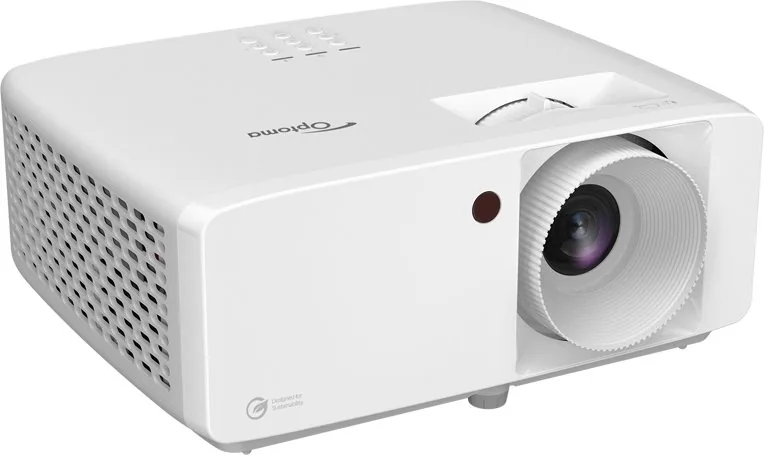
Experience Premium Visuals with the Optoma ZH520
Welcome to the future of home cinema with the Optoma ZH520. This laser projector delivers exceptional brightness and clarity, making it ideal for both entertainment and professional presentations. One of the standout features is its ability to support 3D content through DLP-Link technology, allowing users to enjoy immersive movie experiences at home. For those focused on gaming, the dynamic gaming mode significantly reduces input lag, ensuring responsive performance during high-speed action. The projector also handles various input sources seamlessly, switching automatically to detect connected devices reliably.
Installation and Setup Flexibility
Installing the Optoma ZH520 is straightforward thanks to its versatile mounting options. The device supports front, rear, and ceiling mounting configurations, offering flexibility to fit any room layout. It includes a tilt-adjustment ring and feet to help align the image properly. Proper ventilation is critical for reliability, so always maintain at least 30 cm clearance around the vents to prevent overheating. While setting up, users should consult guidelines in the Optoma ZH520 Manual to understand the specific distance tables for optimal image sizing. Image distortion can be corrected using keystone and geometric correction tools available in the on-screen display menu.
Connectivity and Control
Connectivity is robust with multiple HDMI ports supporting high-resolution signals. The unit also features network control capabilities, allowing integration with Crestron, Extron, and PJLink systems for managed environments. A web browser interface enables remote management of settings and status checks from anywhere on the network. For casual use, the IR remote control provides easy access to all functions, provided batteries are installed correctly. Network settings can be configured via DHCP or static IP for stable LAN connections.
Safety and Maintenance
Safety remains a top priority with this laser projector. Users must avoid looking directly into the lens during operation to prevent eye injury as it is classified as a consumer laser product. The cooling cycle must complete before disconnecting power to protect the internal components. Regular maintenance includes using a special cloth for the lens without touching it with bare hands. Avoid using alcohol or solvents that could damage the coating. Adhering to these practices ensures long-term performance and safety. Whether for gaming, movies, or business, the Optoma ZH520 combines advanced technology with user-friendly design to enhance every viewing session.
Power and Audio Specs
Audio output is managed through a 3.5mm jack for external speakers. Power consumption varies based on the selected mode, with an ECO setting reducing energy usage significantly. The unit supports wide resolutions including 1080p, ensuring compatibility with modern laptops and consoles. By keeping the projector secure and grounded, users minimize the risk of electric shock. This comprehensive approach to design makes it a reliable choice for diverse environments.
Search for 67,706 Manuals online


Type-in Brand or Model