
Optoma ZH403 Manual
PDF manual · 70 Pages
English



Quick check
Incorrect answer, please try again.
Chat with your Optoma ZH403 manual using AI
Get instant AI answers from your Optoma ZH403 manual
Ask anything about the Optoma ZH403. Answers come from this manual, with the pages they are based on.
Ask a Question
Do you recommend ZH403?
Yes NoFrequently Asked Questions
No. The projector uses laser technology and includes clear instructions to avoid direct eye exposure. Never stare into the direct beam, and make sure people in the projection range are not looking at the lens when powered on. Keep reflective objects and magnifiers away from the light path. If laser exposure procedures are not followed, permanent eye damage risk increases.
Is this answer helpful?
Use the manual controls first: adjust image height with the tilt feet, then set focus and size with the zoom lever and focus ring. If the image is distorted due to projector tilt, use Auto Keystone or manual Keystone. For more precise positioning, use Image Shift to move the picture horizontally and vertically. After changes, exit the OSD so settings are saved.
Is this answer helpful?
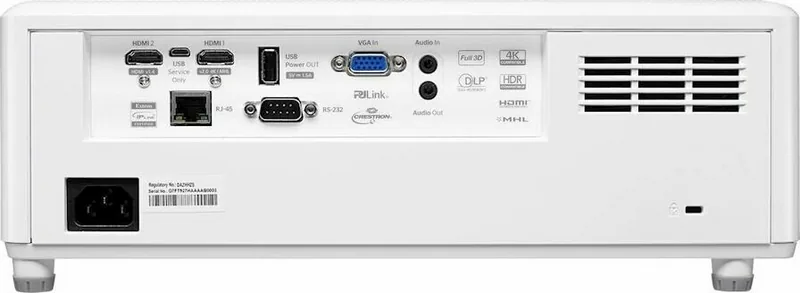
The projector supports HDMI inputs (HDMI 1 includes MHL support), VGA, and audio connections. It also includes RJ-45 for wired network control and RS-232 for advanced control. In the OSD you can select the input source (HDMI1/MHL, HDMI2, or VGA) and rename inputs for easier identification.
Is this answer helpful?
You can enable HDR/HLG processing and choose picture modes to match your content, such as Bright, Standard, Film, and Details. The manual notes that HDMI1 and VGA do not support Dynamic Range, so HDR/HLG behavior and related options can vary by input. If HDR/HLG is set to Auto, the projector detects supported signals.
Is this answer helpful?
Yes, it is 3D-ready using DLP-Link 3D. You need compatible 3D glasses and a 3D-capable source. The input frame rate must be 60Hz for 3D, and the manual specifies that 4K (3840x2160) is not supported in 3D mode. It also recommends 1920x1080 resolution for best performance.
Is this answer helpful?
Yes. The projector includes a web interface via its LAN settings. The guide instructs turning on DHCP, then entering the projector IP address into a browser and logging in. The default credentials are listed as user name and password: admin (unless changed in settings). You can also adjust LAN control features and view network status in the OSD.
Is this answer helpful?
The guide recommends cleaning the dust filter every three months, and more often if you use the projector in a dusty environment. It also notes dust filters may be supplied only in selected regions. Turn off and unplug the projector before removing the filter, then clean or replace it and reinstall by reversing the steps.
Is this answer helpful?
Advantages and Disadvantages
Advantages

- Flexible mounting orientation options for front, rear, ceiling, and rear-top setups.
- Manual zoom and focus plus keystone and image shift for easier alignment.
- Rich picture tuning with HDR/HLG modes, gamma, color temperature, and RGB gain/bias.
- Built-in 10W speaker and straightforward audio mute and volume controls.
- Wired LAN (RJ-45) enables web control and integrations like PJLink, Crestron, and Extron.
Disadvantages

- Laser safety precautions are strict: do not stare into the beam and keep the light path unobstructed.
- 3D support has limitations: requires 60Hz input and does not support 4K resolution for 3D.
- Some image features have input restrictions, such as Dynamic Range not supported on HDMI1 and VGA.
- Signal power on can increase standby power usage.
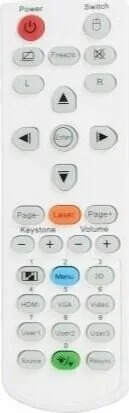
- Some accessories and features vary by model and region, including remote key functions and included manuals.
Product Specification
Type
DLP, 1x 0.65"
Light source
Phosphor laser
Resolution (displayable)
Full HD (1920x1080)
Resolution (native)
Full HD (1920x1080)
Brightness
-/4,000/- ANSI Lumens (High/Standard/Eco)
Contrast
100,000:1
Image diagonal
2.33-25.03ft
Projection distance
3.28-25.92ft
Throw ratio
1.21:1-1.59:1
Video connectors
1x HDMI 2.0 In, 1x HDMI 1.4a In, 1x VGA In
Audio connectors
1x Jack Audio In, 1x Jack Audio Out
Other connectors
1x USB, 1x RJ-45, 1x RS-232
Features
3D ready (active), integrated speaker (10W), vertical projection axis
Lamp life
30,000/-/- hours (Standard/Eco/Eco+)
Noise level
32/30dB(A) (Standard/Eco)
Dimensions
13.27x4.82x10.43in (WxHxD)
Weight
12.13lb
Manufacturer warranty
3 years
Product Description
Optoma ZH403 Manual: A practical guide to set up, tune, and maintain your projector
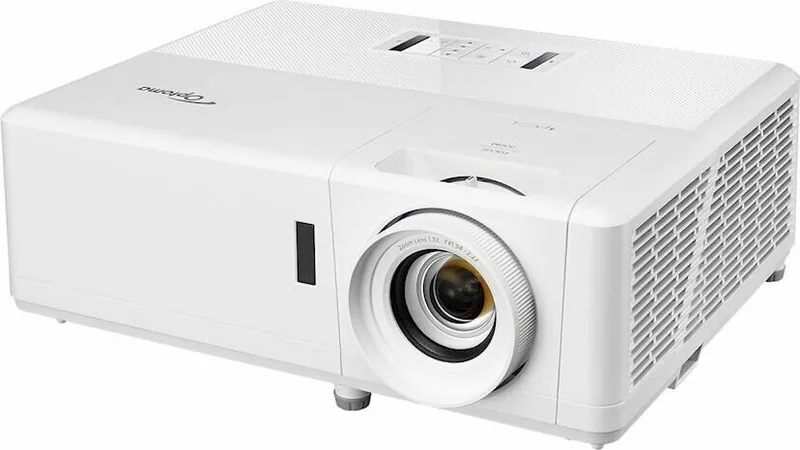
The Optoma ZH403 is a versatile DLP projector built for clear presentations at home, in education, and in meeting rooms. Its practical design supports multiple installation positions (front, rear, ceiling, and rear-top), helping you match the projector to your room layout. You can also fine-tune the image with manual zoom and focus, plus image controls such as keystone correction and image shift.
Getting started is straightforward. After connecting your sources through HDMI (including MHL via the HDMI 1 path), VGA, and audio connections, the projector can auto-detect inputs. The on-screen display (OSD) menus are multilingual and organized for common tasks like selecting display modes, adjusting brightness and color, and configuring projection orientation. For sharper image alignment, you can use features like Auto Keystone or manual Keystone, and then confirm changes are saved when you exit the menu.
For image quality, the ZH403 includes detailed calibration options. You can choose display modes for different content types, including Presentation, Cinema, Game, and specialized modes like DICOM SIM for monochrome medical-style imaging. Dynamic Range processing supports HDR/HLG content with multiple picture modes, and there are advanced color controls such as color temperature, color matching, gamma selection, and RGB gain/bias tuning.
The ZH403 also offers flexible connectivity beyond video. A built-in speaker (10W) supports quick audio playback, while the wired LAN (RJ-45) interface enables remote management, status monitoring, and web-based control. Network options integrate with common control systems and include guidance for using a browser with default credentials.
Notes for safe everyday use
- Laser safety matters: avoid direct eye exposure and keep optics clear of redirecting objects.
- Allow the cooling cycle to finish before disconnecting power.
- Clean the lens carefully and only when the projector is fully cooled.
- Maintain airflow: ensure intake and exhaust vents have clearance.
Quick results you can expect
- Faster setup using auto source detection and multi-language OSD menus.
- Better clarity with zoom, focus, keystone, and image shift adjustments.
- Strong customization with HDR/HLG, gamma, and detailed color controls.
- Convenience with built-in audio and wired network management.
- Longer reliability through regular dust-filter maintenance (where provided).
Search for 67,706 Manuals online


Type-in Brand or Model