
Optoma ZH350ST Manual
PDF manual · 73 Pages
English



Quick check
Incorrect answer, please try again.
Chat with your Optoma ZH350ST manual using AI
Get instant AI answers from your Optoma ZH350ST manual
Ask anything about the Optoma ZH350ST. Answers come from this manual, with the pages they are based on.
ZH350ST Maintenance Schedule
If an optional filter is installed, a warning appears after 500 operating hours. Reset the counter after cleaning or replacing the filter.
Turn off and unplug the projector. Use compressed air for dust and a special lens cloth to wipe gently. Do not use fingers or harsh chemicals.
Ask a Question
Do you recommend ZH350ST?
Yes NoFrequently Asked Questions
The laser light source is designed to last a long time, minimizing the need for frequent replacements associated with traditional lamp projectors.
Is this answer helpful?
Yes, the unit supports 3D content using DLP Link glasses. It requires compatible sources and glasses to enable the three-dimensional viewing experience.
Is this answer helpful?
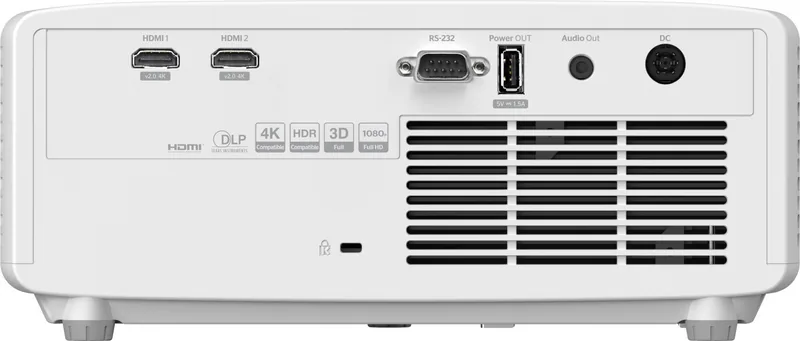
It features multiple HDMI ports, a USB power port, an audio output jack, RS232 for control, and a LAN port for network management capabilities.
Is this answer helpful?
Use a soft dry cloth and compressed air. Do not touch the lens with bare hands or use harsh chemicals or sprays that could damage the coating.
Is this answer helpful?
Yes, the projector can be ceiling mounted. Ensure proper clearance and use appropriate screws. Always consult the specific manual for installation guidelines.
Is this answer helpful?
The throw ratio varies by model configuration, generally allowing for short-throw projection to display large images from nearby distances.
Is this answer helpful?
Advantages and Disadvantages
Advantages

- Long-life laser light source reduces maintenance needs compared to traditional lamps
- Short-throw capability allows large images from close distances in small rooms
- Comprehensive connectivity includes HDMI, USB, RS232, and LAN ports
- Supports 3D content with DLP Link technology for immersive experiences
- Low input lag mode enhances responsiveness for competitive gaming sessions
Disadvantages

- Network setup may require technical knowledge for IT administrators
- Fan noise might be audible in very quiet environments during operation
- Ceiling mount installation requires specific screws to prevent damage
- Lens cleaning requires specific care to avoid damaging the optical surface
- Some features vary depending on specific regional model configurations
Product Specification
Type
DLP, 1x 0.55"
Light Source
Phosphor Laser
Resolution (displayable)
Full HD (1920x1080)
Resolution (native)
Full HD (1920x1080)
Brightness
-3,500/- ANSI Lumen (High/Standard/Eco)
Contrast
300,000:1
Image Diagonal
2.49-25.0 ft
Projection Distance
0.98-10.83 ft
Throw Ratio
0.50:1
Lens Shift
No
Video Ports
2x HDMI 2.0 Input
Audio Ports
1x 3.5mm Jack Audio Out
Additional Ports
1x USB-A, 1x RS-232
Features
3D ready (active), integrated speaker (1x 15W)
Lamp Life
20,000/-/- Hours (Standard/Eco/Eco+)
Noise Level
34/27 dB(A) (Standard/Eco)
Power Consumption
139/88W (Standard/Eco)
Color
White
Dimensions
10.79x4.49x8.50 in (WxHxD)
Weight
6.61 lbs
Manufacturer Warranty
3 Years
Product Description
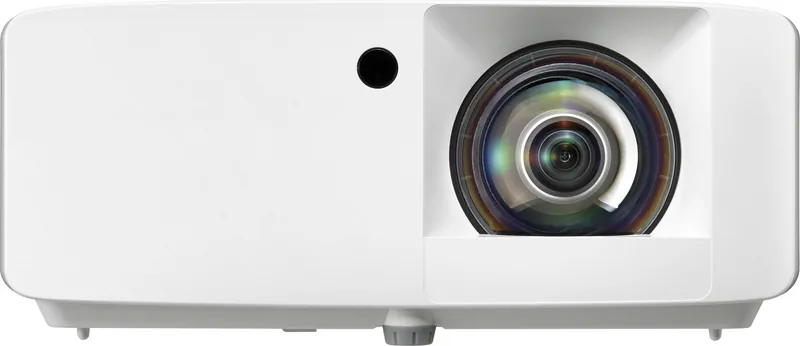
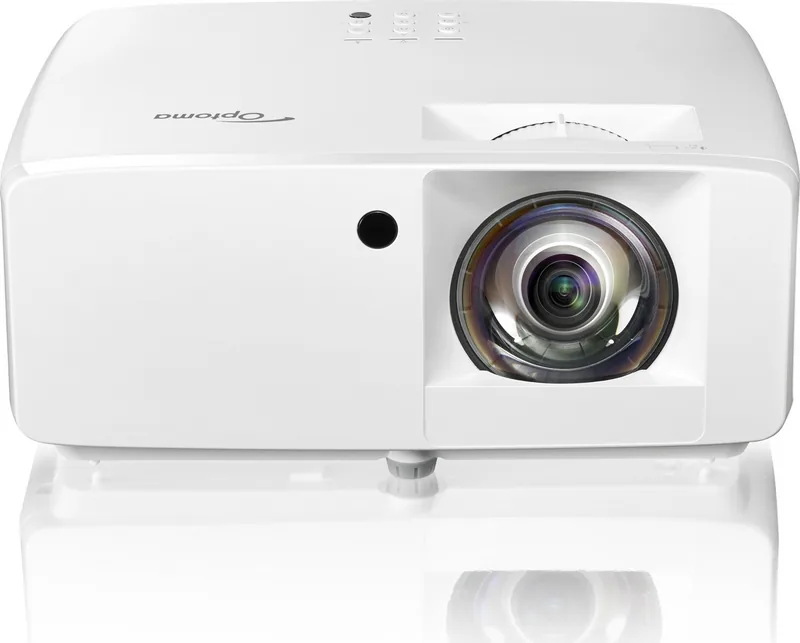
Experience superior home theater integration with the Optoma ZH350ST laser projector. This high-performance device brings cinema-quality visuals into your living space without requiring extreme distances. Designed for versatility, it supports short-throw installation, allowing you to project large images from just a few feet away. This flexibility makes it ideal for small rooms or home office setups where space is premium. The compact design ensures minimal footprint on stands or shelves while delivering robust performance for daily use.
The vibrant color accuracy stems from advanced DLP technology combined with a long-life light source. Users appreciate the ease of setup, supported by features like motorized zoom and keystone correction. These tools help align the projected image perfectly on screens or walls, even when placement isn't directly centered. Connectivity options are comprehensive, including multiple HDMI ports, USB power for dongles, and network access for remote management. Audio flexibility is present with built-in speakers and an output jack for external sound systems. RS232 integration allows for centralized control in larger installations.
Entertaining gaming enthusiasts is another highlight, with low input lag modes available for competitive play. Safety protocols are built-in, including automatic shutdown during overheating to protect the device internals. Always consult the Optoma ZH350ST Manual for detailed safety instructions regarding lens cleaning and ventilation requirements to ensure longevity. Installation is straightforward with clear labeling on ports and controls located on the bottom and sides. Ceiling mounting options expand placement possibilities further for a hidden aesthetic.
The unit supports 3D content for immersive movie nights, utilizing DLP Link glasses. Power management features allow users to switch between eco modes to reduce energy consumption significantly. Network control capabilities enable IT departments to manage multiple units simultaneously from a central computer. Whether for business presentations or family movie nights, this projector adapts to various lighting conditions effectively. The on-screen display allows intuitive navigation through picture settings. Options include gamma adjustments and color temperature changes for precise tuning.
Users benefit from customizable color settings and picture modes tailored for different content types. Whether you are watching sports or playing games, the response time is sufficient for most activities. The system includes robust troubleshooting steps for common issues like focus adjustments or source detection problems. Regular updates keep performance optimized and compatible with new media formats. Throw ratios vary by specific configuration, offering precise distance planning for rooms of different sizes. The resolution supports full HD content for sharp details in both text and video. Brightness levels handle well-lit environments better than traditional lamp-based units. Cleaning the lens requires care, using soft cloths without harsh chemicals or sprays to avoid damage. The power cord removal instructions simplify transport and storage during travel. This equipment serves both professional and leisure needs with consistent output and ease of use, making it a smart choice for modern viewing environments today.
Search for 67,706 Manuals online


Type-in Brand or Model