
Optoma WU1500 Manual
PDF manual · 77 Pages
English



Quick check
Incorrect answer, please try again.
Chat with your Optoma WU1500 manual using AI
Get instant AI answers from your Optoma WU1500 manual
Ask anything about the Optoma WU1500. Answers come from this manual, with the pages they are based on.
WU1500 Maintenance Schedule
Clean the dust filter once every three months. Clean more frequently if used in a dusty environment.
Replace the lamp immediately when a corresponding warning message appears or after the specified operating hours.
Free maintenance reminders
Timed to your purchase date. Always free, unsubscribe anytime.
Ask a Question
Do you recommend WU1500?
Yes NoFrequently Asked Questions
It is best suited for fixed or semi-fixed professional installations such as meeting rooms, classrooms, control spaces, and other environments that need a bright, highly adjustable projector.
Is this answer helpful?
Yes. The projector supports 3D playback and includes menu options for formats such as Frame Packing, Side-by-Side, Top/Bottom, Frame-Sequential, and DLP Link synchronization.
Is this answer helpful?
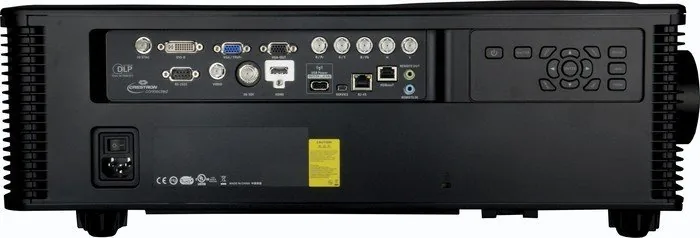
It includes HDMI, DVI-D, VGA, HDBaseT, 3G-SDI, BNC component/RGB inputs, RS-232, RJ-45, and remote control ports, offering strong integration options for AV systems.
Is this answer helpful?
Yes. The projector supports table-front, table-rear, ceiling-front, and ceiling-rear installation, making it flexible for different room layouts and projection needs.
Is this answer helpful?
Image adjustment is handled through motorized zoom, focus, lens shift, keystone correction, digital zoom, and detailed picture menus for brightness, contrast, color, and gamma.
Is this answer helpful?
The manual recommends monitoring lamp life, replacing lamps when warned, resetting lamp hours after replacement, and cleaning the optional dust filter regularly in dusty environments.
Is this answer helpful?
Advantages and Disadvantages
Advantages

- Native WUXGA resolution delivers sharp detail for presentations, video, and large-screen viewing.
- Wide connectivity, including HDMI, DVI-D, HDBaseT, and RJ-45, fits professional AV installations.
- Motorized zoom, focus, and lens shift simplify alignment and make setup more precise.
- 3D support, BiB/BuB, and advanced color controls add flexibility for different content types.
Disadvantages

- Heavy, installation-focused design makes it less convenient for frequent travel or quick portable use.
- Lamp replacement, timer resets, and filter cleaning add ongoing maintenance tasks.
- The menu system and setup options can feel complex for first-time users.
- High-output operation requires good ventilation and careful mounting planning.
Product Specification
Type
DLP, 1x 0.96"
Light source
Lamp
Resolution (displayable)
WUXGA (1920x1200)
Resolution (native)
WUXGA (1920x1200)
Brightness
-/11000/- ANSI Lumen (High/Standard/Eco)
Contrast
5,000:1
Lens-Shift
motorized, vertical -60% +60%, horizontal -25% +25%
Video connections
1x HDMI 1.4b In, 1x VGA In, 1x VGA Out, 1x DVI-D In, 1x 3G-SDI In, 1x Component Video In, 1x Composite Video In
Other connections
2x USB 2.0, 2x RJ-45, 1x RS-232
Special features
Interchangeable lens mount, without lens
Lamp life
1500/2000/- hours (Standard/Eco/Eco+)
Noise level
39/36dB(A) (Standard/Eco)
Power consumption
1080/870W (Standard/Eco)
Dimensions
20.47x7.64x23.27in (WxHxD)
Weight
52.47lb
Manufacturer warranty
3 years
Product Description
Optoma WU1500 Manual: A Professional DLP Projector for Advanced Installations
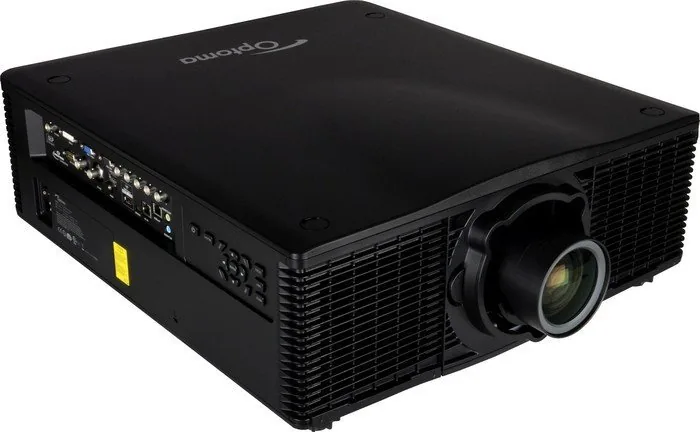
The Optoma WU1500 is a serious DLP projector built for spaces where image precision, flexible placement, and dependable performance matter most. The Optoma WU1500 Manual shows a model aimed at conference rooms, lecture halls, simulation setups, and other demanding environments that need a large, sharp display without sacrificing control. With native WUXGA resolution, motorized lens functions, and broad connectivity, it is clearly designed for users who want a polished installation and a highly adjustable image.
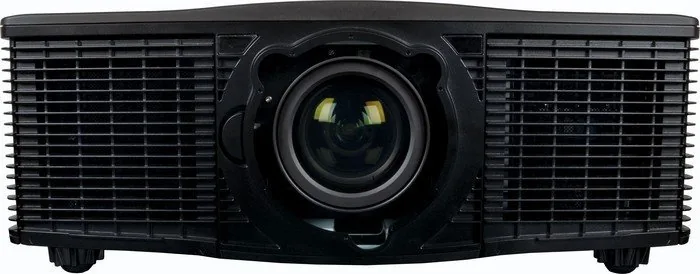
One of the strongest points of this projector is how adaptable it is during setup. It supports table or ceiling installation, front or rear projection, and even 360-degree operation along its widest axis. The manual also highlights advanced lens options, including zoom, focus, and lens shift, which makes alignment easier when the projector must fit a specific room layout. For installers and AV teams, those features reduce guesswork and help deliver a cleaner final result.
Connectivity is another major advantage. The Optoma WU1500 offers HDMI, DVI-D, VGA, HDBaseT, 3G-SDI, BNC, RS-232, RJ-45, and audio/remote-related ports, giving it the kind of input variety often needed in professional systems. It also supports remote network control, web-based management, and Telnet RS232 commands, which is useful for IT-managed environments and larger venues that require centralized operation.
The image controls are equally impressive. The menu system includes brightness, contrast, color, gamma, color temperature, geometry correction, 3D setup, picture-in-picture and picture-by-picture modes, and detailed color tuning. That means the projector can adapt to everything from business presentations to video playback and specialized display needs. The manual also emphasizes lamp monitoring, cleaning routines, and filter maintenance, helping owners keep performance stable over time.
Notes
- Best suited for permanent or semi-permanent installations.
- Strong connectivity makes integration easier in mixed AV setups.
- Regular lamp and filter care helps preserve image quality.
- Advanced adjustment tools are ideal for users who want fine control.
Search for 67,706 Manuals online


Type-in Brand or Model